Todoer
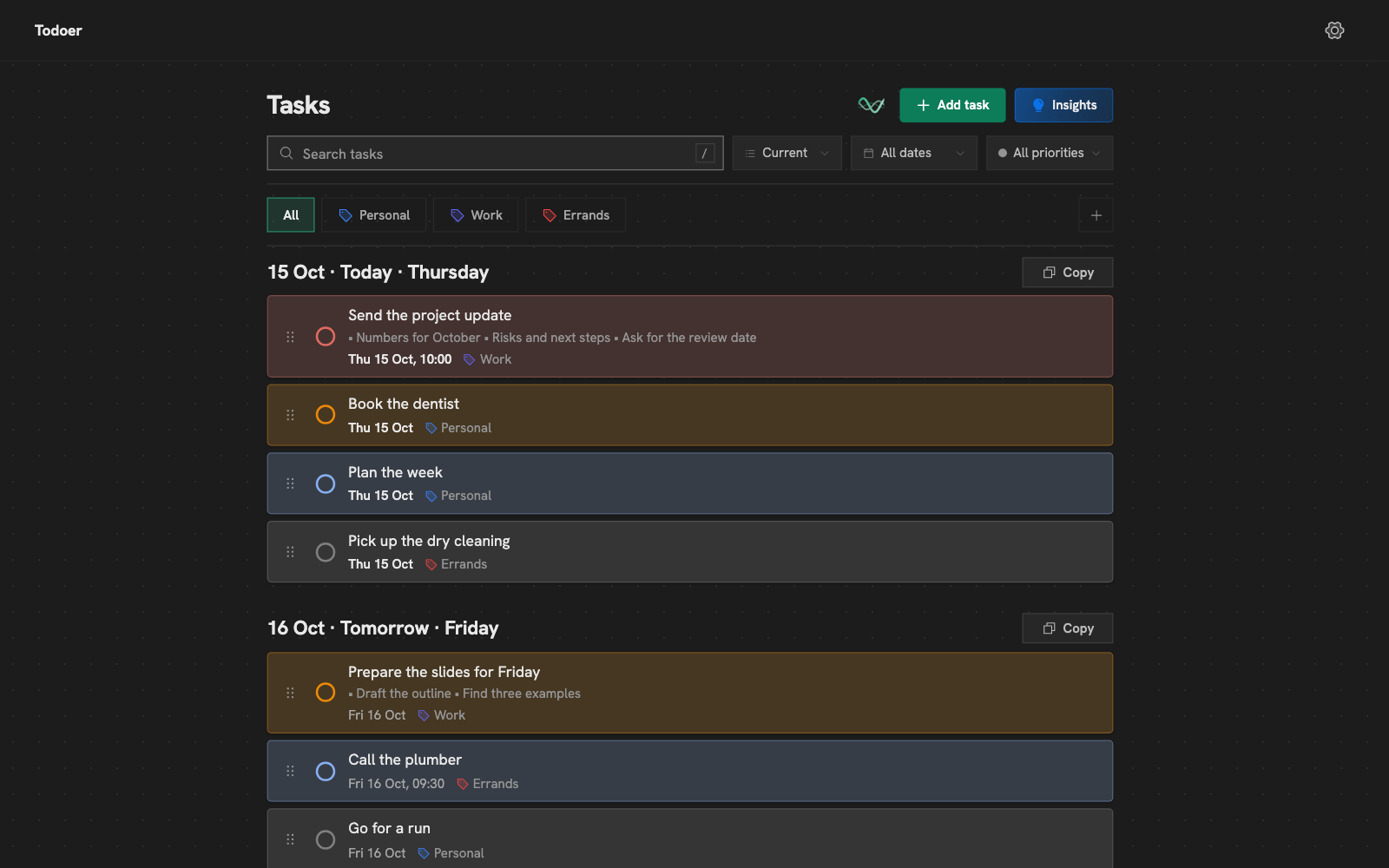
A to-do list with goals, priorities and drag to plan, on your own Supabase.
publik verified: the founder reviewed this exact version for malware and approved it
How to install Todoer
Every step written out. No terminal experience needed. Pick your setup.
README
Open in GitHubTodoer
A to-do list with goals, priorities and drag to plan your days. It runs on your computer, and your tasks live in your own free Supabase project. Nothing goes to anyone else's server unless you turn on Ramble.
- Goals and priorities. File tasks under goals, each with one of four priorities. Each day lists the most important first.
- Plan by dragging a task within its day or onto another. Overdue tasks wait in their own box.
- Descriptions with lists, as in Notes.
- Search that finds every word you type, in any order.
- Insights: what you add, by goal, from a week to five years.
- Copy a day as a list for WhatsApp, Notes or email.
- Ramble: say your tasks, check them, add them.
- Nine themes, and it works on a phone.
Free to use and change for yourself (Licence). To work on the code, see CONTRIBUTING.md.
Connect Supabase
Todoer's first screen, Set up Todoer, walks you through it:
- Make a project. Sign in at supabase.com (a new account first asks you to name an organisation: any name, Free plan). On Create a new project, choose a name, a database password and the region nearest you, then press Create new project.
- Copy the Project URL from the project's home page (Copy beside the address under its name) into Todoer.
- Copy both keys from API Keys: the Publishable key (
sb_publishable_) and the one under Secret keys (sb_secret_; press the eye to show it). Press Connect. - Add the tables. Press Copy the setup, open the SQL Editor (if Supabase shows a note about snippets, press Understood), paste, press Run, then Check again in Todoer.
- Make your account. You start with two goals, Personal and Work.
Already use CronCal? Give Todoer the same project: after step 4 it asks you to sign in with your CronCal account instead, and you start with no goals.
Then switch off sign-ups, so the project stays yours: in Supabase, Authentication, Sign In / Providers, switch off Allow new users to sign up, then Save changes. Strangers could see none of your tasks anyway; Settings reminds you until it's off.
Leave Enable Data API on (Integrations, Data API): Todoer talks to your project through it.
The secret key is saved only on your computer, in a file only your account can read:
- Mac:
~/Library/Application Support/Todoer - Windows:
%LOCALAPPDATA%\Todoer - Linux:
~/.config/todoer
Ramble
The waves button beside Add task: talk, and Todoer writes it as tasks for you to check. Choose what listens in Settings, under Ramble:
- Groq: free, with your own key from console.groq.com. Paste it and press Save; Todoer checks it first. The free plan has limits per minute and per day, and no bill.
- publik: no key. Press Accept and use publik, then Sign in with publik to link this computer for $0.05 of free use. After that it's paid per use; a short ramble costs about a fifth of a cent.
The recording goes to the one you chose to be written down and read, with your goals' names and the titles and dates of your open and recent tasks, so it can file each task under a goal and spot one you already have. Todoer keeps neither the recording nor the words. Ramble understands English only. The first time, allow the microphone for localhost.
Open it again
Double-click Start Todoer.command (Mac) or Start Todoer.cmd (Windows) in the todoer folder. It opens Todoer, or the copy already running.
To open it like an app: Safari's File → Add to Dock, or Chrome's Install icon in the address bar.
Your data
- Back up with Settings → Download my data: every goal and task in one file. Supabase's free plan keeps no backups, so do it now and then. Todoer can't read the file back in yet.
- A paused project: Supabase pauses a free project after a week unused. Press Restore project there, then Try again in Todoer.
- Another project: stop Todoer, delete
config.jsonfrom the folder above, and start it again. Your tasks stay in the old project.
Update
Close Todoer's window first. Your tasks and settings are kept.
- Downloaded: delete the
todoerfolder (rm -rf todoeron Mac or Linux,rmdir /s /q todoeron Windows), then run the download line again. - With publik or Git: in the
todoerfolder, in Terminal (Command Prompt on Windows), rungit checkout main && git pull && npm install && npm start.
If an update changes the tables, Todoer asks you to run the setup again. Nothing is lost.
Something not working
- "Supabase isn't answering": check you're online, and that the project isn't paused.
- "Another program is using port 3101": start on another port with
npm start -- --port 3105. - Forgot your password: press Forgot password? on the sign-in screen and paste your project's secret key.
- Windows says npm isn't recognised: open a new Command Prompt after installing Node.
- PowerShell says "running scripts is disabled": use Command Prompt, or type
npm.cmdfornpm. - The microphone is blocked: allow it for
localhostin the browser's site settings (left of the address bar), then reload.
Remove it
- Delete the
todoerfolder, and the settings folder above. If Ramble used publik, also delete its key for Todoer,publik/apps/todoer.json, in the same place as that folder (Application Support,%LOCALAPPDATA%or~/.config). - If you added it like an app: delete Safari's from the Applications folder in your home folder, or open Chrome's and choose Uninstall Todoer from its ⋮ menu.
- If you're done with Supabase, and CronCal doesn't use the same project, delete the project there.
Licence
PolyForm Noncommercial 1.0.0: use it, change it and share it for yourself or any non-commercial purpose. Don't sell it or use it in a business.
Copyright Eshaan Mehta.