LooseEnds
Paste emails, screenshots or PDFs. Get a short list of what to do, and drafts.
AI: publik API or your key
publik verified: the founder reviewed this exact version for malware and approved it
by 
Where LooseEnds’s AI runs, and what it costs
Prices are for one typical use: one request of about 1,500 words sent and 375 words back. A higher quality score is better.
On your computer
Not checked yet: publik has not read whether LooseEnds can run its AI on your computer.
publik API
- Price
- $0.0100 per use, $10.00 per 1,000 usespublik-balanced, the level LooseEnds uses most
- Quality
- MiMo-V2.6-Pro: 46
- Setup
- Built in. No key to paste; link your publik account and start the 7-day free trial to try it.
Your own key
- Price
- $0.0013 per use, $1.31 per 1,000 usesMiMo-V2.6-Pro at OpenRouter’s list price, before its fee for buying usage
- Quality
- MiMo-V2.6-Pro: 46
- Setup
- Open a provider account, add a card, paste the key into LooseEnds.
Quality and price, side by side
| Model | Quality | Per 1,000 uses |
|---|---|---|
| On your computer (Ollama, 4-bit download size) | ||
| Granite 4.2 3B2.2 GB | 9 | $0 |
| Phi-4 Mini2.5 GB | 6 | $0 |
| Llama 3.1 8B4.9 GB | 7 | $0 |
| gpt-oss 20B14 GB | 9 | $0 |
| Gemma 4 31B20 GB | 19* | $0 |
| Qwen3.5 35B-A3B24 GB | 19* | $0 |
| publik API | ||
| publik-fastGLM-5.3 Flash | 42 | $1.00 |
| publik-balancedMiMo-V2.6-Pro · LooseEnds | 46 | $10.00 |
| publik-smartGPT-6 Sol | 48 | $18.00 |
Quality: Artificial Analysis Intelligence Index v4.3.2, read 2026-09-22 (publik API models 2026-09-25); * = estimated by Artificial Analysis. Sizes: the Ollama library, read 2026-09-22.
What you pay for
- On your computer: nothing per use. You pay in disk space, memory and electricity, at lower quality.
- publik API: publik’s published price for each use, in dollars, from your publik balance. It is above the model’s cost; the difference runs publik and pays the app’s builder.
- Your own key: the provider’s price, billed to an account you keep with the provider.
How to install LooseEnds
Every step written out. No terminal experience needed. Pick your setup.
README
Open in GitHub

LooseEnds
The assistant for the everyday admin that slips through the cracks.
Connect Gmail and ask in plain words, or drop in a screenshot or a PDF. LooseEnds works across your inbox, calendar and other apps, finds what you actually have to do, shows you the exact sentence it came from, and gets the next step ready: a reply, a calendar event, a reminder, or an action in one of your apps. Nothing is sent, posted, changed or deleted until you approve it.
It's built for the small stuff that piles up:
- Students: registrations, forms, advisor emails, financial aid and scholarship deadlines.
- Young professionals: scheduling back-and-forth, renewals, service follow-ups.
- Everyone else: appointments, returns, bills, bookings, the letter on the counter.
How it works
1. Drop it in, or ask
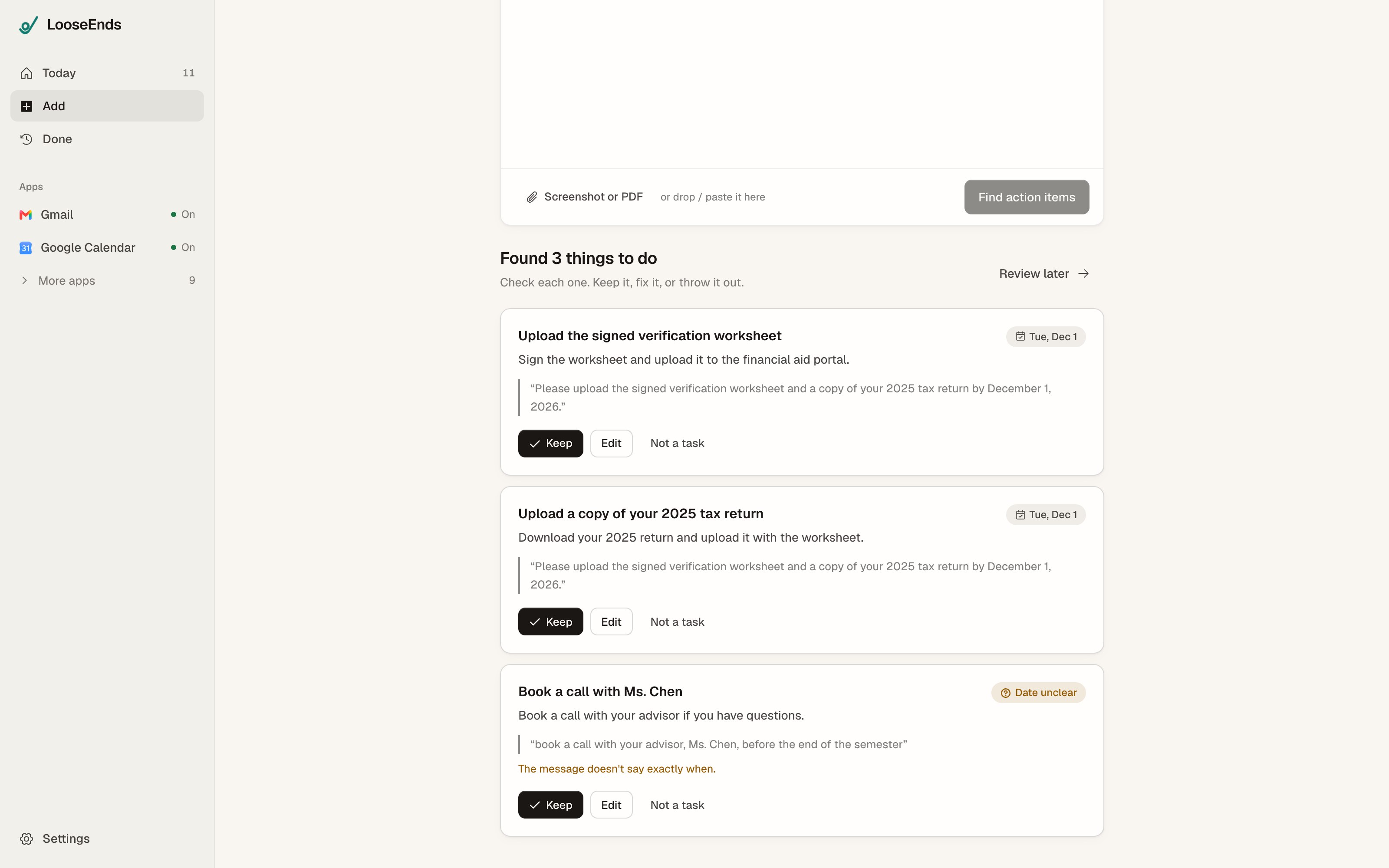
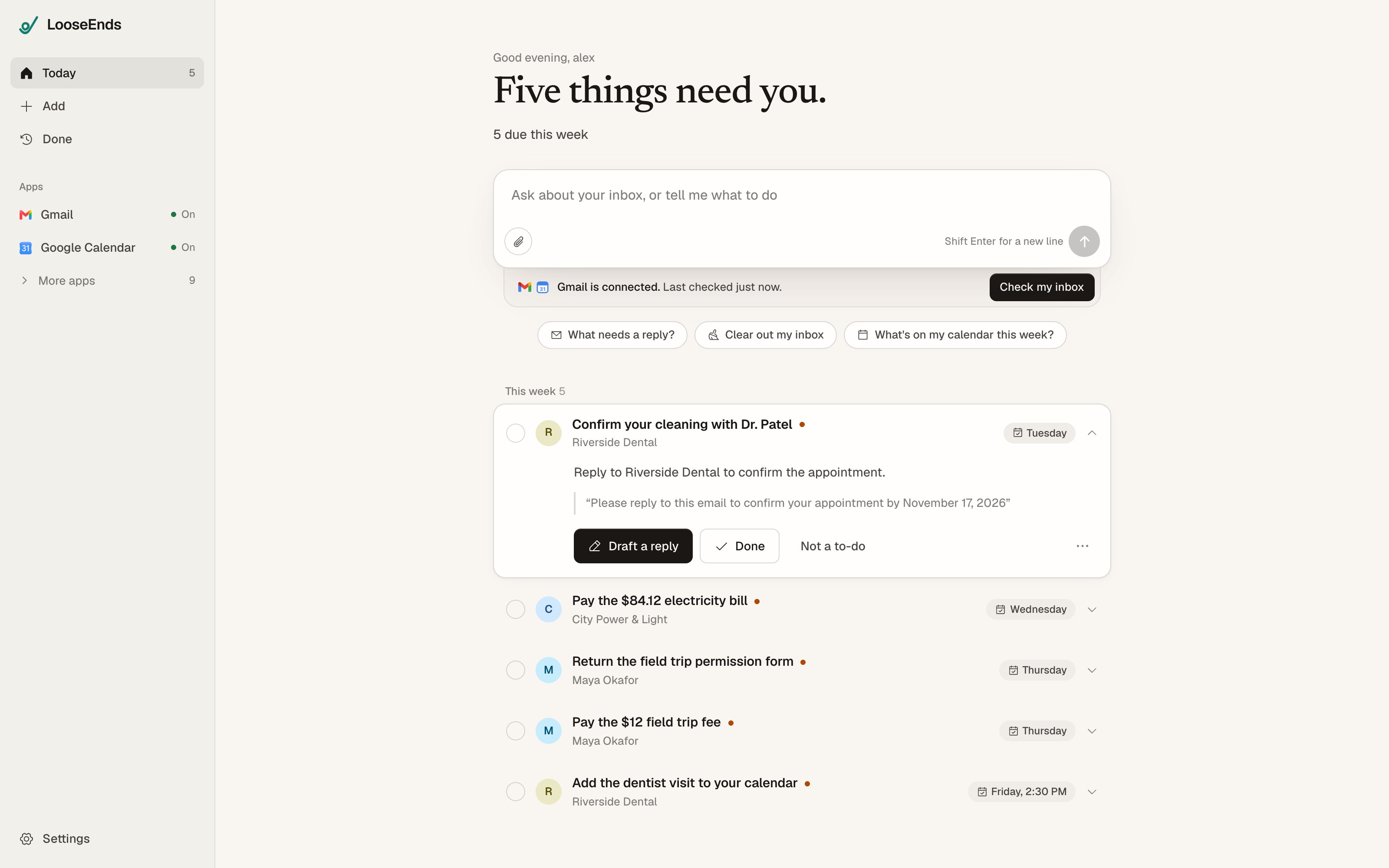
Connect Gmail and ask LooseEnds to check your inbox, or drop in a message, a screenshot, a phone photo or a PDF. Each task has a plain title, the next step, its due date, and the quote it came from. Keep it, fix it, or throw it out.
2. Ask the assistant
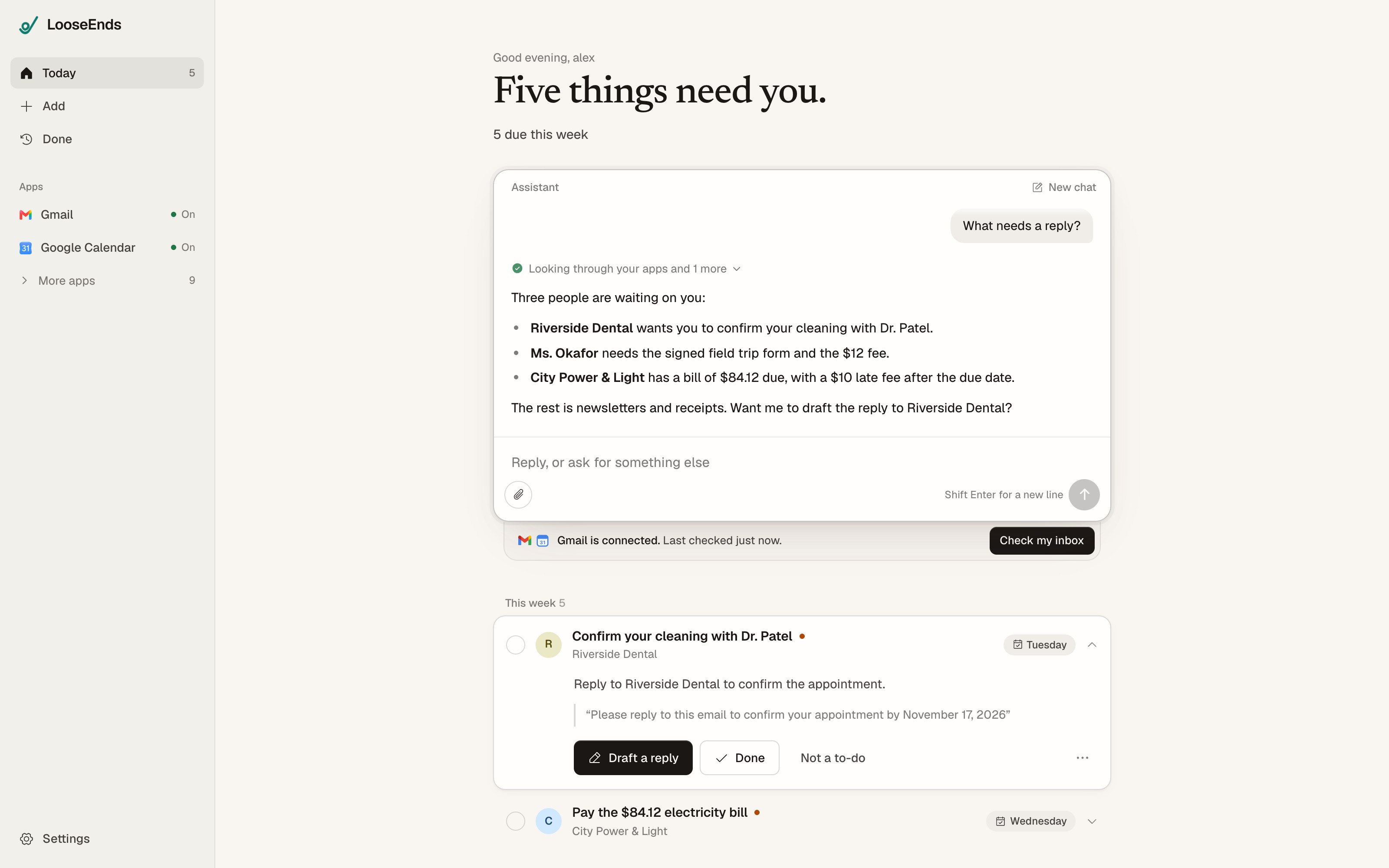
Type what you want in plain words: "What needs a reply?", "Clear out my inbox", "What's on my calendar this week?", "Reply to Riverside and confirm Thursday". The assistant reads your tasks and the apps you connected, answers, and adds or completes tasks.
3. Approve what goes out
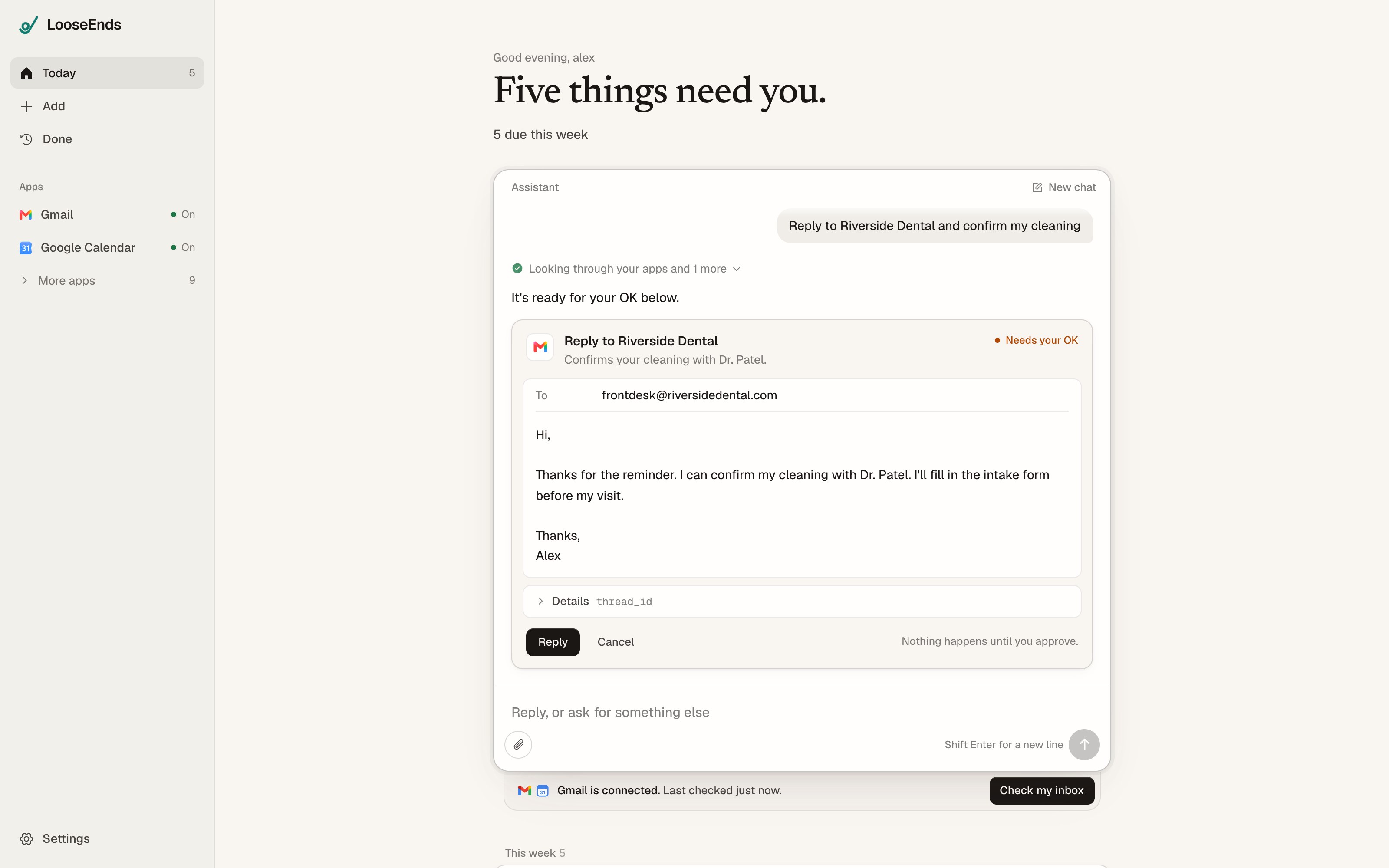
When something would change the outside world (send an email, post a message, add an event, create or delete something in an app), the assistant puts an approval card in front of you instead. The card shows the readable parts to check and edit (To, Subject, the message) and, under Details, every other value that will be sent: ids, links, numbers and nested data. Nothing happens until you press the button. You can also cancel.
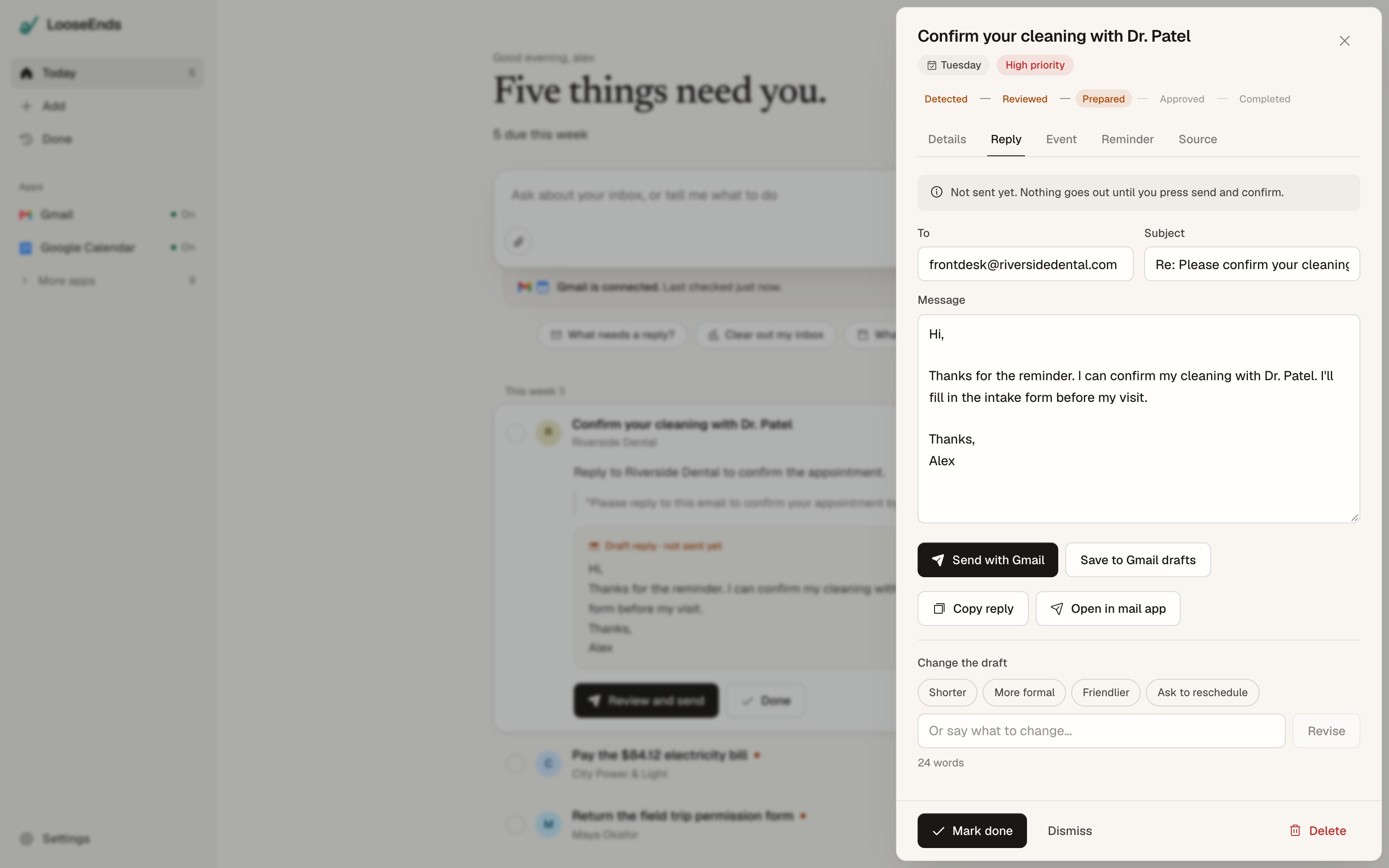
Every reply task also has Draft a reply: a short draft written only from the message, which you can send with Gmail, save to drafts, copy, or change.
4. Come back tomorrow
Your list is waiting: what needs you now, what's coming later. Finished and dismissed items move to Done, with a receipt of what you sent, copied or downloaded.
Agents
Open Agents, describe a task, and select Spawn agent. Each agent works independently while you use another page. Reopen it to see its progress, results, and approval cards. You can run several at once; connected-app actions still wait for your approval. Runs have the same time limit as chat, and an interrupted run is shown as failed.
Connected apps
Connecting apps is optional. LooseEnds can connect Gmail, Google Calendar, Outlook, Slack, Notion, Google Drive, Google Docs, Google Sheets, GitHub, Linear and Todoist. Connections are made and held by Composio; you can disconnect any app in Settings.
Built to be trusted
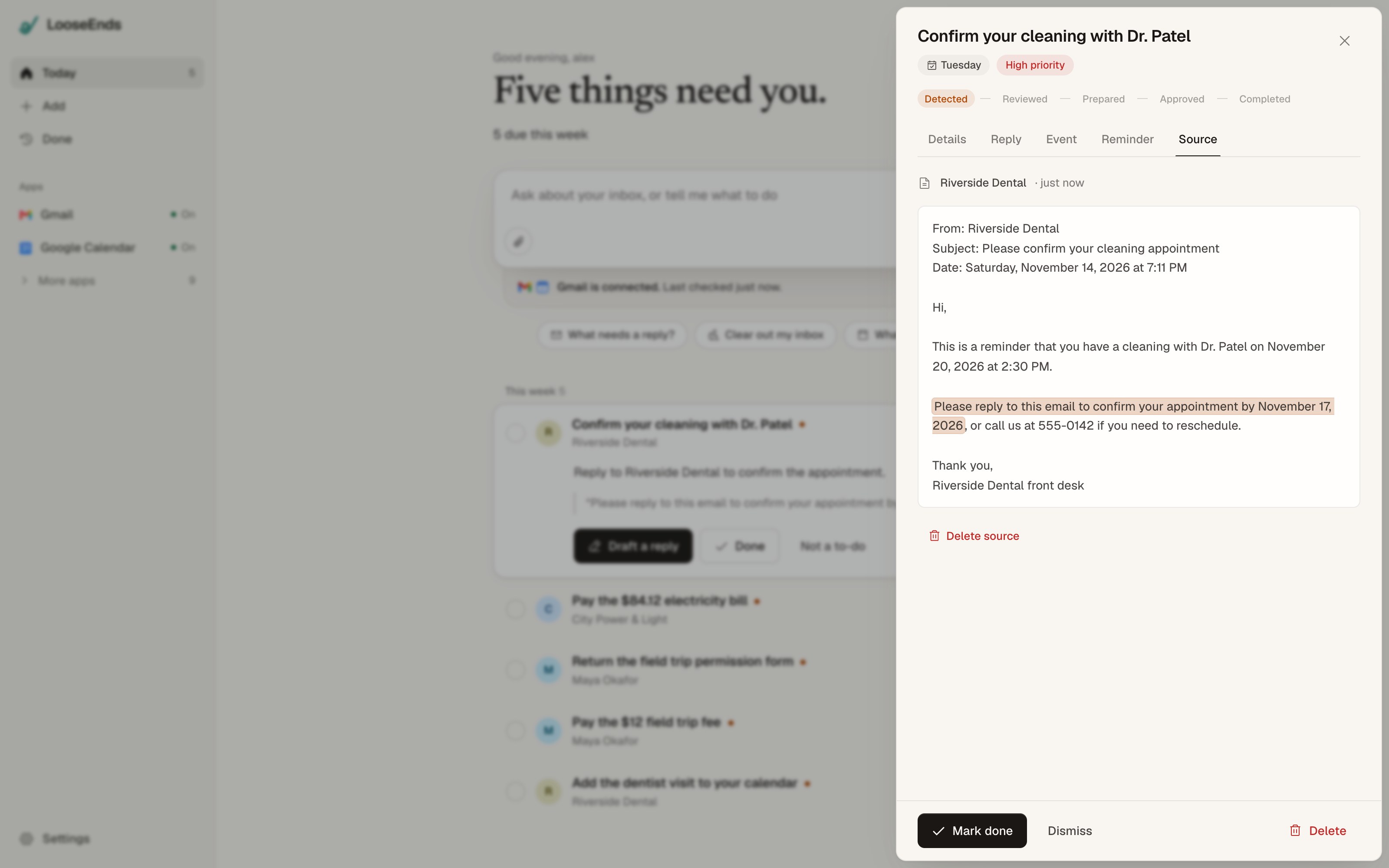
- Every task shows its source. Tap the quote to see the original message with the exact sentence highlighted.
- No invented dates. "December 3, 2026" is taken as written. "Thursday by 3 p.m." is worked out and shown with a question mark until you confirm it. "Before your visit" is marked Date unclear.
- You approve external actions, and see all of them. Approval cards show every argument the action sends, not just the friendly summary.
- Messages are data. Text inside an email can try to give the AI instructions. LooseEnds treats it as content, flags obvious attempts, and can't act outside LooseEnds without your approval.
- Duplicates are caught, and newsletters and sales emails are recognised as promotions, not obligations.
- You control your data. Delete a task, a message, or everything from Settings. Delete everything also disconnects your apps. See the privacy page and terms.
AI and pricing
LooseEnds uses publik API: sign in with publik and AI runs on your own publik plan, so there's no key to paste. A new publik account includes $0.05 of free use; after that you need a publik plan (from $8/month), or choose Use my own key at sign-in or in Settings (any OpenAI-compatible provider).
Your content is sent to the AI model through publik (or to your own provider) only to find tasks, write drafts and answer you. publik does not train on requests.
Open LooseEnds
Open LooseEnds in your browser or use Get started on publik. Sign in with publik to begin.
For developers
Next.js 16 (App Router), Tailwind CSS v4, Motion, Neon Postgres (PGlite for local development), publik API and Composio. Hosted configuration uses DATABASE_URL, APP_SECRET, COMPOSIO_API_KEY and PUBLIK_APP_TOKEN; see .env.example.
src/lib/server/publik.ts: Sign in with publik, usage counting and publik API (adapted from publik's reference module).src/lib/server/gate.ts,src/app/api/gate/: the sign-in gate. A visit only reads it; the session and publik install are created when "Sign in with publik" is clicked (POST).src/lib/server/agent.ts: the assistant and its tools; writes become approval cards (src/components/app/agent-ui.tsx).src/lib/server/extract.ts: task extraction and the server-side date and evidence rules.src/components/app/: the app UI.
Run it locally without accounts
scripts/mock-publik.mjs stands in for publik and scripts/mock-connector.mjs for the app connections. Visiting a mock claim URL "signs in".
pnpm install && pnpm build
node scripts/mock-publik.mjs &        # :4555; set MOCK_UPSTREAM_BASE_URL/MOCK_UPSTREAM_API_KEY to answer AI requests
node scripts/mock-connector.mjs &     # :4666
LOOSEENDS_DATA_DIR=/tmp/looseends PUBLIK_ORIGIN=http://localhost:4555 PUBLIK_APP_TOKEN=pat_mocktoken \
  CONNECTOR_ORIGIN=http://localhost:4666 pnpm start
Leave DATABASE_URL unset to use PGlite in LOOSEENDS_DATA_DIR. PUBLIK_SELF_TEST=1 pnpm start prints publik self-test: ok looseends <version> once publik answers.
CI (.github/workflows/ci.yml) runs pnpm lint, pnpm build and npx tsc --noEmit on every pull request and push to main.
License
MIT