Jev Score
Local-first document evaluation workspaces powered by Jev
not yet reviewed by publik. It is live now; the founder has not reviewed this version yet.
by 
How to install Jev Score
Every step written out. No terminal experience needed. Pick your setup.
README
Open in GitHubJev Score




TLDR: Jev-Score enables Claude to optimize writing in a loop against a deterministic evaluator (TypeSafe's Jev model) paired with natural language writing objectives.
What Jev Score does
Jev Score is a local CLI tool, MCP server, and web app that scores drafts of a document against some context and a list of questions. It is meant for developers who let Codex or Claude Code edit their writing, and it has its own editor for when you would rather write the next draft yourself. The agent writes a draft, Jev Score returns a number for each question, and the agent uses those numbers to write the next draft.
Typical pairings are a resume and a job posting, a college essay and its prompt, or a cold email and the reader's background. TypeSafe's Jev model is used deterministic scoring. Every draft and every score is stored in a local SQLite database and shown in the web UI, live, while the agent works.
The screenshots in this section and in The app use a demo database with simulated scores.
Jump to: Install · First score · Concepts · Agent loop · The app · MCP server · Limits
Example: a resume
You give the agent a resume, the job posting, and questions you wrote:
This resume is a strong fit for the job
This resume would land an interview
This resume would pass an ATS scan
This resume is well organized
This resume has obvious red flags
This resume is at the right seniority level for the role
Jev reads the posting and the resume, then gives each question a score from 0 to 100 for how strongly it agrees with the statement. The agent reads the scores, rewrites the resume, and submits it for scoring again:
original resume       83.2
revised resume        96.6
The same loop works for an essay and its assignment, a product spec and its requirements, or a landing page and its positioning brief.
Evidence: this project's own README
These measurements are for the 1.x README. Version 2.0 updated the install, first score, and agent loop sections and added sections on the app and the MCP server. Those changes have not been re-scored.
This README was picked by scoring it against its alternatives. Nine drafts (the original, the previous version, and seven rewrites) went through one evaluation group of 12 questions. Eight questions have higher as better, such as "I understand what this project does within 30 seconds of reading". Four have lower as better: em dashes, defining things by what they are not, stock buzzwords, and slogans. Each draft was scored 3 to 6 times, and the Documents panel below is in "median" mode:
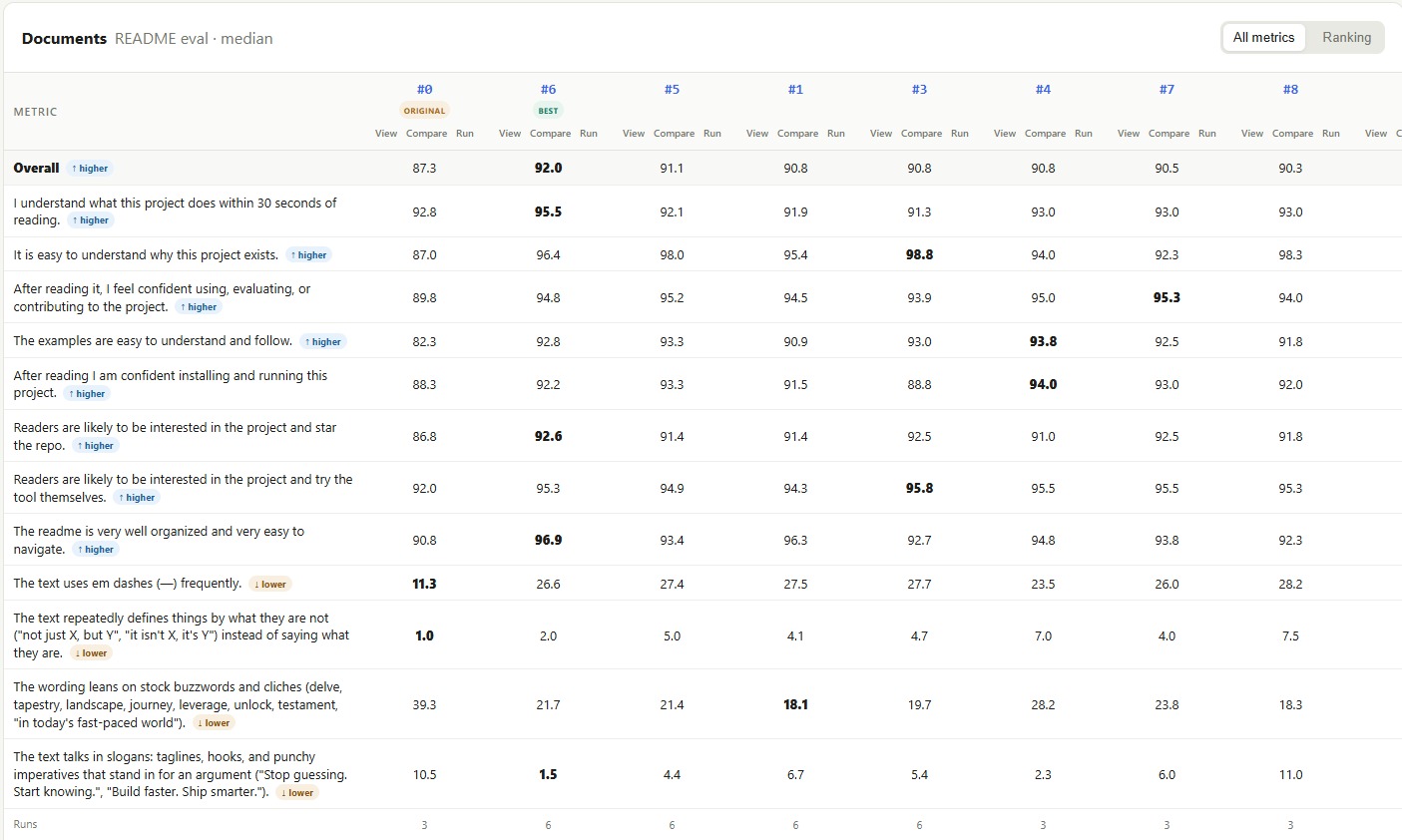
Columns are numbered by draft. #0 is the original README, #1 is the previous README, and #6 is the 1.x README, which had the highest overall median. The other columns are alternative rewrites that scored lower.
| Draft | Overall | Easy to see why the project exists | Well organized |
|---|---|---|---|
| Original README (#0) | 87.3 | 87.0 | 90.8 |
| Previous README (#1) | 90.8 | 95.4 | 96.3 |
| 1.x README (#6) | 92.0 | 96.4 | 96.9 |
The lead over the previous README is 1.2 points. Across 6 runs each, the ranges did not overlap (91.3 to 92.1 for the 1.x README, 90.6 to 91.0 for the previous one), but Jev is probabilistic, so treat a gap that small as a modest edge. All three READMEs are linked in the table, pinned to commits, so you can read them side by side.
Your first score
Three commands, run from a clone of the repo so the example paths resolve. To skip writing questions, jev-score group create --template resume starts from a built-in rubric instead; jev-score group templates lists all eight.
# 1. The questions that define a good resume
jev-score group create --name "Resume review" \
  --questions ./examples/resume/questions.txt

# 2. A workspace built around the job posting
jev-score workspace create --name "Product writer" \
  --context ./examples/resume/job-posting.md \
  --context-title "Job posting" \
  --group "Resume review"

# 3. Save and score the example resume
jev-score score "Product writer" ./examples/resume/resume.md \
  --title "Original resume"
The third command prints JSON when its output is piped or with --json, and a table at a terminal. This is a real run with 5 questions, 3 of them shown:
{
  "documentTitle": "Original resume",
  "status": "success",
  "overallScore": 83.2,
  "scores": [
    { "text": "Does the resume demonstrate strong fit for the role?", "score": 89.5 },
    { "text": "Does the resume use specific, credible evidence?", "score": 76 },
    { "text": "Does the resume feel authentic?", "score": 77.8 }
  ]
}
Evidence (76) and authenticity (77.8) are the lowest of the three shown, so the next draft should work on those. The full output names them for you: it lists the three weakest questions and, for each revision, the change from its parent draft (vsParent) and from the best draft so far (vsBest). Every change is signed so that positive means better, even for lower-is-better questions.
Concepts
| Term | Meaning |
|---|---|
| Context | The text a document must satisfy, such as a job posting, a prompt, or a requirements doc. Each workspace has one. You can edit it: runs scored against an earlier version are kept but marked stale, and rankings count only runs against the current version. |
| Workspace | A context plus every revision of the document and all their scores. |
| Document | One stored draft. #0 is the first draft stored (the original), then #1, #2, and so on. Numbers are never reused, and "#3" works anywhere a draft is named. Each draft can carry a change summary and a parent. |
| Evaluation group | A reusable list of questions plus the scorer that folds them into one number. The default scorer is a mean, and lower-is-better questions count as 100 minus the score. Questions can be edited until a draft is scored with the group; after that, fork the group to change them. |
| Template | A starter evaluation group for resumes, cover letters, college essays, cold emails, READMEs, landing pages, product specs, or blog posts. |
| Run | One evaluation of one document under one group: a score from 0 to 100 per question, plus the overall. Scoring a document again adds a run to that document. |
| Ranking mode | max (default) ranks each document by its best run. median ranks by its middle run, which rewards stability. Switch with jev-score workspace mode <workspace> median or the UI toggle. |
The agent loop
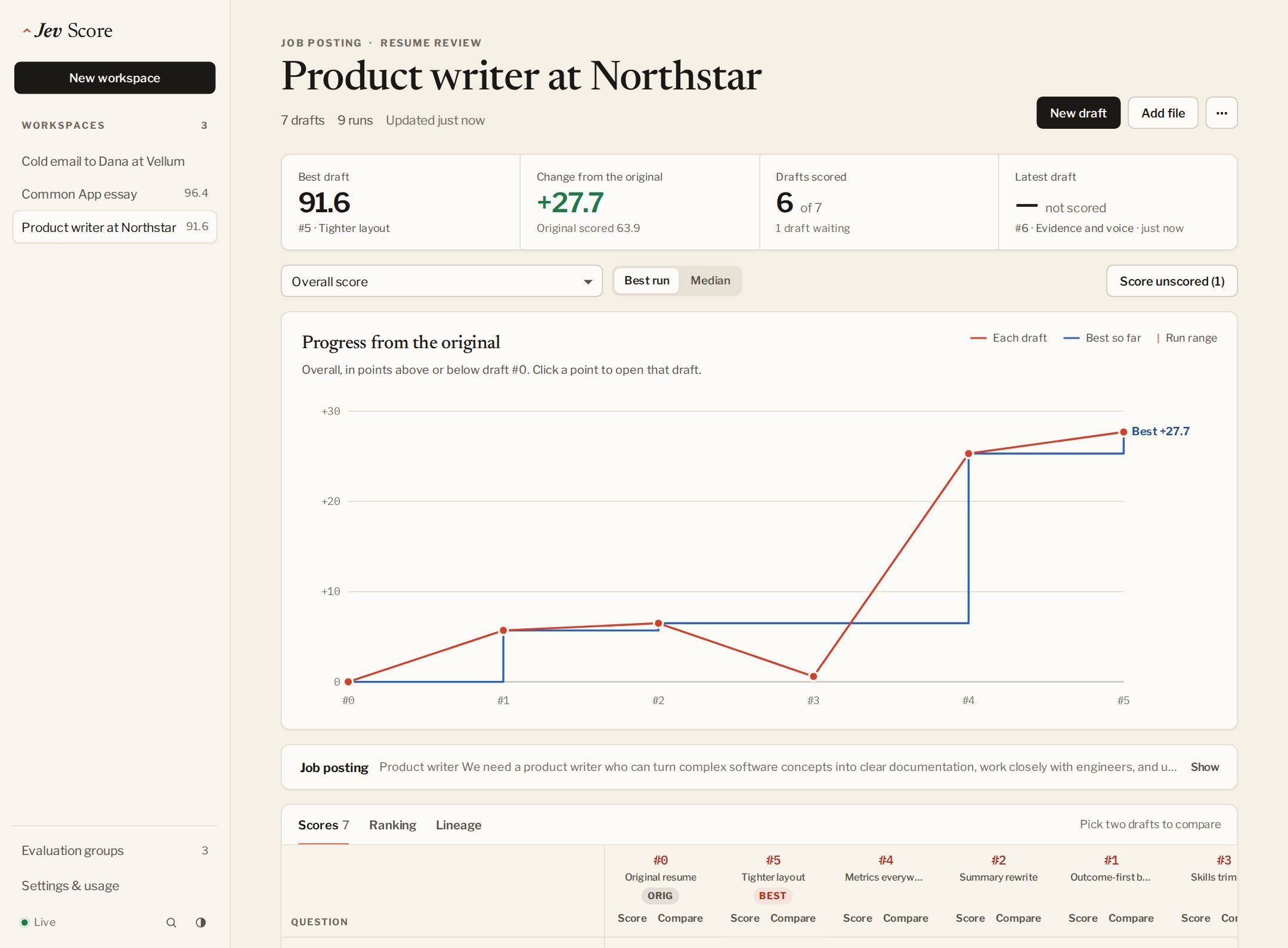
Each turn has three steps. The agent creates a draft, Jev Score evaluates it, and the agent reads which questions fell short before creating the next draft.
Every step has a CLI command that prints JSON (the chart and diff views are UI only). One turn looks like this:
# create and eval: save a revision with what changed and where it came from, then score it
jev-score score "Product writer" ./resume-v2.md \
  --title "Quantified outcomes" \
  --summary "Added measured outcomes and provenance" \
  --parent "#0"

# think: rank the drafts overall, then by a single question
# (keys are listed by `jev-score group show <group>`)
jev-score rank "Product writer"
jev-score rank "Product writer" --question does-the-resume-feel-authentic

# only when the top two drafts are within a point or two: score each a few more times
jev-score score "Product writer" "#3" --runs 3
Bold revisions beat small ones. A reworded sentence moves scores by less than Jev's run-to-run variation, so the agent should aim each revision at the weakest questions and change something substantial, then score it once.
On the bundled example, with a revision aimed at those two weak questions (written by an agent and not shipped in the repo), rank printed this, trimmed:
{
  "mode": "max",
  "items": [
    { "title": "Quantified outcomes", "runs": 3, "median": 96.6, "spread": 0.2, "rankScore": 96.7, "delta": 13.2 },
    { "title": "Original resume", "runs": 3, "median": 83.2, "spread": 0.6, "rankScore": 83.5, "delta": 0 }
  ]
}
Evidence went from 76 to 99.3 and authenticity from 77.8 to 96.3. The spreads of 0.6 and 0.2 are small next to the 13.2 point delta, so the gain is larger than the run to run variation. The repo includes an agent skill that describes this loop to your agent.
The app
jev-score ui opens a local web app on the same database. Anything an agent saves or scores through the CLI or MCP server appears as it happens, and the sidebar shows which draft is being scored.
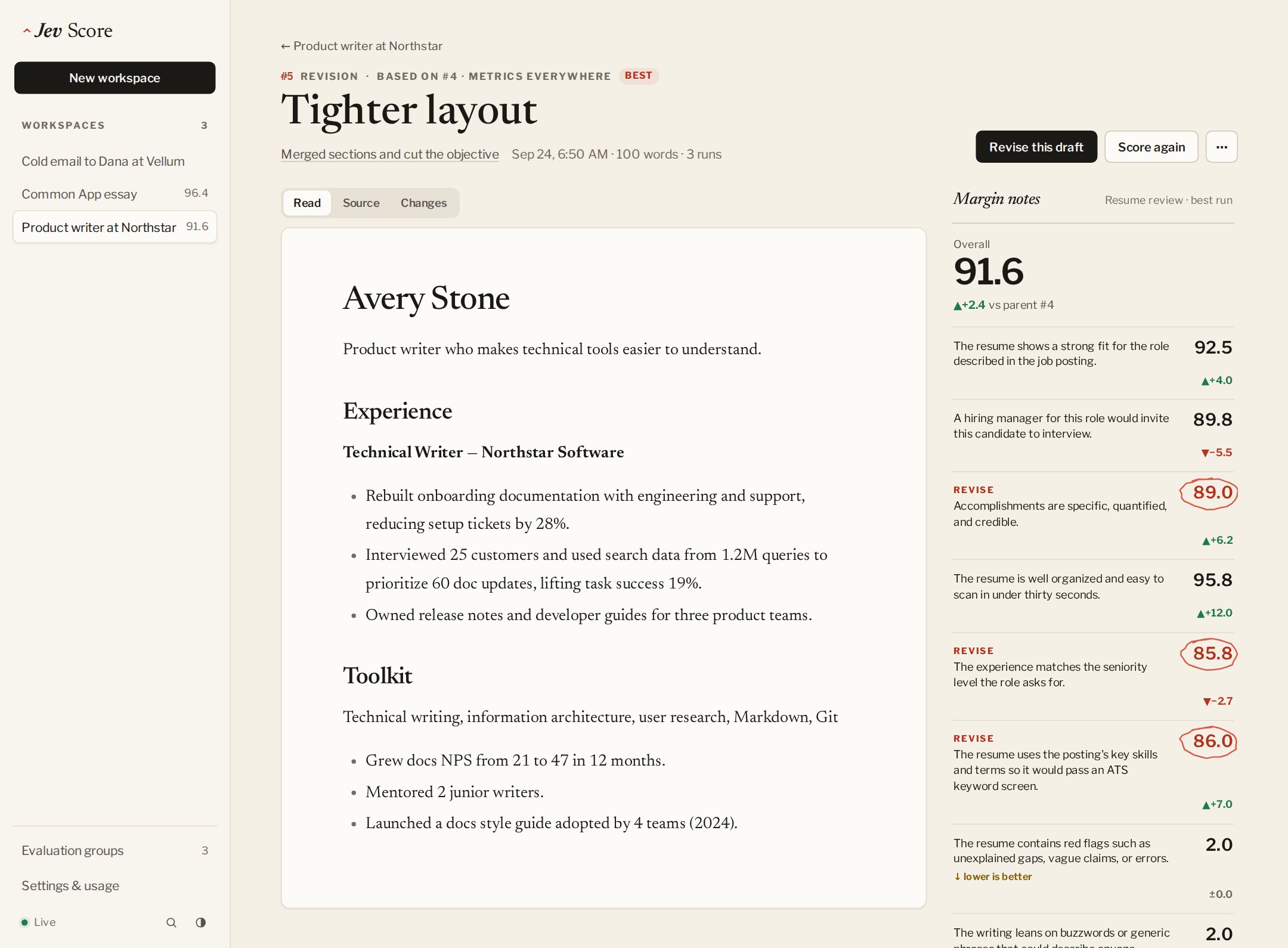
- Editor. Revise any draft in the browser with a live preview and a tracked-changes view against its parent. The margin shows the parent's scores with the weakest questions circled. Save & score (Ctrl or ⌘ + Enter) stores the new draft, scores it, and keeps you editing from it. Unsaved text is kept in the browser.
- Progress. A chart of every draft's change from the original, the best score so far, and a grid of every question's score for every draft. A lineage view shows which draft each revision came from.
- Compare. Pick any two drafts to see their scores side by side and their text as tracked changes. When two drafts are too close to call, one click scores each three more times.
- Library. Start evaluation groups from templates, edit their questions until they are used, and fork them afterwards.
- Reports and export. Every workspace can produce an HTML or Markdown report, a CSV of scores, or a JSON export you can import on another computer.
- Settings. Recorded usage and cost, a global spend limit that stops all scoring once reached, and copyable MCP setup for Claude Code, Claude Desktop, and Codex.
It works in light and dark mode, on narrow windows beside a terminal, and from the keyboard (Ctrl or ⌘ + K jumps anywhere).
MCP server
jev-score mcp serves the same features as Model Context Protocol tools over stdio. Claude Code and Codex can already use the CLI, so this matters most for chat apps without a shell, such as Claude Desktop. For Claude Code:
claude mcp add --scope user -e OPENROUTER_API_KEY=your_key jev-score -- jev-score mcp
docs/mcp.md has the Claude Desktop and Codex setup and the list of tools.
Honest limits
- Scores vary between runs. Jev is probabilistic. A gap of one or two points is within the variation, so compare close drafts with
--runs 3and the median before picking one. - Your text leaves the machine to be scored. Only the document, the context, and the questions are sent to OpenRouter.
jev-score doctorand the app's key check also contact OpenRouter, without sending any text. - Single user, localhost only. The server binds to
127.0.0.1. It has no authentication and no hosted mode, and anyone with access to your OS account can read the database. - Text and Markdown files. Convert PDF or Word files to text first.
- The spend limit counts what OpenRouter reports. Runs without reported cost don't count toward it, and it is checked before each run, so parallel runs can overshoot it slightly.
- Custom scorers are trusted local JavaScript. They run in a worker with a three second timeout. The timeout guards against infinite loops and is not a security sandbox, so run only scorer code you trust.
- Independent project. MIT licensed, with no affiliation to TypeSafe or OpenRouter.
jev-score db path prints the database location (JEV_SCORE_DB or JEV_SCORE_DATA_DIR moves it). workspace delete --yes and db reset --yes clean up. jev-score usage shows the Jev tokens and costs recorded locally, and jev-score config spend-limit <usd> sets the spend limit. Databases from 1.x upgrade in place the first time 2.0 opens them.
More documentation
- MCP server: setup for Claude Code, Claude Desktop, and Codex, and the tools it provides.
- Custom scorers: weight questions or apply your own formula with a JavaScript function (CLI only). To mark a question lower-is-better, prefix its line with
[lower]in a text question file; seejev-score --help. - CONTRIBUTING.md: run
npm testandnpm run pack:checkbefore a pull request. - SECURITY.md: report vulnerabilities privately through GitHub security advisories.