Cura
Privacy-focused medical history management app for Android. Scan reports…
AI: local or online
not yet reviewed by publik. It is live now; the founder has not reviewed this version yet.
by 
Where Cura’s AI runs, and what it costs
Prices are for one typical use: one request of about 1,500 words sent and 375 words back. A higher quality score is better.
On your computer
- Price
- Free per use. Your computer does the work.
- Runs with
- whisper.cpp
- Memory
- —
- Quality
- —
publik API
- Price
- $0.0100 per use, $10.00 per 1,000 usespublik-balanced, the default level
- Quality
- MiMo-V2.6-Pro: 46
- Setup
- Not built into Cura yet. A publik API key works wherever Cura takes an OpenAI-compatible address.
Your own key
- Price
- $0.0013 per use, $1.31 per 1,000 usesMiMo-V2.6-Pro at OpenRouter’s list price, before its fee for buying usage
- Quality
- MiMo-V2.6-Pro: 46
- Setup
- Open a provider account, add a card, paste the key into Cura.
Quality and price, side by side
| Model | Quality | Per 1,000 uses |
|---|---|---|
| On your computer (Ollama, 4-bit download size) | ||
| Granite 4.2 3B2.2 GB | 9 | $0 |
| Phi-4 Mini2.5 GB | 6 | $0 |
| Llama 3.1 8B4.9 GB | 7 | $0 |
| gpt-oss 20B14 GB | 9 | $0 |
| Gemma 4 31B20 GB | 19* | $0 |
| Qwen3.5 35B-A3B24 GB | 19* | $0 |
| publik API | ||
| publik-fastGLM-5.3 Flash | 42 | $1.00 |
| publik-balancedMiMo-V2.6-Pro · Cura | 46 | $10.00 |
| publik-smartGPT-6 Sol | 48 | $18.00 |
Quality: Artificial Analysis Intelligence Index v4.3.2, read 2026-09-22 (publik API models 2026-09-25); * = estimated by Artificial Analysis. Sizes: the Ollama library, read 2026-09-22.
What you pay for
- On your computer: nothing per use. You pay in disk space, memory and electricity, at lower quality.
- publik API: publik’s published price for each use, in dollars, from your publik balance. It is above the model’s cost; the difference runs publik and pays the app’s builder.
- Your own key: the provider’s price, billed to an account you keep with the provider.
How to install Cura
Every step written out. No terminal experience needed. Pick your setup.
README
Open in GitHub
Cura
A Privacy-Focused Medical History Management App
Cura scans your lab reports, prescriptions, bills and discharge summaries, reads them on the device, files them automatically, and lets you ask questions about your own records in plain language.
No account. No server. No telemetry. By default, nothing leaves your phone.



What Cura is
Most people keep medical documents as a pile of paper, a folder of photos, or a forgotten email attachment. When you actually need something ("what was my hemoglobin last time", "how much did that surgery cost", "when was that scan"), it is almost impossible to find.
Cura turns that pile into something you can search and question, without handing your medical history to anyone.
What it does
- Reads a document with the camera or imports a PDF you already have.
- Pulls out the title, type, date and results table automatically.
- Flags a lab value as High or Low against the range printed on the page.
- Files it into a searchable library and a chronological timeline.
- Rewrites a scraped report summary into plain prose in the background, after saving.
- Sets medicine reminders from a scanned prescription, reading the dose times off the printed directions.
- Charts the same test across reports once it appears in two or more of them.
- Answers questions about your records, showing a card for every report an answer names and marking which model replied. Stop an answer mid-sentence, or long press your last question to copy or re-ask it.
- Exports any record, or your whole library, back out as a PDF.
What it is for
Keeping your own medical history in one place, understanding what a report says, and finding a value or a date quickly. It is a personal organizer for documents you already own.
What it is not
Cura is not a doctor. It does not diagnose, and it does not give medical advice. It explains and organizes documents you already have.
Screenshots
Setting up
The first run walks you through where AI should run, optional voice input, and an optional app lock. Every step can be skipped.
| Welcome | Choose an engine | Cloud option |
|---|---|---|
| 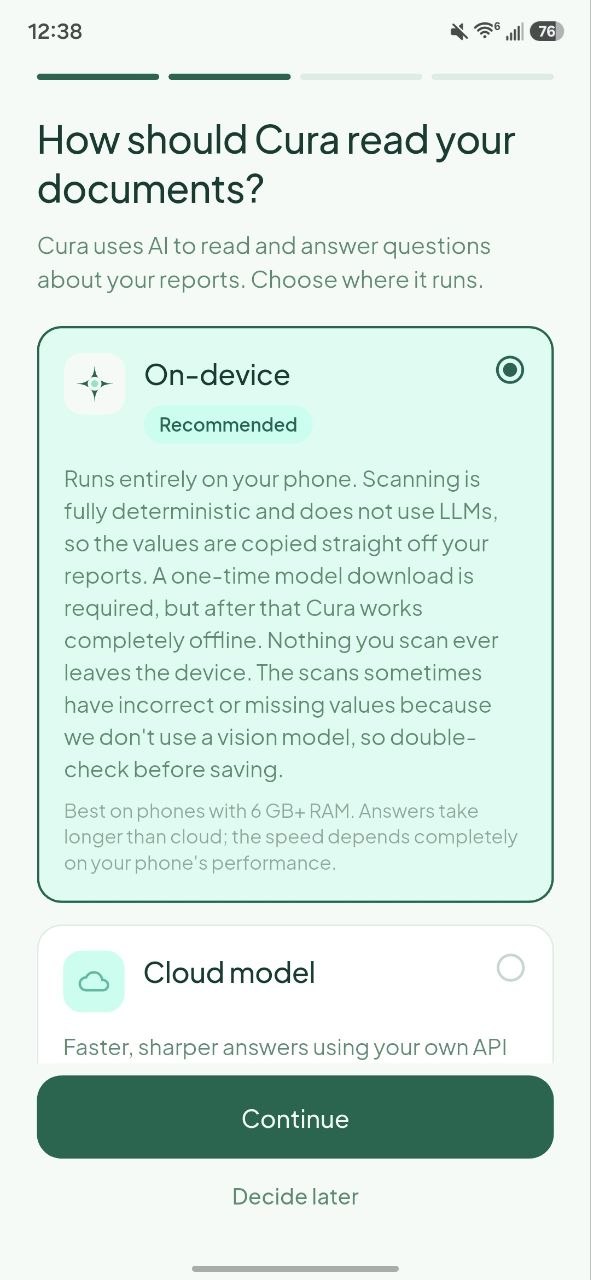 | 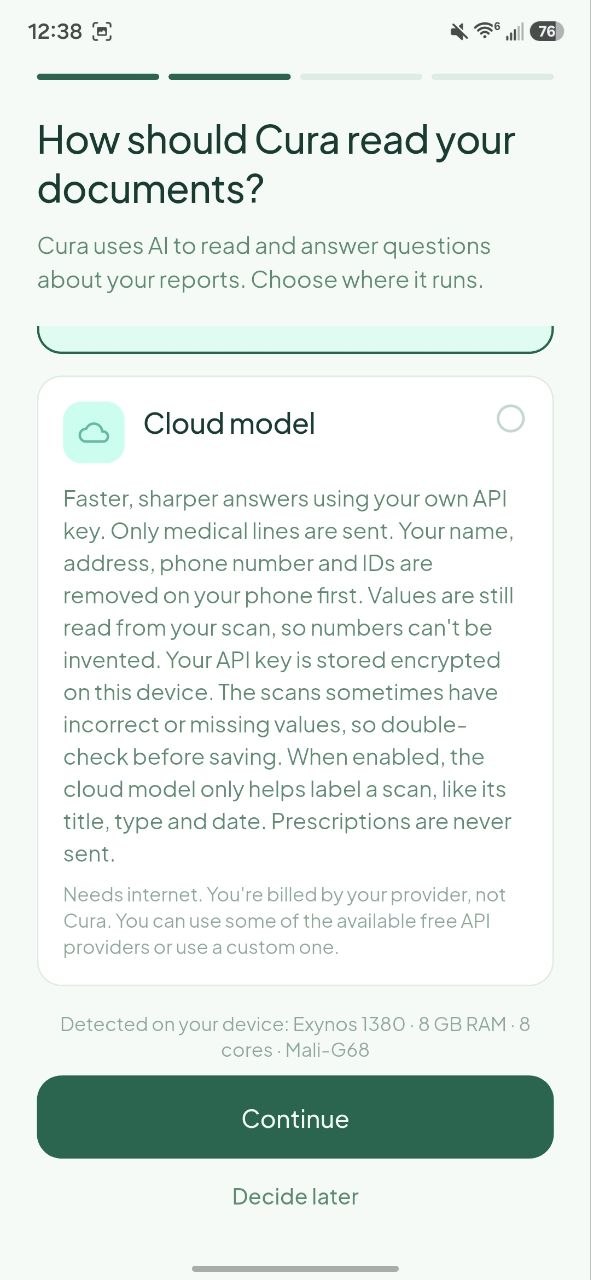 |
| Privacy promise and a one tap start | On-device is explained in full, with its real tradeoffs | The cloud option is opt in, never the silent default |
| Download a model | Connect a provider | Voice input |
|---|---|---|
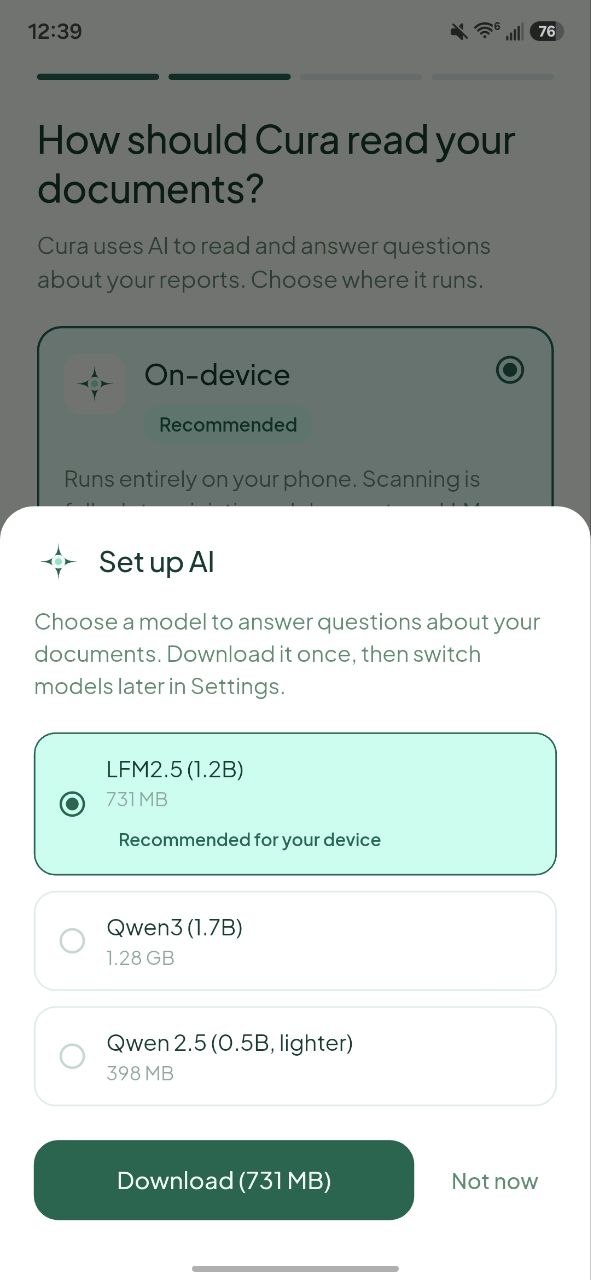 | 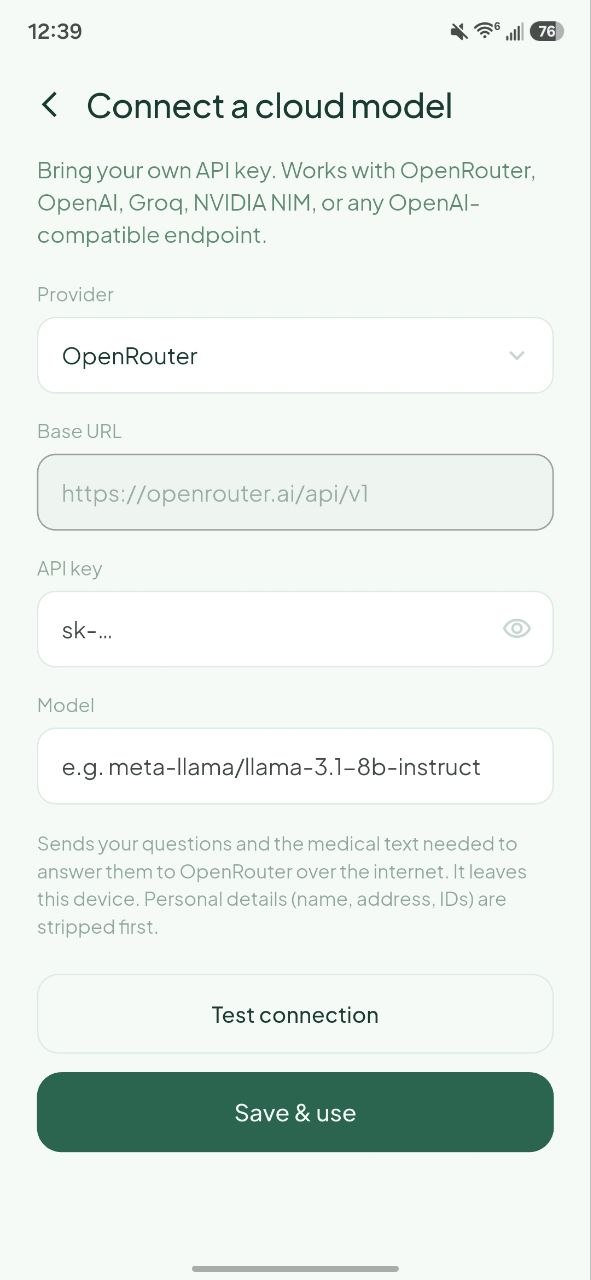 | 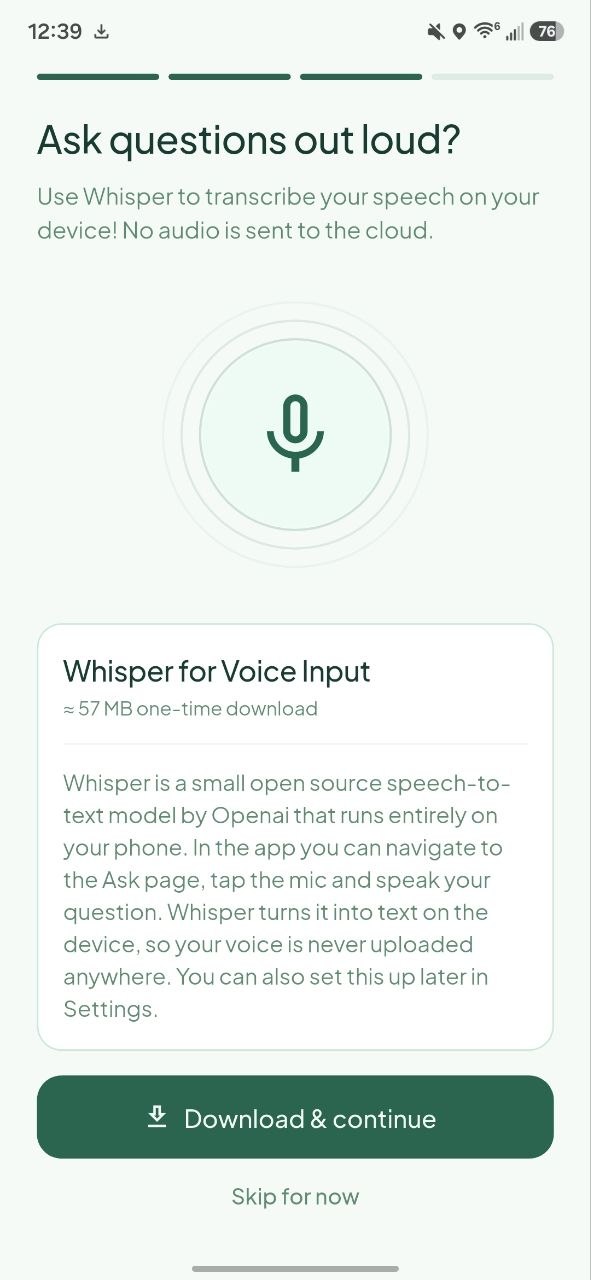 |
| One recommended for your phone, the choice is still yours | Bring your own API key, with a test button | Optional Whisper download for speaking your questions |
| App lock |
|---|
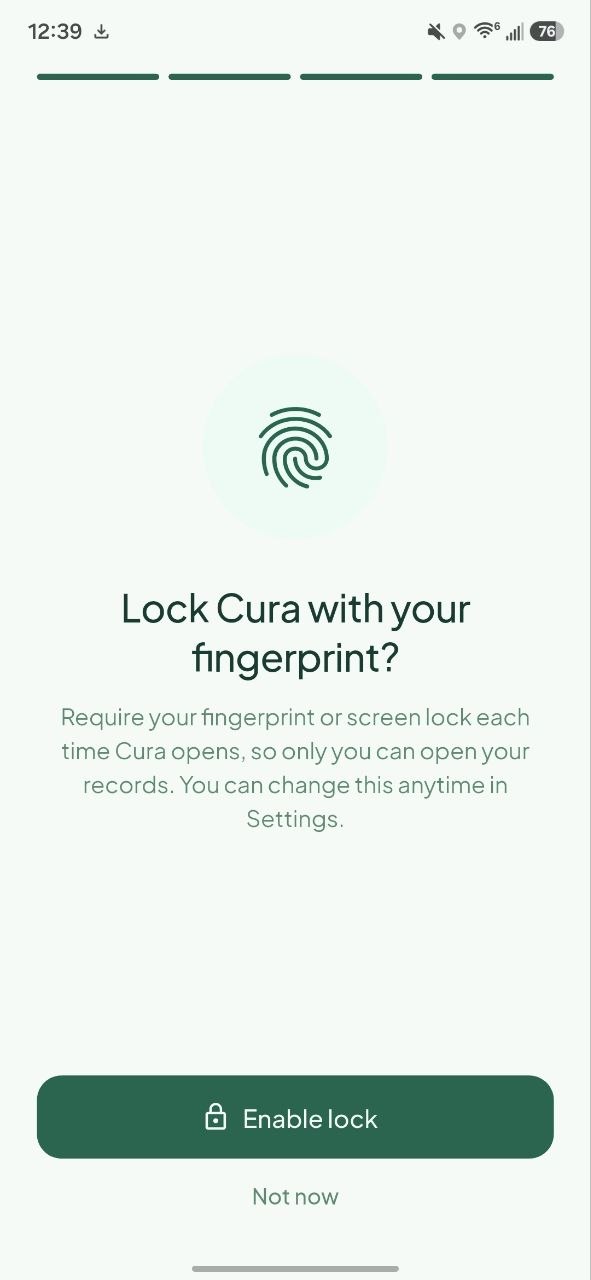 |
| Optional fingerprint or screen lock to open Cura |
Using it
| Add a document | Your records | Timeline |
|---|---|---|
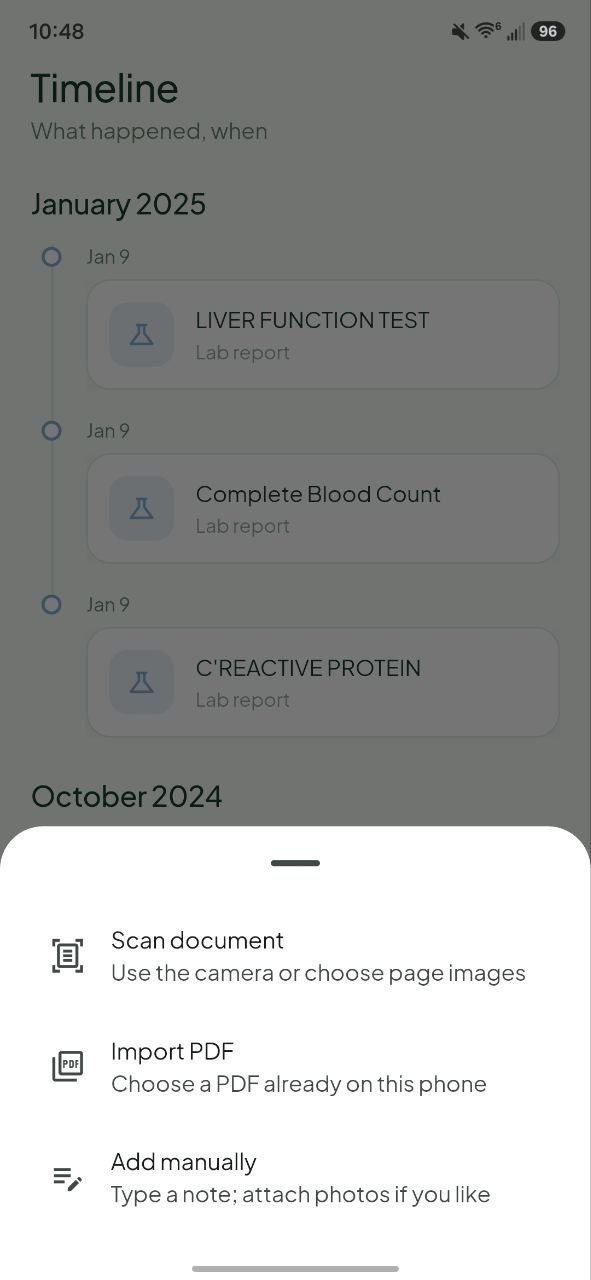 | 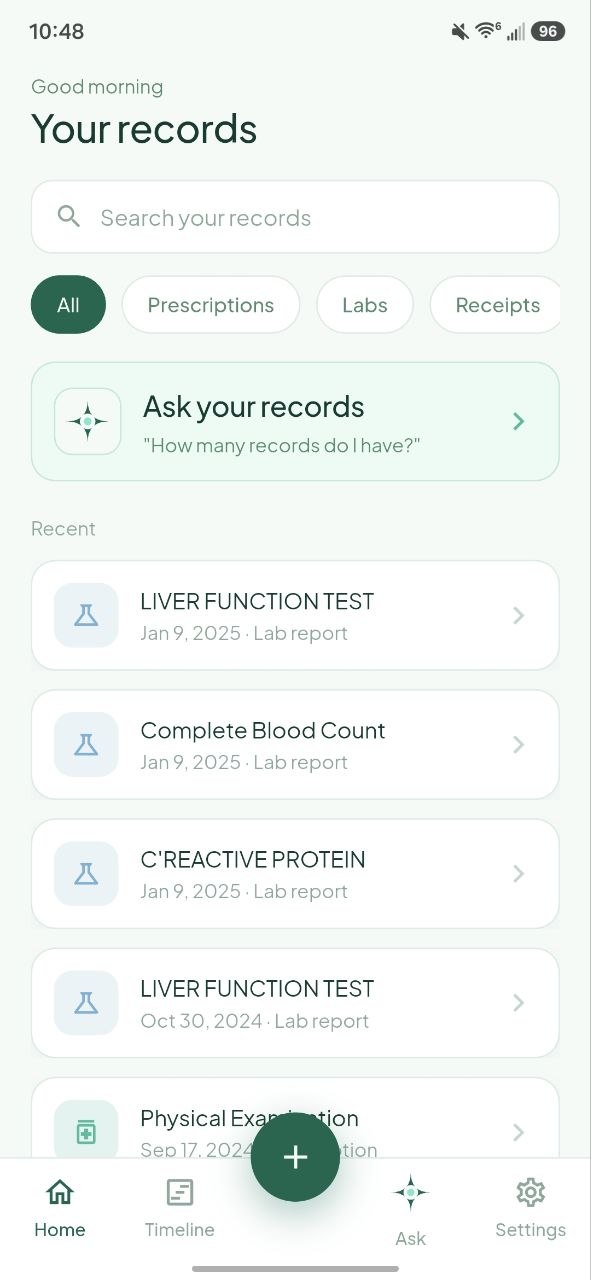 | 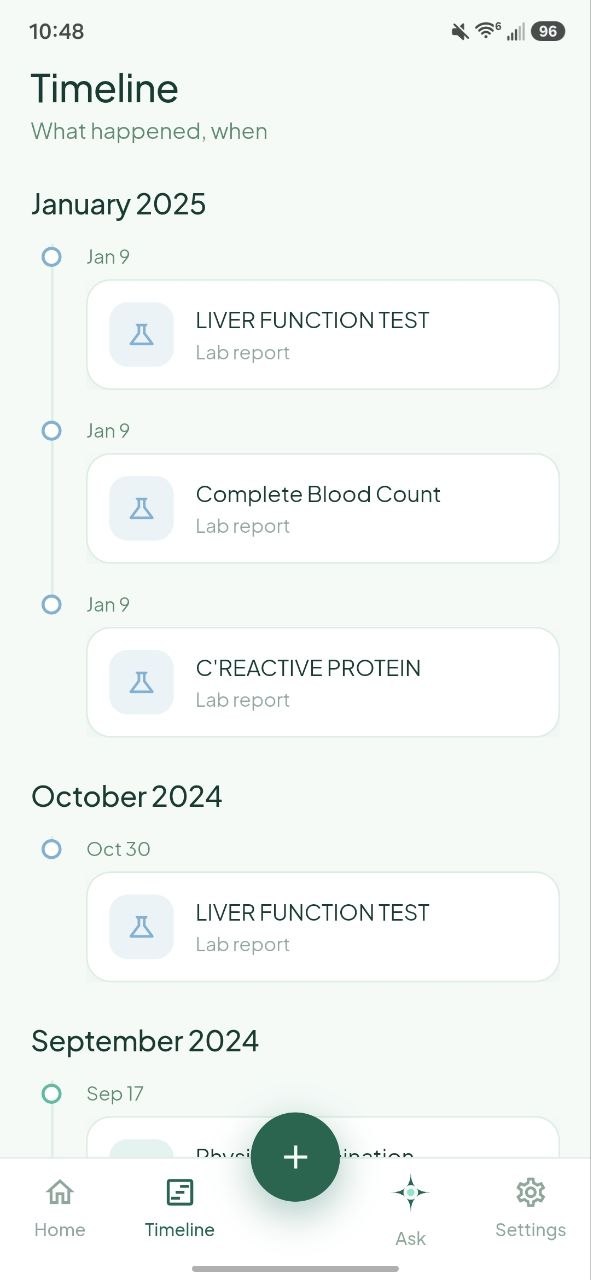 |
| Scan with the camera, import a PDF, or type a note | Search and filter by type, newest first | Everything in date order, grouped by month |
| Ask | Settings | Models |
|---|---|---|
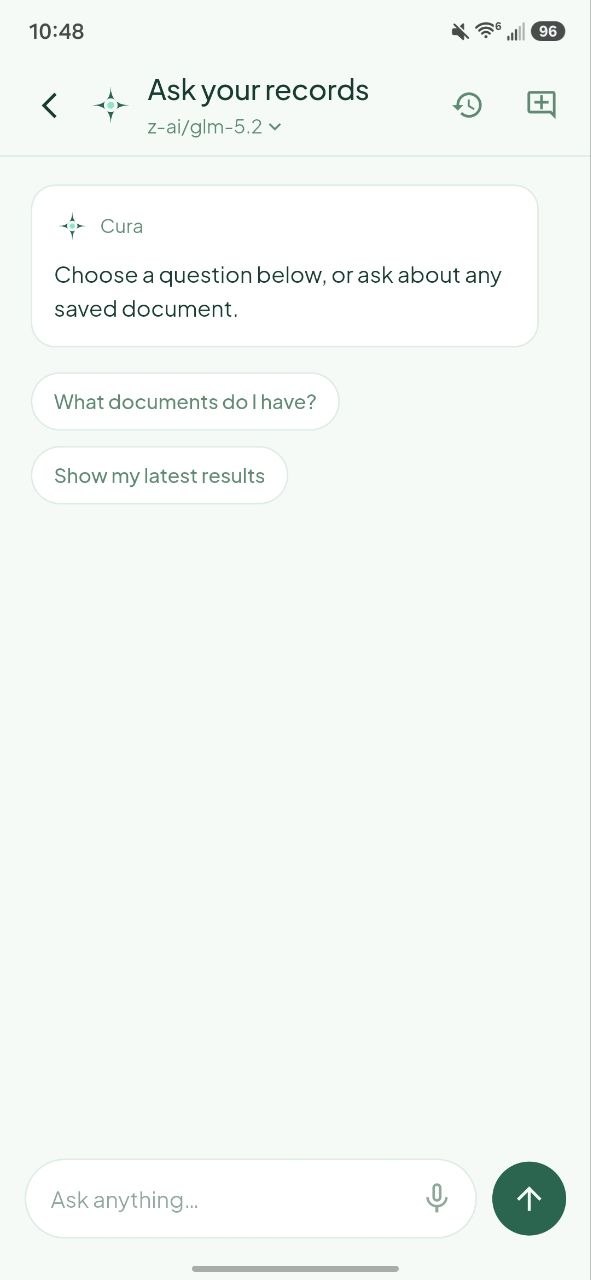 | 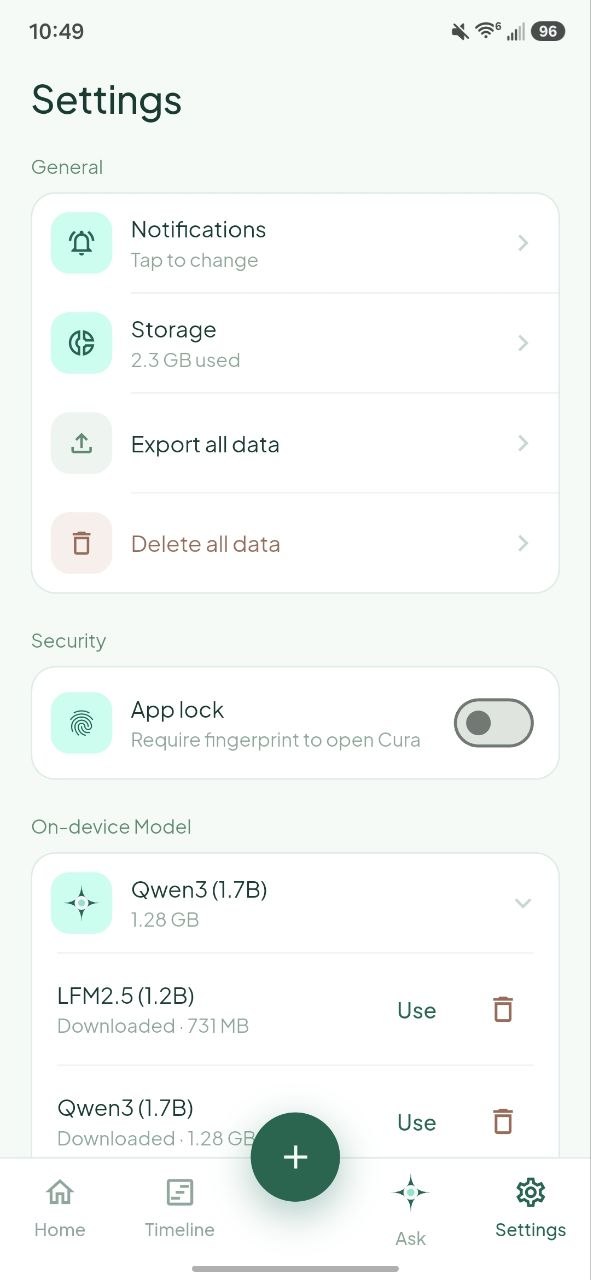 | 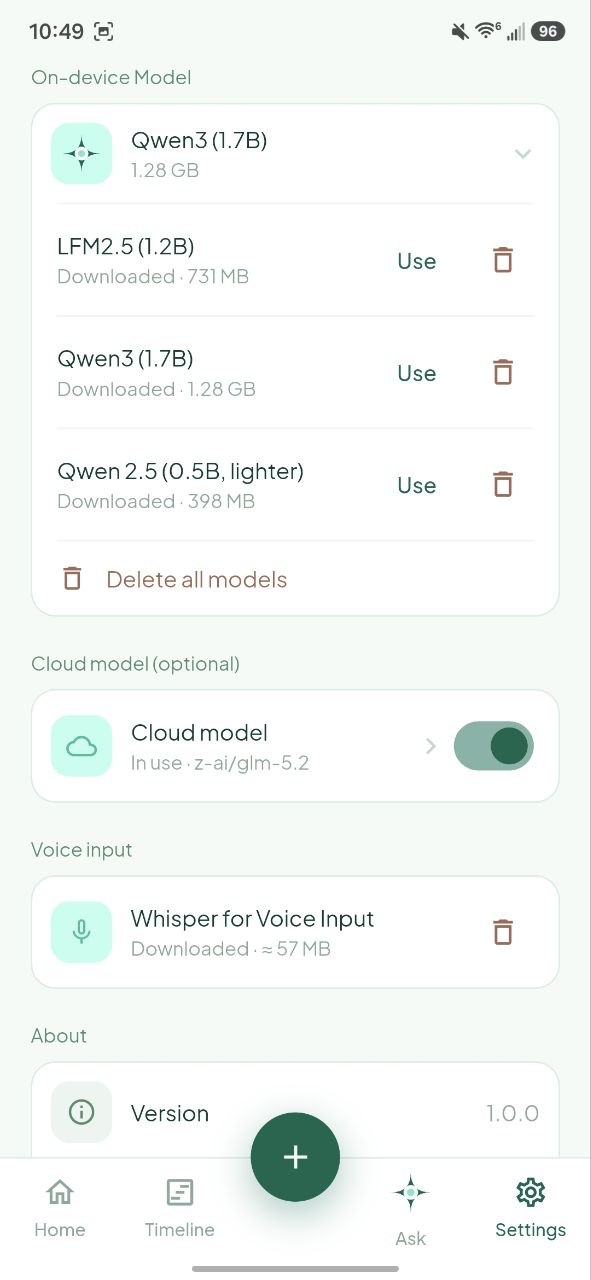 |
| Ask about your records, with a card for every report cited | Data controls, app lock, and engine settings | Switch or delete models, see which engine is live |
| Storage |
|---|
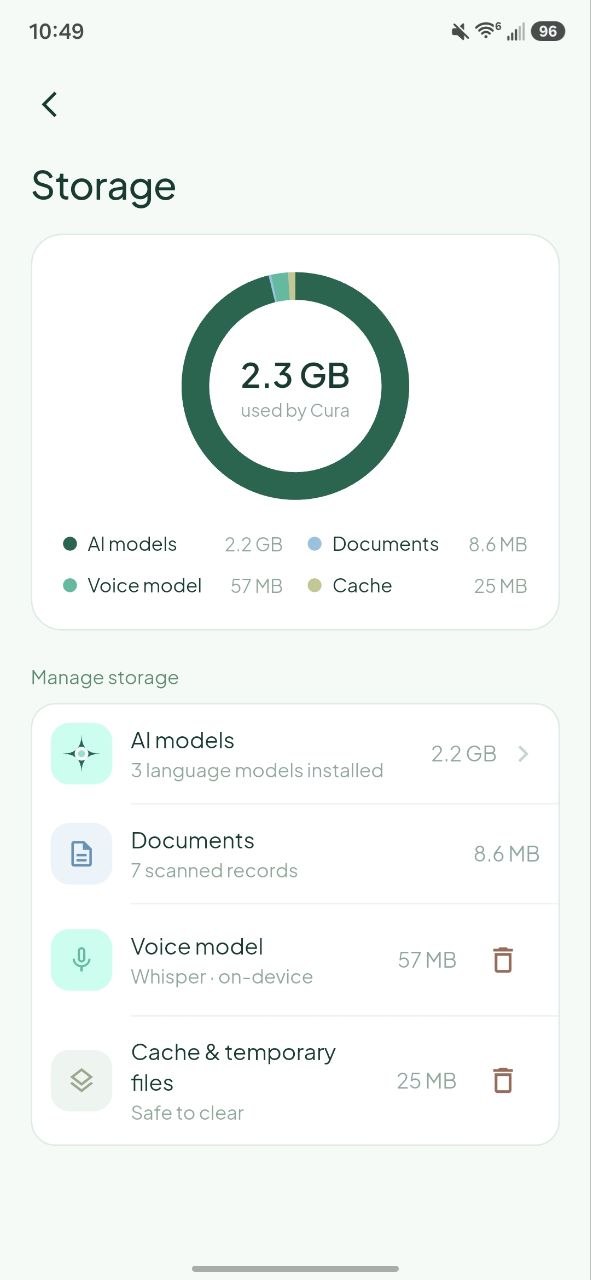 |
| See exactly what Cura is using on your phone |
Medicine reminders
| Set a reminder | How long | Every dose |
|---|---|---|
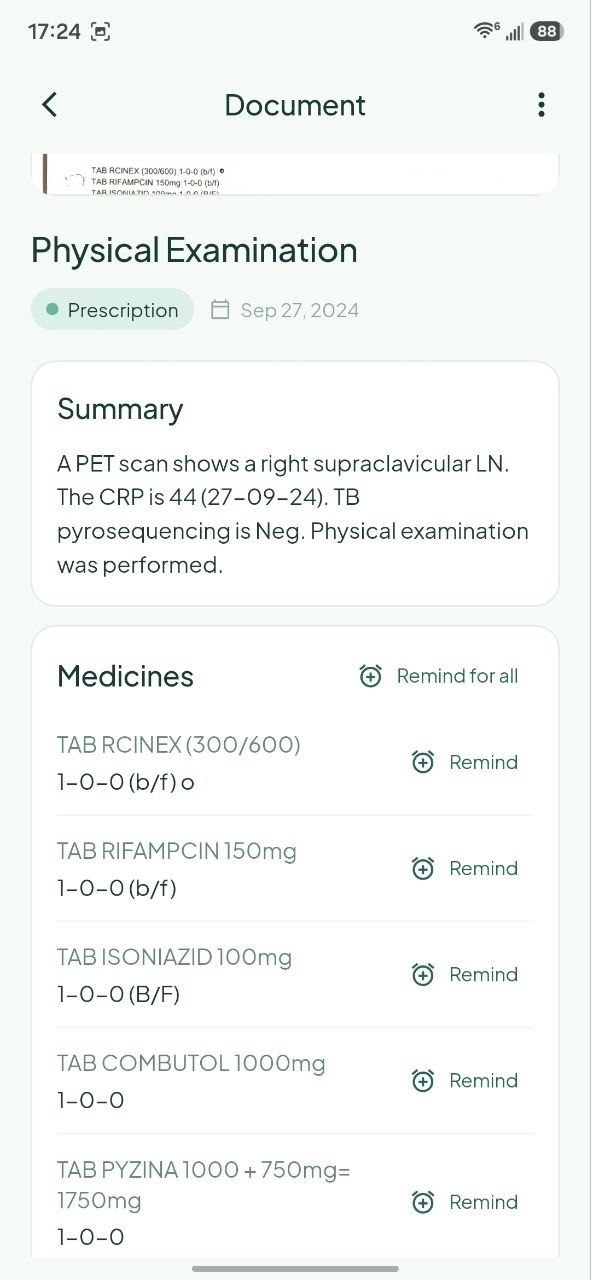 | 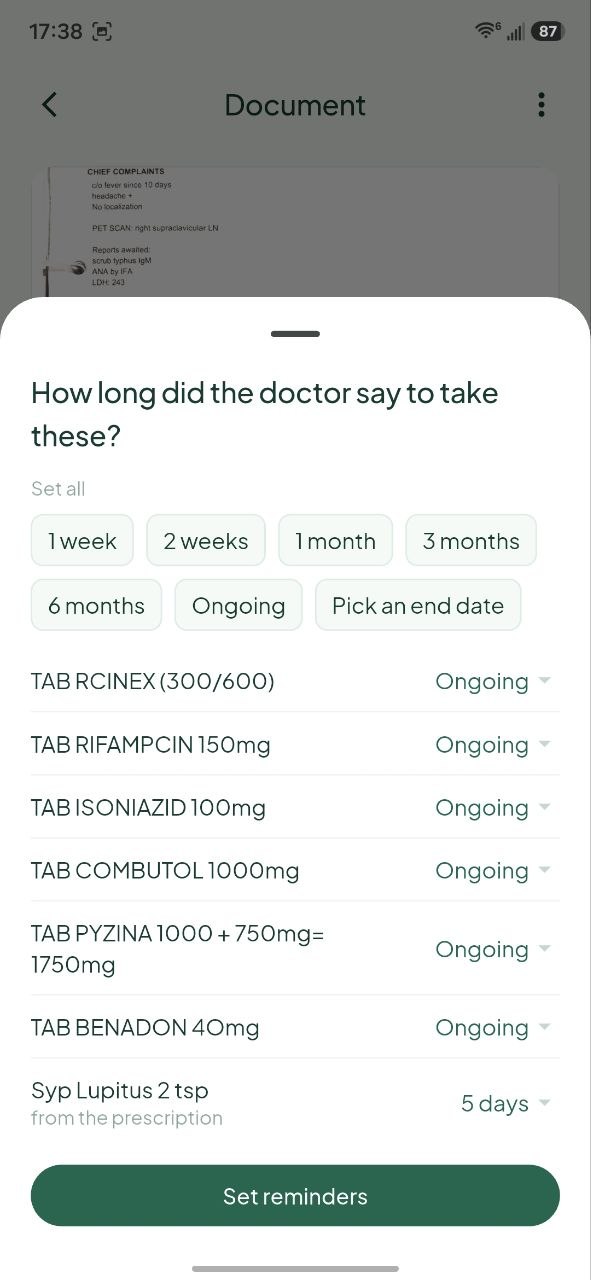 | 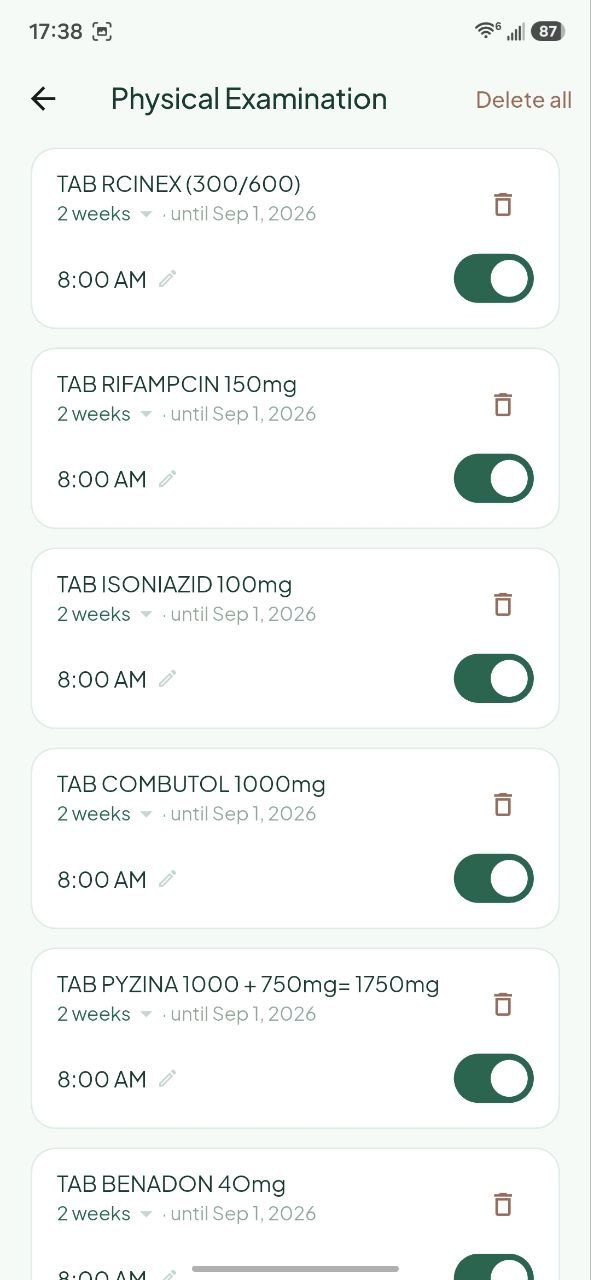 |
| Remind on one medicine, or all of them at once | Cura asks only when the page does not say how long | Every time editable, each dose switchable |
Trends
| The same test, over time | A single measure |
|---|---|
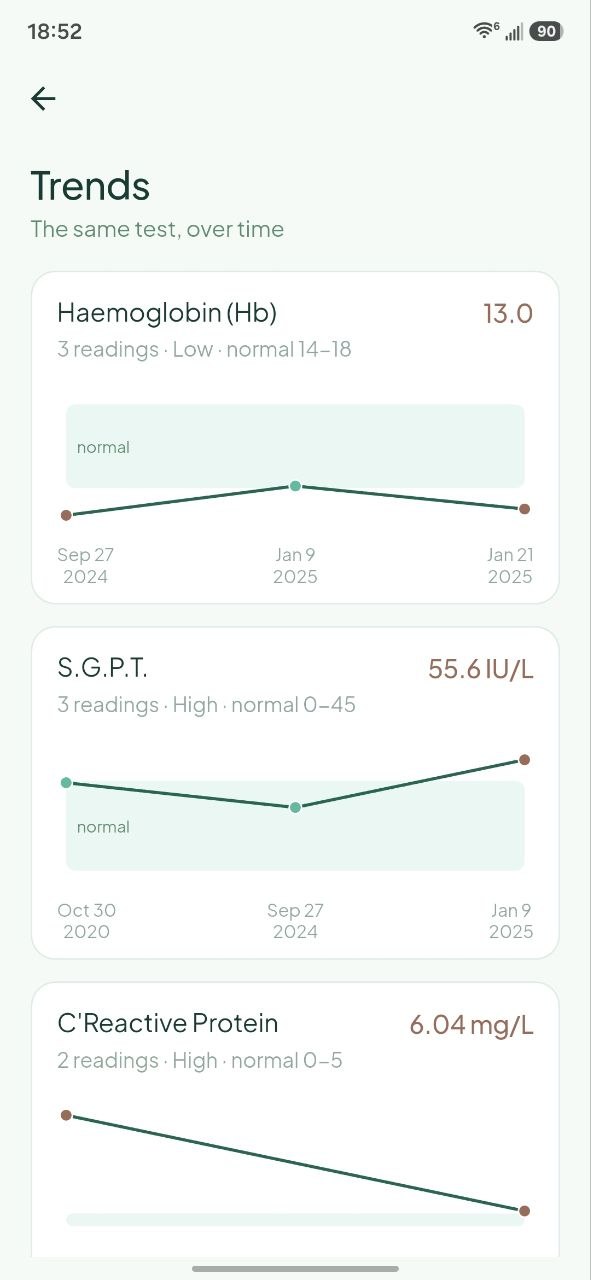 | 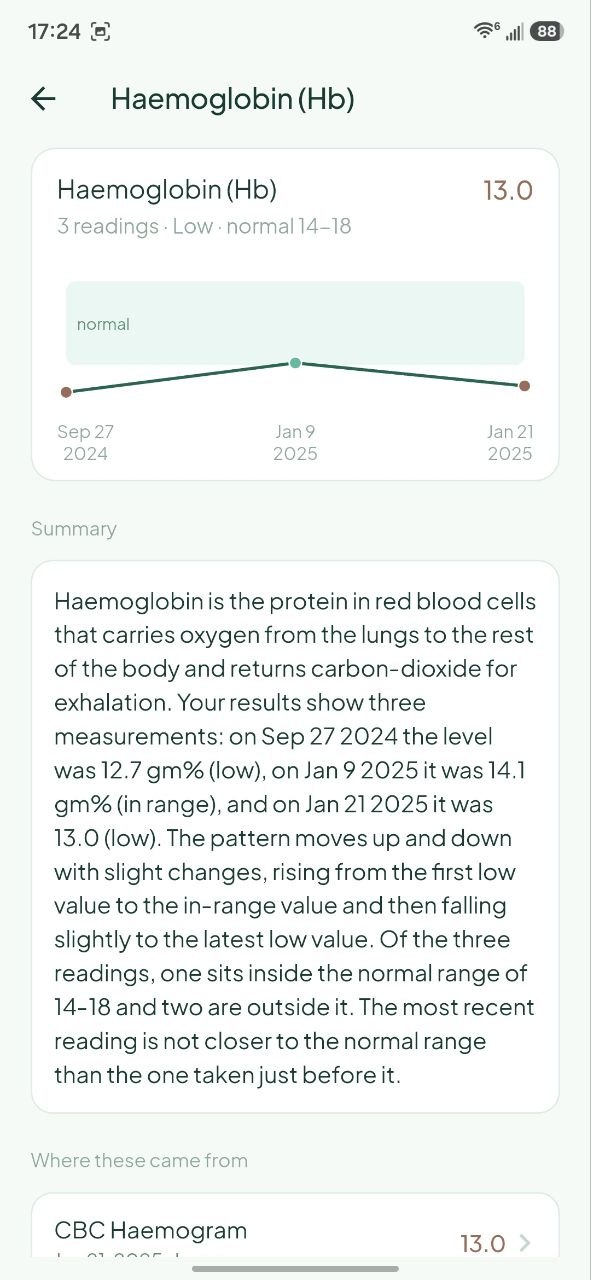 |
| Charts once a measure appears in two or more reports | The chart, a written summary, and every report it came from |
How scanning works, and why you must review it
This is the most important thing to understand about Cura.
Values are read off the page, never written by a model. OCR recognizes the text on the page, and the results table is rebuilt from the geometry of that text, which number sits in which row and which column. Titles, document types and dates are decided by rules. Amounts on bills come from the same geometry.
On a lab report where that geometry clearly came up short, an AI model gets one narrow job: point at the rows that were skipped. It never supplies the numbers. Every label and every digit it hands back has to already appear in the recognized text or the row is thrown away, and a row the geometry already read is never overwritten.
The upside is that a value in Cura is a value literally printed on your report. It cannot be invented, because nothing is generating it.
Out of range values are flagged the same way. A High or Low badge is computed from the reference range printed beside the value, not from any general medical knowledge. A value sitting exactly on a boundary stays in range. If the lab printed its own arrow and that arrow disagrees with the arithmetic, Cura shows no badge at all rather than a confident wrong one, because no flag beats a wrong flag. Edit a value on the review screen and it is re-checked immediately.
Please read before you trust a scan
Because the reader is geometric and rule based, it depends on the page looking like a normal document. Unusual, cramped, skewed, handwritten or multi column layouts can produce missing values, values attached to the wrong row, a wrong date, or a wrong title.
Cura always shows you a review screen before saving so you can fix or delete anything that came out wrong. Check the values against the original document every time before you save. Treat the paper report, not Cura, as the source of truth.
Medicine reminders
Once a prescription is saved, each medicine gets a Remind button, and the Medicines header gets Remind for all.
The times come off the page, not from a model. The printed directions are read by rule, the same way the results table is:
| Printed on the prescription | Reminder times |
|---|---|
1-0-1 | 8:00 AM, 9:00 PM |
1-1-1 | 8:00 AM, 2:00 PM, 9:00 PM |
OD, "once daily" | 8:00 AM |
BD, "twice daily" | 8:00 AM, 9:00 PM |
TDS, "thrice daily" | 8:00 AM, 2:00 PM, 9:00 PM |
QID | 8:00 AM, 2:00 PM, 6:00 PM, 10:00 PM |
HS, "at night" | 10:00 PM |
every 6 hours, q6h | every 6 hours from 8:00 AM |
An as needed medicine is never scheduled. SOS, PRN, stat and "as needed"
are recognized and deliberately produce no reminder.
How long the course runs comes from the page too, from x 5 days, for 2 weeks
or the 5/7 shorthand. When the prescription does not say, Cura asks you once
instead of guessing, and you can override any single medicine in that same sheet.
What it does not read. b/f and a/f, before and after food, are not
interpreted. Only the dosing pattern sets the times, so a medicine meant for after
food will still remind you at the default hour. Adjust it if that matters.
Every time is editable, every dose has its own on/off switch, and you can delete one medicine's doses or every reminder on a prescription. Notifications carry Taken and Snooze 15m, medicines due at the same time arrive as one notification rather than five, and the last day of a course gets its own notice an hour after the final dose. The home screen carries a bell with a badge and a Today's medicines card with tick offs and how far through the course you are.
Nothing about this touches the network. Reminders are scheduled by your phone and delivered by your phone. There is no push service and no server. Medicine names and dose times never leave the device. Cura asks for notification and alarm permission, and for permission to restart after a reboot so your reminders survive one. If exact alarms are unavailable, reminders still work, they just fire approximately.
Reminders live in the same local database as everything else. Deleting a document deletes its reminders, wiping your data wipes them, and a course that has finished is cleared automatically the next time you open the app.
Trends
The same test, over time. A measure starts charting once it appears in two or more of your reports. Bills and prescriptions are skipped, and so is any row still flagged for review.
Matching the same test across reports is deterministic. Cura folds known synonyms together, so haemoglobin, hemoglobin, Hb and Hgb are one chart, as are SGPT and ALT, or urea and BUN. It also knows what must stay apart: fasting and postprandial glucose are separate charts, as are direct and indirect bilirubin, because merging them would be a lie.
Units are compared, never converted. If one report prints a measure in a unit that does not match the others, that reading is dropped from the chart rather than rescaled into place. Cura would rather show you fewer points than a converted number it had to invent.
Seven common markers chart by default, haemoglobin, platelet count, bilirubin, SGPT, HbA1c, glucose and CRP. Anything else that repeats is one tap away under Track a measure.
The chart is drawn by the app itself, with no charting library. The shaded band is the normal range printed on your most recent report, and a dot turns red when that reading sits outside it. Points are spaced evenly rather than by time, so the gap between two dots is not proportional to the gap between two dates. The real date is printed under every point.
The summary under the chart is the one place a model writes prose about your numbers, and it is fenced in tightly. It is handed only the measure name, the unit, the range and the readings themselves. It never sees your report titles. Every number it writes back has to already appear in those facts, or the whole summary is thrown away and asked for again. A model may phrase, never renumber. The result is cached until your readings, your engine or the prompt actually change.
If you have turned the cloud engine on, this crosses the same privacy filter as everything else, and it fails closed: if the filter strips the request to nothing, nothing is sent.
Under the summary, Where these came from lists every report the readings were taken from, newest first. Tap one to open it.
The on-device engine (default)
Everything runs locally: OCR, parsing, storage, search, and AI answers. There is no server and no account.
What you download. A language model is fetched once, then never again. Three open GGUF builds are offered, quantized Q4_K_M, all requiring no login or token:
| Model | Size |
|---|---|
| LFM2.5 1.2B Instruct | 731 MB |
| Qwen3 1.7B | 1.28 GB |
| Qwen 2.5 0.5B Instruct (lighter) | 398 MB |
Onboarding measures your phone's RAM and cores and recommends one, but the choice is always yours. Models can be switched or deleted later in Settings. The download runs in the background with a progress notification, and can be cancelled.
Qwen3 can reason step by step, so with it selected Ask gains a Think harder toggle that gives the model a larger budget to work in. It is off by default, because thinking costs time and most questions do not need it. The other two models do not have it.
Where the model actually runs. Mostly it does not. Counts, latest values, dates and lists are answered directly from the stored fields with no model at all, which is why those answers are instant. The language model only runs for reasoning, summaries and definitions.
During scanning, the on-device model is used for two things: on a receipt or bill it may suggest a title and a purpose note, and on a lab report whose table came out short it may point at the rows that were missed. Nothing else. Prescriptions, dates and amounts stay fully deterministic, and every value it points at is checked against the recognized text first.
After saving, it does one more thing. An imaging, discharge, visit or prescription summary is scraped straight off the page, section by section, so it is accurate but reads like a dump. Once you save the record, the model rewrites it into plain prose in the background. Open the document before it finishes and you see the original with a "Rewriting" note beside it. The scraped text is never overwritten: it is what Ask searches and quotes, and the rewrite is display only, so a rewrite that drops a detail costs you nothing. Any number in the rewrite that is not on the original page is thrown away.
Tradeoffs, honestly. Answers are slower than cloud, and the speed depends entirely on your phone. It works best on devices with 6 GB or more of RAM.
Network use. The one-time model download, and, only if you turn it on, a daily check for a new version of Cura (see Updates). Your documents never leave the device.
The cloud model (optional, off by default)
Some phones are too slow to run a language model comfortably. For those users, Cura can talk to any OpenAI-compatible provider using your own API key.
This is off by default, requires a one-time explicit consent, and once it is on, the privacy text in Settings changes to say so. The app never claims to be fully offline while it is not.
Providers
Presets are built in for the following, and any other OpenAI-compatible endpoint can be added with a custom base URL:
| Provider | Base URL |
|---|---|
| OpenRouter (default) | https://openrouter.ai/api/v1 |
| OpenAI | https://api.openai.com/v1 |
| Groq | https://api.groq.com/openai/v1 |
| NVIDIA NIM | https://integrate.api.nvidia.com/v1 |
| Custom | any OpenAI-compatible base URL |
Free options. You do not have to pay to use this. Several of these providers offer free access at the time of writing: OpenRouter lists a number of free models, and Groq and NVIDIA NIM both offer free tiers. You are billed by whichever provider you choose, never by Cura. Cura takes no cut and has no API key of its own.
Your key. It is stored in encrypted storage backed by the Android Keystore, using
flutter_secure_storage, never in plain preferences. There is a test connection
button so you can verify a key before saving it.
Exactly where the cloud model is used after scanning
Cloud involvement in scanning is deliberately narrow, and it never produces your numbers.
| Document type | With cloud enabled, the model may set |
|---|---|
| Prescription | nothing, never sent, fully deterministic |
| Visit note (typed by you) | nothing, never sent, fully deterministic |
| Receipt or bill | title, purpose note |
| Lab, imaging, discharge summary | type, date, title |
| Lab report only | the results table, and only when the OCR geometry was ambiguous or clearly missed rows, and every value can be matched back to the OCR |
| Imaging, discharge, visit, prescription | after saving, the summary is rewritten for readability, from the scraped clinical sections only |
| A charted measure | the sentences under a trend chart, written from the measure name, unit, range and readings alone, never the report titles |
Everything else stays deterministic: prescription contents and bill amounts. Lab values are always read off the page, never written by a model. The narrative summary is deterministic where it counts: the scraped text is stored verbatim and is what Ask searches and quotes. Only the copy you read on the document page is rewritten.
Even in the table cases, the answer is not trusted blindly. Every value that comes back is re-checked against the original OCR text before it is stored, so a remote model cannot invent, alter or round a measurement.
What is actually sent
Before any request leaves the phone, Cura minimizes it:
- An allowlist filter runs first. Only lines carrying a medical signal are kept: a value with a unit, a reference range, a verdict, a section heading, a procedure, the report title, or the report date. Everything else is dropped as a block, which removes the letterhead, the patient details block and the footer in one go. That is where names, addresses, hospital IDs and phone numbers live, so they are removed no matter how they happen to be worded.
- A second pass scrubs whatever survived, by keyword and by structure.
- Questions in Ask are sent with structured fields only, meaning the title, results and note. The raw OCR text of the page is never sent.
- A summary rewrite sends the scraped clinical sections and nothing else. No question you typed, no chat history, no page text. If the filter strips it to nothing, the request is abandoned rather than widened.
- A trend summary sends the measure name, its unit, its normal range and the list of readings with their dates. Not the report titles, not the page text. It is abandoned the same way if the filter empties it.
On-device is never redacted, because nothing leaves the phone, and your stored documents always keep their full text.
Voice input (optional)
Ask can listen instead of making you type. Cura downloads Whisper, a small open source speech to text model, once, about 57 MB. Transcription happens on the phone, so your audio is never uploaded, and the microphone only opens while you are actually speaking. It can be skipped during setup and enabled later in Settings, or deleted to reclaim the space.
App lock (optional)
Because Cura holds your medical history, you can require a fingerprint, face unlock, or your device PIN or pattern before the app will open. It is off by default, can be toggled in Settings, and also hides your records in the app switcher preview. If you later remove every screen lock from your phone, Cura lets you in rather than locking you out of your own records.
Updates
Cura can tell you when a new version is out and install it for you. Open Settings → Updates and tap Check for updates to look now: it says so when there is nothing new. Turn on Check for updates automatically there and Cura asks GitHub at most once a day, and shows you the update as soon as you next open the app. It is off by default, so until you turn it on, Cura never checks by itself.
The check asks which version is latest and sends none of your records. Like any web request, it shows GitHub your IP address. That is the only thing it costs.
When there is a newer version, Cura shows what changed. Tap Update and it:
- Downloads the APK from the release, in the background, with a progress notification.
- Checks the file against the SHA-256 GitHub publishes for it, and throws it away if a single byte differs.
- Hands it to Android's installer. The first time, Android asks you to let Cura install apps.
Android installs an update only when it is signed with the same key as the Cura already on your phone, so a file from anyone else is refused. Your records are kept. Later closes the notice, and it comes back the next day.
Versions before 1.4.0 do not have this, so updating to 1.4.0 is done by hand, once.
Your data stays yours
- Export any single record or your entire library as a PDF. Export covers your documents; reminders are not included in it.
- Delete any record, or wipe everything, from Settings. Deleting a prescription also cancels its reminders.
- See exactly what is stored, broken down by models, documents, voice model and cache, and clear the cache at any time.
- Documents live in the app's private storage. Uninstalling Cura removes them.
Tech stack
| Area | Choice |
|---|---|
| App | Flutter, Android first, Dart ^3.12.2 |
| State | Riverpod |
| Database | Drift (SQLite) |
| OCR | google_mlkit_document_scanner, google_mlkit_text_recognition, bundled and offline |
| On-device LLM | llama_flutter_android (llama.cpp, GGUF, CPU, ARM64) |
| Model download | background_downloader, with a progress notification and cancel |
| Updates | GitHub Releases API over http, the same downloader for the APK, crypto for the SHA-256 check, Android's installer via a FileProvider |
| Speech to text | whisper_ggml (whisper.cpp), microphone via record |
| Reminders | flutter_local_notifications, scheduled in your zone with timezone and flutter_timezone |
| App lock | local_auth (fingerprint, face, device PIN) |
| Optional cloud | any OpenAI-compatible endpoint over http |
| Secrets | flutter_secure_storage (Android Keystore) |
| Settings | shared_preferences, for everything that is not a secret |
pdf, pure Dart and fully offline; image to downscale pages, file_picker for the save dialog | |
| Font | Plus Jakarta Sans, bundled locally so there is no runtime font fetch |
| Intro clip | video_player, playing a bundled asset, never a fetch |
Build it yourself
You need the Flutter SDK, the Android
SDK, and JDK 17. flutter doctor tells you if anything is missing.
git clone https://github.com/Tarun-032/Cura.git
cd Cura
flutter pub get
flutter run                  # debug build on a connected phone
That is the whole setup. There is no API key to configure, no .env file, no backend to
run. A cloud key, if you want one, is entered in the app at runtime and never touches
the repository.
Other useful commands:
flutter analyze              # static analysis
flutter test                 # unit and widget tests
flutter build apk --release  # the installable APK
Use a real phone, not an emulator. The AI model is compiled for ARM64, so it will not load on an x86 emulator. Everything else works there, but nothing AI-related will.
Signing. Release builds here are signed with a private key that is not in this
repository. Building from source without it just works: Gradle falls back to your own
debug key automatically, so flutter build apk --release needs no extra setup from a
fresh clone. Your build simply carries your signature instead of the official one.
Code generation. The database layer is generated. If you change a table in
lib/core/data/app_database.dart, regenerate it:
dart run build_runner build
How the project is organised
Everything lives under lib/, split by feature rather than by layer, so one folder
holds the screen, its state and its logic together.
lib/
  app/theme/       colours, typography, the Material 3 theme
  core/data/       the SQLite schema and the repositories that read it,
                   documents, chats and reminders
  core/widgets/    small widgets shared across features
  features/
    onboarding/    first run: engine choice, voice, app lock
    scan/          camera, OCR, and the rule-based parsers that read a page
    library/       the records list, search, and a single document's page
    timeline/      the same records in date order
    reminders/     dose times read off a prescription, scheduled on-device
    trends/        one measure across reports, charted and summarised
    ask/           the chat screen and its saved conversations
    ai/            answering questions: retrieval, the local model, and
                   remote/ for the optional cloud engine and its PII filters
    export/        writing records back out as PDF
    pdf_import/    reading a PDF you already have
    security/      the biometric app lock
    settings/      storage, models, engine, and data controls
    updates/       the opt-in GitHub release check, download and install
test/              unit and widget tests, one file per area
Two folders carry most of the weight. scan/ is where a photo becomes a record, and
it is deliberately free of AI: OCR reads the text, and rules and table geometry do the
rest. ai/remote/ is the boundary the cloud engine has to cross, and it is where
every piece of personal information is stripped before a request can leave the phone.
reminders/ is model-free for the same reason scan/ is. Dose times are parsed
from the printed directions by rule, so a reminder can only ever repeat what the
prescription says. trends/ derives its charts from the stored results with no
model either; the only model call in it writes the summary sentences, and every
number in those has to match the readings first.
Acknowledgements
- llama.cpp and whisper.cpp by Georgi Gerganov and contributors
- Google ML Kit for on-device OCR
- GGUF quantizations by bartowski and LiquidAI
- Plus Jakarta Sans by Tokotype, under
the SIL Open Font License 1.1, see
assets/fonts/OFL.txt - Drift and Riverpod
License
Apache 2.0, see LICENSE and NOTICE. The bundled font is licensed separately under the SIL OFL 1.1.
Disclaimer
Cura organizes and explains your own documents. It does not provide medical advice and it does not diagnose. Extracted values can be wrong, especially on unusual layouts, so always review a scan before saving it. Always consult a qualified healthcare professional, and treat the original document as the source of truth.