cc-deck
Self-hosted web dashboard for Claude CLI sessions — tmux-backed in-browser…
AI runs online
not yet reviewed by publik. It is live now; the founder has not reviewed this version yet.
by  @cyberneel
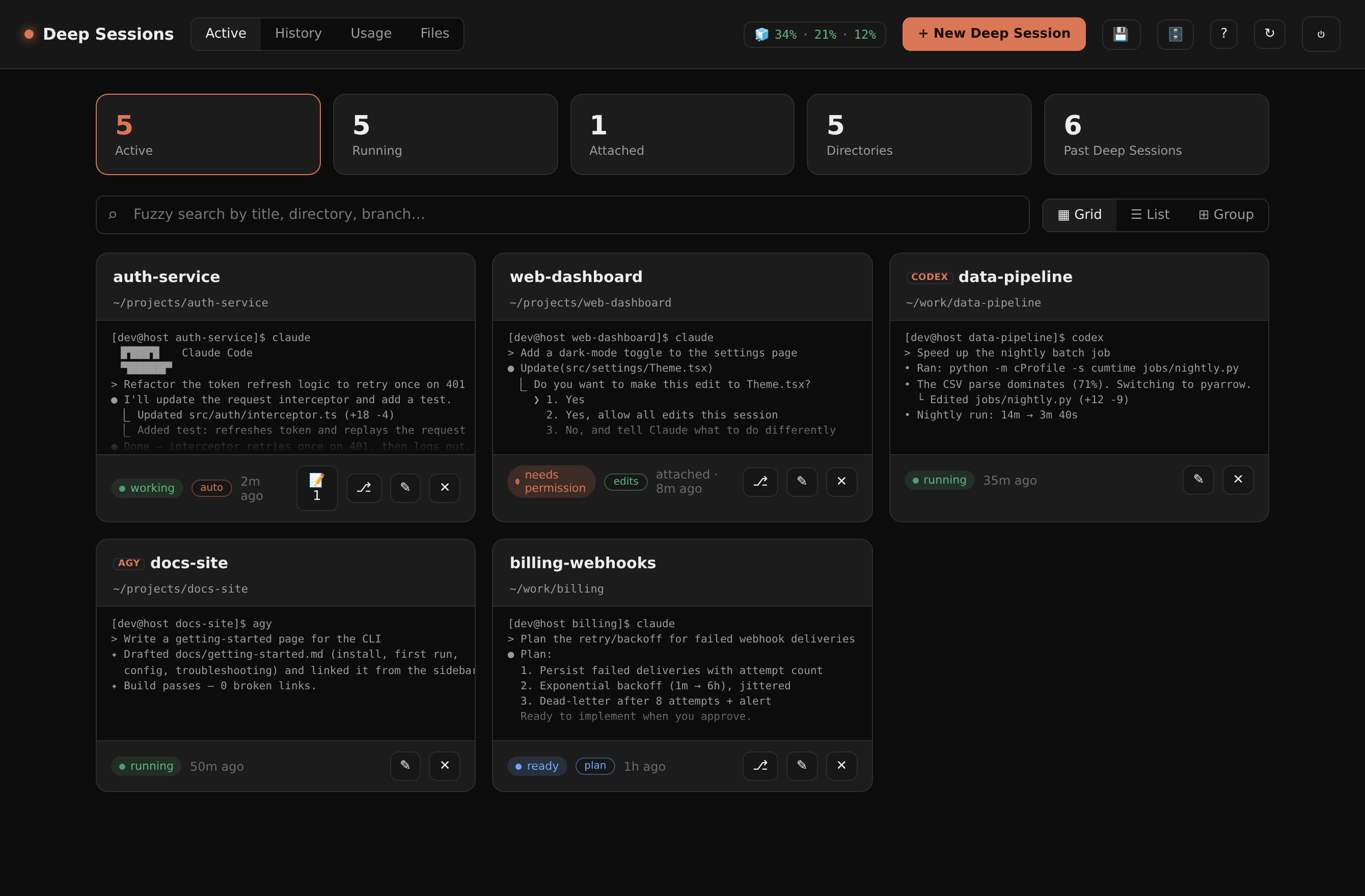
Where cc-deck’s AI runs, and what it costs
Prices are for one typical use: one request of about 1,500 words sent and 375 words back. A higher quality score is better.
On your computer
cc-deck has no option to run its AI on your computer.
publik API
- Price
- $0.0100 per use, $10.00 per 1,000 usespublik-balanced, the default level
- Quality
- MiMo-V2.6-Pro: 46
- Setup
- Not built into cc-deck yet. A publik API key works wherever cc-deck takes an OpenAI-compatible address.
Your own key
- Price
- $0.0013 per use, $1.31 per 1,000 usesMiMo-V2.6-Pro at OpenRouter’s list price, before its fee for buying usage
- Quality
- MiMo-V2.6-Pro: 46
- Setup
- Open a provider account, add a card, paste the key into cc-deck.
Quality and price, side by side
| Model | Quality | Per 1,000 uses |
|---|---|---|
| On your computer (Ollama, 4-bit download size) | ||
| Granite 4.2 3B2.2 GB | 9 | $0 |
| Phi-4 Mini2.5 GB | 6 | $0 |
| Llama 3.1 8B4.9 GB | 7 | $0 |
| gpt-oss 20B14 GB | 9 | $0 |
| Gemma 4 31B20 GB | 19* | $0 |
| Qwen3.5 35B-A3B24 GB | 19* | $0 |
| publik API | ||
| publik-fastGLM-5.3 Flash | 42 | $1.00 |
| publik-balancedMiMo-V2.6-Pro · cc-deck | 46 | $10.00 |
| publik-smartGPT-6 Sol | 48 | $18.00 |
Quality: Artificial Analysis Intelligence Index v4.3.2, read 2026-09-22 (publik API models 2026-09-25); * = estimated by Artificial Analysis. Sizes: the Ollama library, read 2026-09-22.
What you pay for
- On your computer: nothing per use. You pay in disk space, memory and electricity, at lower quality.
- publik API: publik’s published price for each use, in dollars, from your publik balance. It is above the model’s cost; the difference runs publik and pays the app’s builder.
- Your own key: the provider’s price, billed to an account you keep with the provider.
How to install cc-deck
Every step written out. No terminal experience needed. Pick your setup.
README
Open in GitHubcc-deck
A self-hosted web dashboard for your coding-CLI sessions (Claude Code, Codex, and agy). See every
running session in a grid/list/grouped view, launch a new claude in any directory, resume or fork
past conversations, and click into a fast, smooth in-browser terminal — the real CLI, no wrapper.
In the app, sessions are called Deep Sessions.
Sessions can hand context to each other through notes, and cc-deck exposes an MCP endpoint
so Claude.ai, Claude Code, or your own agents can search past work and drive sessions remotely.
Each session is a tmux session running claude, so sessions persist through tab-closes,
no connected client, and restarts of the cc-deck app/tunnel. cc-deck runs them on its own
dedicated tmux server (tmux -L ccdeck, kept alive with exit-empty off) — isolated from
your personal tmux, and immune to the "server exits when the last session closes" trap.
Attach from a shell with tmux -L ccdeck attach. It also snapshots active sessions and
restores them after a host reboot (see Reboot survival).
browser (xterm.js)  ──ws──▶  Node/Fastify  ──node-pty──▶  tmux attach -t ccdeck-…  ──▶  claude
        ▲                          │  launch · resume · fork · kill · rename (REST)
        │                          │  notes · handoff · usage/ROI · files · snapshot
 Claude.ai / Claude Code  ──MCP──▶ │  search sessions · read context · create · send
        └──── grid / list / group / search ────┘
Screenshots
| Active sessions | Usage & ROI |
|---|---|
| 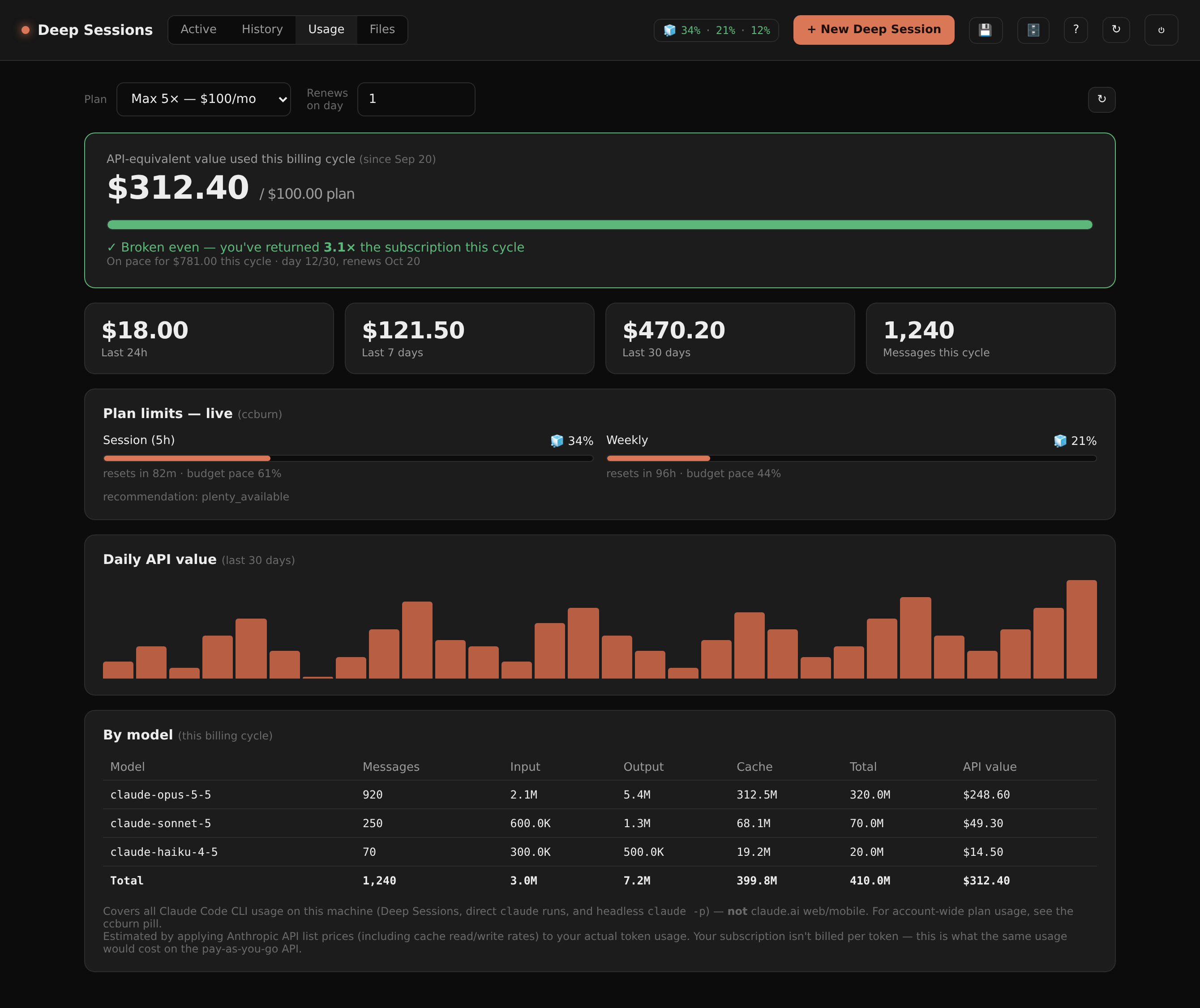 |
| Grouped by directory | History (resume) |
|---|---|
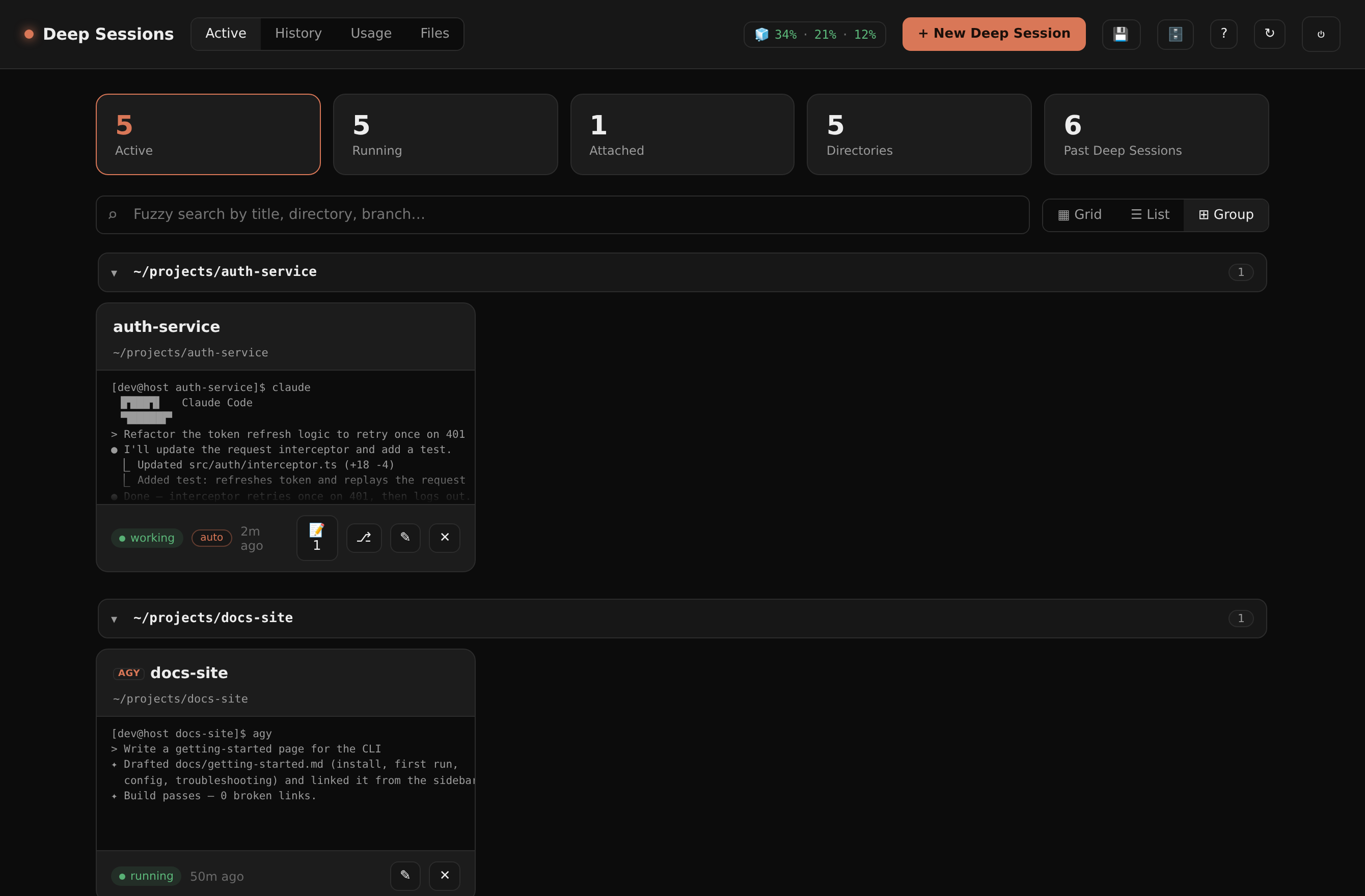 | 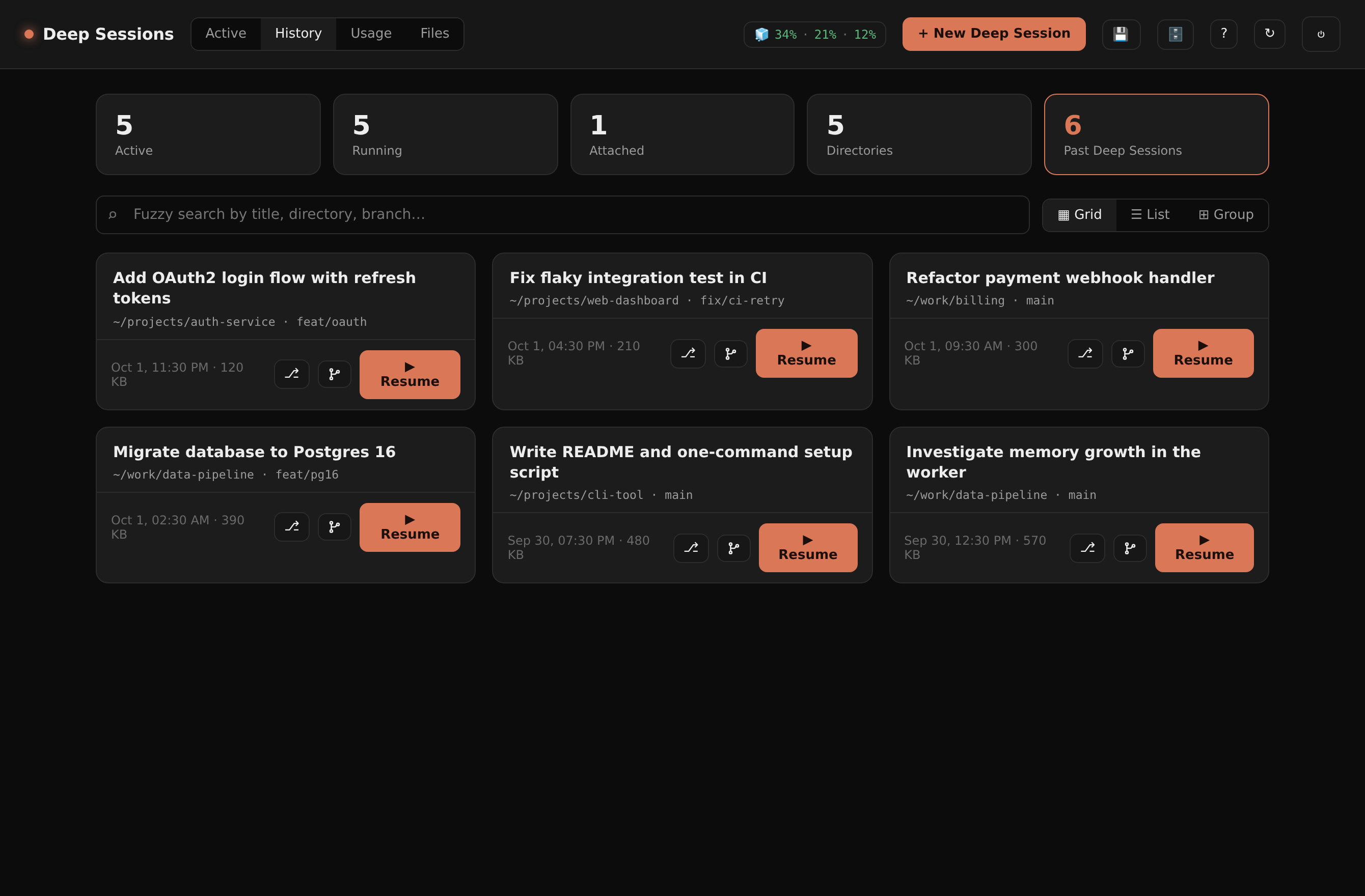 |
Regenerate with node scripts/screenshots.mjs (needs npm install playwright --no-save && npx playwright install chromium, plus a TOKEN env var set to a valid ccdeck cookie value — the header of the script shows how to mint one).
Features
Sessions & terminal
- Launch anywhere under your roots — a folder picker (create-folder inline) starts a new
claudein any directory underCCDECK_ROOTS. Give it a title and an optional seed prompt. - Resume & fork — "▶ Resume" runs
claude --resume <id>in the original directory as a fresh live session; fork (--fork-session) branches into a new independent session that copies the prior history and leaves the original untouched. - Real in-browser terminal — a full-screen xterm.js terminal (WebGL/canvas renderer, auto-reconnect). Closing the browser only detaches — Claude keeps running. A per-terminal scroll-mode toggle switches between tmux (native copy-mode, full history) and fast (strips the alt-screen so the wheel scrolls xterm's local buffer instantly). Per-device window-size ownership means a desktop and a phone attached at once don't fight over the size.
- Parked panes — if a pane ends up showing a Claude Code background job instead of its main conversation, the card and terminal bar flag it with ↩ main; one click swaps the pane back to the full main conversation.
- In-terminal session switcher — a collapsible sidebar (off-canvas drawer on mobile) lists
every active session with live/idle and "needs-attention" dots (unseen activity since you last
looked). Click to switch in place, Alt+
/ Alt+Shift+to cycle most-recently-used (Zen-style overlay), or Alt+1–9 to jump directly. The current + 2 most-recent sessions are kept warm (attached in the background), so switching between them is instant. ↩ Resume a Deep Session at the top of the sidebar opens a filterable picker of past sessions — click one to resume it and switch straight in.
Organize & find
- Status panel — at-a-glance counts (active, running, attached, distinct directories, total past sessions); the tiles double as tab switches. Cards also show each session's CLI and current permission mode (auto / plan / edits / …).
- Fuzzy search — instant subsequence search across title, directory, and git branch, ranked by relevance, in both Active and History tabs.
- Three views — grid (with live pane previews), compact list, or grouped by directory (collapsible; starts collapsed so you can scan many directories fast).
- History tab — past Claude sessions from
~/.claude/projectswith directory, branch, time, and opening prompt (hides currently-running ones and any dir inCCDECK_EXCLUDE_DIRS). - Session graph — a git-log-style branch/thread viewer for a transcript, so forked and resumed lineages are readable. Transcripts are parsed off the main thread, so even a multi-hundred-MB session doesn't stall the dashboard.
- Files & uploads — browse/download/delete files under your roots, and drag-drop files or whole folders straight into a session's working directory.
- Remote sessions (over SSH) — list and attach tmux sessions on other tailnet hosts (a laptop, another box) right in the terminal sidebar, tagged by host. Attach-only for now (no rename/kill/notes). See Remote sessions.
Usage & cost
- Usage tab — ROI on your plan — pick your plan (Pro / Max 5× / Max 20× / custom) and billing-renewal day, then see the API-equivalent dollar value of your usage this billing cycle vs the subscription price ("are you breaking even?"), a daily-spend chart, and a per-model breakdown. Token prices are pulled live from the LiteLLM pricing dataset (disk-cached, ~7-day refresh, with a built-in fallback) so the numbers don't go stale. Covers all local Claude Code CLI usage on the machine (cc-deck + direct + headless), not claude.ai web/mobile.
- Burn pill — if
ccburnis installed, a top-bar pill shows live session (5h) and weekly plan-limit utilization (including model-scoped weekly limits) with pace indicators, plus a popover breakdown.
Handoff, notes & context
- External notes — other agents (via MCP) can
save_session_summaryto leave a note on a session; cc-deck badges it, and on the next open/resume it's seeded into the session as context. Notes follow a session across resume/fork (lineage-matched), and are consumed once delivered. There's also an "apply to running" action to inject them immediately, and you can edit or delete a pending note from the viewer. - Context handoff — build a markdown handoff from one or several prior sessions (an AI
summary via headless
claude -p, or the full transcript) and seed it into a new session or inject it into a running one.
Remote control (MCP) — see MCP and remote connectors
- MCP endpoint — a Streamable-HTTP MCP server at
/mcplets Claude.ai connectors, Claude Code, or your own agents search past sessions, read a session's context, leave handoff notes, and (with the right token) create and drive sessions. - Handoff-aware sessions — optionally auto-wire every new session with the read-only MCP + a
short system-prompt nudge, so a session can discover related work elsewhere and hand off
instead of duplicating (
CCDECK_SESSION_MCP=on). - Browser access — opt a session into driving a logged-in Chrome (via
chrome-devtools-mcpover CDP) straight from the New Session dialog.
Reliability & access
- Reboot survival — cc-deck snapshots active sessions
(periodically, on graceful stop, and via
npm run snapshot) torestore.json, and on a fresh boot with no sessions already running it relaunches them withclaude --resume(falling back to a fresh session if the transcript is gone). The 💾 button snapshots on demand and tells you whether any session is still mid-task (a safe-to-reboot check). Disable withCCDECK_RESTORE=off. - Storage / retention hub — inventory and selectively delete cc-deck artifacts (handoffs, caches) and old transcripts; transcripts of running sessions are protected.
- Installable PWA — a service worker precaches the app shell for offline load and prompts to reload when a new build ships; add-to-home-screen on mobile.
- Auth — password login with a signed cookie. Binds to loopback; exposed via Tailscale or Cloudflare. Safe to put on a public hostname (layer Cloudflare Access for per-identity control).
- Mobile-friendly — responsive layout, iOS safe-area + dynamic-viewport handling, secondary actions tucked into a ⋯ menu, an on-screen key bar (Esc / Tab / Shift+Tab / Ctrl / arrows / ^C) in the terminal since phone keyboards lack them, and a 🎤 compose box for clean voice dictation.
- Built-in help — a first-run walkthrough and a full Help page (the ? button).
Requirements
- Node.js ≥ 20, tmux, and the Claude CLI (
claude) onPATH(Codex and agy are optional — the CLI picker only offers the ones it finds installed). - A C toolchain (
gcc/clang,make,python3) is needed once to buildnode-pty. - Linux or macOS. The optional background service uses systemd (Linux).
- Optional:
ccburn(npm i -g ccburn) for the live plan-limit burn pill/charts. The Usage tab's ROI/cost numbers work without it.
Updating
main is the release channel. A git-clone install checks its upstream branch every few hours;
when there are new commits, the dashboard shows a ⬆ Update pill with the command to run:
./update.sh # fast-forward to upstream, npm ci if the lockfile changed, rebuild, restart
It refuses to run with local changes to tracked files or diverged history, reinstalls
dependencies only when package-lock.json changed, and restarts the systemd user service if it
runs this checkout (otherwise it tells you to restart npm start). Your sessions keep running
across the restart (see KillMode=process below). If the install or build fails, it rolls
back to the previous commit and leaves the running server alone. You can run it from a cc-deck
terminal: the page drops for a moment during the restart, then offers a reload.
Set CCDECK_UPDATE_CHECK=off to disable the background check (it's a git fetch of your
upstream). Docker: git pull && docker compose up -d --build. Hosted cc-deck is updated for
you, so it never shows the pill.
Run with Docker (Windows, macOS, Linux)
cc-deck needs Linux + tmux + node-pty, which is awkward on Windows/macOS — so the container
does it for you (Docker Desktop runs the Linux VM). The image bundles the Claude Code, Codex, and
agy (Google Antigravity) CLIs (agy is installed at build from Google's official installer), so
sessions launch inside the container against a folder you mount.
# 1. create a .env next to docker-compose.yml
printf 'CCDECK_PASSWORD=%s\nCCDECK_SECRET=%s\n' 'choose-a-password' "$(openssl rand -hex 32)" > .env
# 2. point the workspace at your code (edit ./workspace in docker-compose.yml), then:
docker compose up -d
# 3. log the CLIs in once (stored in a volume, so it persists):
docker compose exec cc-deck claude       # then /login
docker compose exec cc-deck codex login
docker compose exec cc-deck agy          # then follow its sign-in prompt
# 4. open http://127.0.0.1:8787
- Your projects: bind-mount them at
/workspace(that'sCCDECK_ROOTS). Edit the./workspaceline indocker-compose.ymlto your code directory (on Windows, e.g.C:\Users\you\code). - Persistence: CLI auth (
~/.claude,~/.codex,~/.gemini) and cc-deck's notes/restore live in theccdeck-homenamed volume, so they survivedocker compose down/up. Sessions run while the container is up; on restart, cc-deck relaunches them from its snapshot. - Exposure: the port maps to
127.0.0.1only. Put it behind Tailscale/Cloudflare (below) for remote access — don't drop the127.0.0.1prefix without an auth layer. - Host-specific features off by default: the shared browser (CDP) and remote SSH sessions reach host resources, so they need extra wiring in a container — the core (managing Claude/Codex sessions on your mounted code) works out of the box.
To build the image yourself instead of via compose: docker build -t cc-deck .
Filesystem & isolation
The container keeps its own state separate from the host — three layers:
| Layer | Lives in | Host relationship |
|---|---|---|
App + Node + the claude/codex/agy binaries | the image | isolated (container FS) |
Projects — ./workspace → /workspace (CCDECK_ROOTS) | a host directory (bind mount) | shared — the one deliberate shared surface, so sessions edit real code |
State — CLI auth (~/.claude, ~/.codex, ~/.gemini), notes, restore snapshots, caches | the ccdeck-home named volume | separate — Docker-managed, not a host path you use directly |
- Bounded access: every path cc-deck touches (a session's cwd, the Files tab, uploads) is
validated to be under
CCDECK_ROOTS— so via the app it only sees/workspaceand its own home volume, never the wider container or host filesystem. - Multiple instances: each container has its own image FS, its own
ccdeck-homevolume, and its own tmux server + sessions — run several with distinct volumes/roots/ports and they don't collide on state (they'd only overlap if you mount the same/workspaceinto more than one). - Disk is the host's (no separate quota): a container shares the host's disk, so a runaway session can fill it. For hard isolation, put the volume on its own disk or set a Docker volume/storage size limit.
- Permissions (Linux hosts): cc-deck runs as the non-root
nodeuser (uid 1000), so bind-mounted files must be read/writable by uid 1000. Docker Desktop (macOS/Windows) maps this for you; on a Linux host you may need tochownthe mounted dir to match.
Configuration (.env)
Only the first two are required; everything else has a sensible default. See .env.example
for the full annotated list.
| Var | Default | Meaning |
|---|---|---|
CCDECK_PASSWORD | — | Login password (required). |
CCDECK_SECRET | insecure default | Random string used to sign cookies + OAuth tokens. Set this. |
PORT | 8787 | Listen port. |
CCDECK_BIND | 127.0.0.1 | Bind address — keep loopback so the raw port isn't exposed. |
CCDECK_ROOTS | $HOME | Colon-separated dirs sessions may launch/browse under. |
CCDECK_EXCLUDE_DIRS | — | Colon-separated dirs to hide from the History tab (e.g. where another app runs claude -p headlessly). |
CCDECK_LAUNCH | claude | Command for the Claude CLI provider. |
CCDECK_CODEX_LAUNCH | codex | Command for the Codex CLI provider (cc-deck is multi-CLI; see Multiple CLIs). |
CCDECK_CODEX_APPROVAL | — | Default Codex approval policy new Codex sessions start in (its "permission mode"). Empty = Codex default. |
CCDECK_AGY_LAUNCH | agy | Command for the agy (Antigravity) CLI provider. |
CCDECK_AGY_MODE | — | agy execution mode new agy sessions start in (accept-edits / plan). Empty = agy default. |
CCDECK_AUTO_TRUST | on | Auto-accept a CLI's "trust this folder?" prompt on launch (the dir is under CCDECK_ROOTS). off to answer it yourself. |
CCDECK_PERMISSION_MODE | — | Permission mode new sessions start in (acceptEdits/auto/plan/…). Empty = Claude's default. |
CCDECK_REMOTE_HOSTS | — | Hosts whose tmux sessions to list+attach over SSH (see Remote sessions). |
CCDECK_SESSION_BROWSER | off | on auto-wires every session with the shared logged-in browser + a coordination nudge (lock registry). |
CCDECK_BROWSER_CDP | http://127.0.0.1:9222 | CDP endpoint of that shared browser. |
CCDECK_FRIDAY_REACH_URL | — | Optional webhook to push a session's "needs input" transition to instantly (see Instant push). Empty = standalone. |
CCDECK_FRIDAY_REACH_PASSWORD | — | App password sent as X-App-Password with the push. |
CCDECK_TMUX_SOCKET | ccdeck | Dedicated tmux -L socket name. |
CCDECK_MCP_TOKEN | — | Static bearer for the MCP endpoint. Empty = the bearer path is off (OAuth connectors still work). Unlocks the session-control tools (create / resume / drive sessions, read their files). |
CCDECK_MCP_TOKEN_READONLY | — | Read-only MCP bearer (search + leave-note only). Used to auto-wire sessions. |
CCDECK_SESSION_MCP | off | on auto-wires every new session — on any CLI (Claude, Codex, agy) — with the read-only MCP so sessions can leave/receive cross-session notes. |
CCDECK_PUBLIC_URL | derived | Public origin for OAuth metadata (e.g. https://claude.example.com). Auto-derived from request headers if unset. |
CCDECK_FRAME_ANCESTORS | — | Extra origins allowed to iframe cc-deck (CSP frame-ancestors), for embedding in a parent hub. Space/comma-separated bare origins. Unset = same-origin only (blocks cross-origin clickjacking). |
CCDECK_MAX_SESSIONS | unset (no cap) | Most Deep Sessions running at once, for a small box. At the cap, an idle session Friday started is closed to make room (it stays in History); otherwise Friday's start waits in a queue (~/.claude/cc-deck/queue.json) and launches when a slot opens (cancel it from the dashboard), and a start from the dashboard is refused. Restore-on-boot brings back only the most recent ones. |
CCDECK_SLOT_IDLE_SECS | 300 | How long a session Friday started must sit idle before it may be closed for a slot. |
CCDECK_RESTORE | on | off disables snapshot/restore across reboot. |
CCDECK_RESTORE_FILE | ~/.claude/cc-deck/restore.json | Snapshot location. |
CCDECK_PRICING_URL | LiteLLM dataset | Token-pricing source for the Usage tab. |
CCDECK_PRICING_TTL_HOURS | 168 | How often to refetch pricing (default 7 days). |
CCDECK_CACHE_DIR | ~/.cache/cc-deck | Where pricing + retention caches live. |
CCDECK_UPDATE_CHECK | on | off stops the background upstream check behind the ⬆ Update pill (see Updating). |
CCDECK_MCP_IDLE_MS | 1800000 | Idle MCP client sessions are dropped after this long (30 min), so abandoned ones can't pile up. |
LOG_LEVEL | info | Fastify log level. |
The hosted tier sets a few more at provisioning — ACCOUNT_URL, CCDECK_TENANT_ID,
CCDECK_SSO_VERIFY_URL, CCDECK_TELEMETRY_URL / CCDECK_TELEMETRY_TOKEN — for the account link,
single sign-on and fleet telemetry. Leave them unset when self-hosting; everything they gate stays off.
MCP and remote connectors
cc-deck speaks MCP (Model Context Protocol) over Streamable HTTP at POST /mcp, so remote
clients can work with your sessions. Three auth paths, three privilege levels:
| Caller | How it authenticates | What it can do |
|---|---|---|
| Claude.ai / desktop connector | OAuth 2.1 (dynamic client registration + PKCE; you approve on a consent page using the cc-deck password) | Read tools + leave notes |
Read-only bearer (CCDECK_MCP_TOKEN_READONLY) | Authorization: Bearer … | Read tools + leave notes |
Static bearer (CCDECK_MCP_TOKEN) | Authorization: Bearer … | Everything, including creating, resuming and driving sessions |
Tools — sessions can be named by id or by exact title.
Read + notes (every caller):
search_sessions— keyword-search past transcripts; returns matching snippets (secrets redacted).list_recent_sessions— most-recent sessions with title/dir/date.list_sessions— currently active sessions with live, structured status (running/waiting_input/idle/done, plusneeds_input,last_activity,pending_notes) — poll and diff to detect transitions (a session finishing, waiting on you, or exiting).get_session_context— read a session as an AIsummary(cached per latest message) or the tail of itstranscript.save_session_summary— leave a handoff note on a session's lineage (surfaces on next open/resume).pending_notes— the notes waiting on a session that it hasn't received yet.browser_tabs/browser_claim/browser_release— the shared-browser lock registry (only whenCCDECK_SESSION_BROWSER=on): see every tab and who holds it, claim the tab you're driving, release it. Lets many sessions (and Friday) share one logged-in browser without colliding.
Session control (static bearer only):
find_folders— find an existing folder under your roots by name (so new work lands in the right repo).create_session— launch a new session in a directory (relative paths land under a root; auto-created), optionally picking the CLI.resume_session— reopen a past Claude session with its full conversation in its original folder, delivering its pending notes; optionally type a prompt once it's back.send_to_session— type a line into a running session.apply_notes— deliver a running session's pending notes now instead of on next resume.peek_session— the live terminal screen of an active session (what it's doing right now).get_session_files/read_session_file— see what a session created or changed in its directory, then read a file (confined to that directory, secrets redacted).
Connect from Claude.ai — add a custom connector pointing at
https://<your-cc-deck-host>/mcp; you'll be sent through the OAuth consent page (log in with the
cc-deck password) and the connector gets the read + note tools. Set CCDECK_PUBLIC_URL if the
host can't be derived from request headers.
Connect from Claude Code / your own agent — point an MCP client at /mcp with a bearer token.
Use the static token if the agent should be able to create and drive sessions; use the read-only
token if it should only search and leave notes.
Handoff-aware sessions (CCDECK_SESSION_MCP=on) — every new session, on any CLI (Claude,
Codex, agy), is launched with the read-only MCP pre-wired (loopback URL, read-only bearer; Claude
also gets a one-line system-prompt nudge), so sessions can discover related work and hand off
through notes instead of duplicating it — across CLIs. They cannot start or drive other
sessions — that stays operator-only via the static bearer.
Shared browser + lock registry — cc-deck can attach sessions to a single, already-logged-in Chrome (over CDP) so they can read/act on authenticated pages — and coordinate so they don't fight over it. Two ways in:
- Per session: the New Session dialog's Browser access dropdown launches just that session with
chrome-devtools-mcp. - Every session:
CCDECK_SESSION_BROWSER=onauto-wires the shared browser + a coordination nudge into all new sessions.
Because CDP is multi-tab, collisions only happen when two drivers act on the same tab. So
cc-deck runs a visible lock registry (one in-memory registry in the always-on server, exposed
via the browser_tabs / browser_claim / browser_release MCP tools). The nudge tells each
session to: check browser_tabs → open its own tab (new_page) → browser_claim it → work
only there → never touch tabs it didn't open (those hold other agents' logins) → browser_release
when done. Friday can call the same tools to see/avoid session tabs. Point cc-deck at the browser
with CCDECK_BROWSER_CDP (default http://127.0.0.1:9222); launch that Chrome with
--remote-debugging-port=9222.
Instant push (optional)
list_sessions lets an agent poll for state changes. If you'd rather have your assistant react
the instant a session needs you, set CCDECK_FRIDAY_REACH_URL (+ CCDECK_FRIDAY_REACH_PASSWORD):
cc-deck watches session transitions and POSTs a small JSON event to that webhook the moment a
session flips to waiting-for-input — the time-sensitive case where instant beats a 60s poll —
with an X-App-Password header. Only that one transition is pushed (everything else stays with
polling), and it's best-effort: if the webhook is down the event is dropped and the poll is the
backstop. Built for Friday's Reach Manager, but it's just a
webhook — empty url = disabled (cc-deck runs fully standalone).
Multiple CLIs (Claude, Codex, agy)
cc-deck is CLI-agnostic: each session records which CLI it runs, and a small provider
(src/providers/) owns everything tool-specific. The New Session dialog has a CLI picker
(shown when more than one provider is available); sessions are badged by CLI in the sidebar and
grid. Adding another CLI is one provider file, and the CLI's "trust this folder?" prompt is
auto-accepted on launch (see CCDECK_AUTO_TRUST).
- Claude (
claude) — the default. Full feature set: live status dots, History-tab resume/fork, usage/ROI, notes/handoff + the shared-browser auto-wire. - Codex (
codex) — resume/fork are subcommands, approval via-a. The cc-deck MCP is wired per-launch via-c mcp_servers.*(scoped, so your global~/.codex/config.tomlis untouched). - agy (Antigravity, Gemini-backed) — resume via
--conversation <id>, mode via--mode accept-edits|plan. The cc-deck MCP is registered once at startup viaagy mcp add(agy has no per-launch MCP flag).
Codex and agy launch clean and get the CLI-agnostic surface: the in-browser terminal, attach, kill, rename (cc-deck label), snapshot/restore, and remote — everything you'd drive by hand.
Cross-CLI notes work (CCDECK_SESSION_MCP=on): every session — Claude, Codex, and agy — is
wired with the read-only cc-deck MCP, so any session can search_sessions, list_sessions, read a
sibling's context, and save_session_summary to leave a note on another session (any CLI) that
surfaces the next time it opens/resumes — even if that session is offline. Notes are keyed by the
session's CLI id, so a note left for a Codex or agy session lands the same way it does for Claude.
What's Claude-only for now (gaps in what the other CLIs expose, not cc-deck limits you can flip):
the live busy/idle/waiting status dot (Codex/agy have no machine-readable status feed — those
sessions show live/idle from the process), History-tab resume (they keep sessions in stores with
no scriptable listing — resume with codex resume / agy --continue in a terminal), usage/ROI
(Claude-plan specific), and the shared-browser auto-wire (Codex/agy get the cc-deck MCP but not
the browser MCP). Note delivery to a Codex/agy session needs an id cc-deck knows — while it's live
(message it by title), or its conversation id — since their transcript stores aren't indexed for
search the way ~/.claude/projects is.
Remote sessions on other hosts
cc-deck can also list and attach tmux sessions running on other machines (a laptop that stayed on, another box) — reached over SSH, ideally across your tailnet. They appear in the terminal sidebar tagged by host, and clicking one attaches through the browser like a local session. It's attach-only for now (no rename/kill/notes).
# in .env — comma/space-separated; "sshTarget" or "label=sshTarget"
CCDECK_REMOTE_HOSTS=laptop=cyber@laptop.tailnet.ts.net dell-box
Two prerequisites, because a session is only remotely attachable if its terminal is shareable:
-
Key-based SSH from the cc-deck host to each remote host (cc-deck uses
BatchMode=yes, so it never hangs on a password/host-key prompt — set up keys first). -
The remote session must run inside tmux. A bare
claudein a plain terminal has a PTY owned by that terminal — nothing else can attach to it. So start remote work like:tmux new -s work claude # then it shows up in cc-deck as "work" on that host
cc-deck lists the remote's tmux sessions with ssh <host> tmux list-sessions and attaches with
ssh -t <host> tmux attach; resize propagates over SSH. Empty by default — set
CCDECK_REMOTE_HOSTS to enable.
Serve it on your tailnet (TLS, no open ports)
tailscale serve terminates HTTPS with an
automatic cert and proxies to the local app:
tailscale serve --bg --https=443 http://127.0.0.1:8787
tailscale serve status      # prints the https://<machine>.<tailnet>.ts.net URL
Reachable from any device on your tailnet. (If it says "Access denied", run
sudo tailscale set --operator=$USER once.) Stop with tailscale serve --https=443 off.
Keep it running (systemd user service)
setup.sh can do this for you. Manually:
# the unit in systemd/ uses placeholders; fill them for your machine:
mkdir -p ~/.config/systemd/user
sed -e "s|__CCDECK_DIR__|$PWD|g" -e "s|__NODE__|$(command -v node)|g" \
    -e "s|__PATH__|$(dirname $(command -v node)):/usr/local/bin:/usr/bin:/bin|g" \
    systemd/cc-deck.service > ~/.config/systemd/user/cc-deck.service
systemctl --user daemon-reload && systemctl --user enable --now cc-deck
sudo loginctl enable-linger "$USER"     # keep running while logged out
journalctl --user -u cc-deck -f         # logs
The unit sets KillMode=process on purpose: cc-deck's dedicated tmux server runs in the
service's cgroup, so the default control-group kill would destroy every session on each restart.
KillMode=process stops only the node process and leaves tmux (and your sessions) running across
restarts.
Remember: changes to .env need systemctl --user restart cc-deck; changes to src/client/*
need npm run build first. With KillMode=process, restarts no longer disturb running sessions.
To pull a new version, run ./update.sh (see Updating): it rebuilds and restarts
this service for you.
Exposing on your own domain via Cloudflare (access off-VPN)
A named Cloudflare Tunnel reaches the loopback app with no inbound ports, and Cloudflare Access gates it at the edge so it's never publicly exposed:
# 1. install cloudflared, then authenticate + pick your domain (opens a browser)
cloudflared tunnel login
# 2. create the tunnel and route a hostname to it
cloudflared tunnel create cc-deck
cloudflared tunnel route dns cc-deck claude.example.com
# 3. config pointing at the local app (use a dedicated file if you have other tunnels)
cat > ~/.cloudflared/cc-deck.config.yml <<YAML
tunnel: <TUNNEL_ID>
credentials-file: $HOME/.cloudflared/<TUNNEL_ID>.json
ingress:
  - hostname: claude.example.com
    service: http://127.0.0.1:8787
  - service: http_status:404
YAML
# 4. run it (a systemd user service like cc-deck's keeps it up; enable-linger to persist)
cloudflared tunnel --config ~/.cloudflared/cc-deck.config.yml run
Then, in Zero Trust → Access → Applications, add a self-hosted app for
claude.example.com with an Allow policy limited to your email (the built-in One-time PIN
method emails you a code — no IdP setup needed). Now reaching the hostname requires a Cloudflare
login before the app is touched, and the app password is a second layer. cc-deck sets secure
cookies when it sees x-forwarded-proto: https, and WebSockets (the terminal) pass through Access
using the browser's Access cookie, so it all works behind the tunnel. Keep your Tailscale route as
well — on-VPN access is unaffected.
Note for the MCP connector: a Claude.ai remote connector can't complete the OAuth handshake through an interactive Access login. Either scope an Access service token / bypass for the
/mcpand/.well-known/*+/oauth/*paths, or reach/mcpover the tailnet with a bearer token instead.
Security notes
- All tmux/pty calls use
execFile/spawnwith argument arrays — no shell, no injection. - Session names are validated (
^ccdeck-[A-Za-z0-9]+$), resume IDs must be UUIDs, and launch/ upload directories must resolve underCCDECK_ROOTS. - The MCP
search_sessionsoutput redactssk-ant-…keys before returning transcript snippets. - Single shared password (no multi-user accounts) — layer Cloudflare Access for per-identity control.
- Keep
CCDECK_BIND=127.0.0.1so the unauthenticated raw port is never on the network. TreatCCDECK_MCP_TOKENlike a password — it can create and drive sessions.
Project layout
src/server.js      Fastify app: static, REST API, auth gate, ws + /mcp routes
src/auth.js        password check + HMAC-signed cookie / token
src/oauth.js       single-user OAuth 2.1 AS for MCP connectors (DCR + PKCE, in-memory)
src/mcp.js         MCP server + tools (search / context / notes / create / resume / send / files)
src/tmux.js        list/create/kill/rename/preview — wraps tmux (resume, fork, per-CLI launch)
src/providers/     per-CLI adapters (claude.js, codex.js, agy.js) — launch/resume/fork/wire, registry
src/pty.js         websocket ⇄ node-pty(`tmux attach`) bridge
src/agents.js      parse live Claude state (title / mode / session id) from a pane
src/history.js     scans ~/.claude/projects for resumable past sessions
src/notes.js       external note store — save, lineage-match, seed on open, consume
src/handoff.js     build a context handoff (AI summary or transcript) → new/running session
src/graph.js       git-log-style branch/thread graph of a transcript (parsed in a worker thread)
src/usage.js       token usage + API-equivalent cost from transcripts (ROI), mtime-cached
src/pricing.js     live Anthropic token pricing (LiteLLM dataset, disk-cached + fallback)
src/burn.js        shells out to `ccburn --json` for live plan-limit utilization
src/restore.js     snapshot active sessions + restore them after a host reboot
src/remote.js      list + attach tmux sessions on other hosts over SSH (CCDECK_REMOTE_HOSTS)
src/browser.js     shared-browser lock registry (browser_tabs/claim/release over CDP)
src/reach-emit.js  optional: push "needs input" transitions to a webhook (CCDECK_FRIDAY_REACH_URL)
src/origin.js      tags sessions an agent launched over MCP, so they stay out of search/history
src/turn-telemetry.js  hosted tier: per-turn RAM/CPU via CLI hooks (inert unless configured)
src/sw.js          service-worker source (built to public/sw.js by esbuild)
src/storage.js     retention hub — inventory + selective delete of artifacts/transcripts
src/update.js      self-host update check (behind upstream? → dashboard "Update" pill)
src/config.js      env config
src/client/*.js    dashboard + terminal + PWA (bundled by esbuild into public/)
public/*.html      login / dashboard / terminal pages + manifest/icons
systemd/           user-service unit template (filled in by setup.sh)
scripts/           snapshot CLI + screenshot generator
test/              node:test suites (`npm test`)
Dockerfile, docker-compose.yml  container packaging (see Run with Docker)
setup.sh           one-command installer
update.sh          self-host updater (fast-forward, rebuild, restart; rolls back on failure)
Contributing
Issues and PRs welcome — cc-deck aims to stay small and dependency-light. See CONTRIBUTING.md for dev setup and conventions, and the Code of Conduct. Please report security issues privately per SECURITY.md, not as a public issue.