TODOLISTO
DO IT
not yet reviewed by publik
How to install TODOLISTO
Every step written out, for people who have never opened a terminal. Pick the setup you have.
README
Open in GitHub✅ TODOLISTO — native Windows task manager
A fast, native Windows desktop task manager built with WinUI 3 (Windows App SDK) and C#. No Electron, no Tauri, no webview — real XAML, real native controls, local SQLite storage, and a proper installer.
- 🪟 Native WinUI 3 UI with Fluent design, Mica backdrop, rounded corners
- ⚡ Fast startup, low memory (self-contained, no web runtime)
- 💾 All data stored locally in SQLite (offline-first, private)
- 🔔 Native Windows notifications, reminders, sound, system tray & hotkey
- 🌗 Dark / light / system theme
- 🤖 Optional Gemini AI assistant
📥 Downloads
Latest release: v1.0.0 — both files below are also attached to every release.
| File | What it is | Size |
|---|---|---|
Todolisto-Setup.exe | Full installer — choose where to install, Start-menu/desktop shortcuts, "Add or remove programs" entry, uninstaller, portable mode | ~172 MB |
Todolisto-portable.zip | Portable copy — unzip anywhere (e.g. a USB stick) and run Todolisto.exe; no shortcuts, no registry entries | ~34 MB |
The
Setup.exeis too large for GitHub's repository storage, so it is distributed through GitHub Releases. If you cloned the source and want to produce a fresh copy locally, runbuild\setup\make-setup.ps1(see Building the installer). Note the local build is unsigned, so Windows SmartScreen may ask for confirmation on first run.To publish a new release after making changes, upload the freshly built
.exeand.zipfrombuild\at github.com/CodingBhaiRaghav/TODOLISTO/releases/new.
✨ Features
Task management
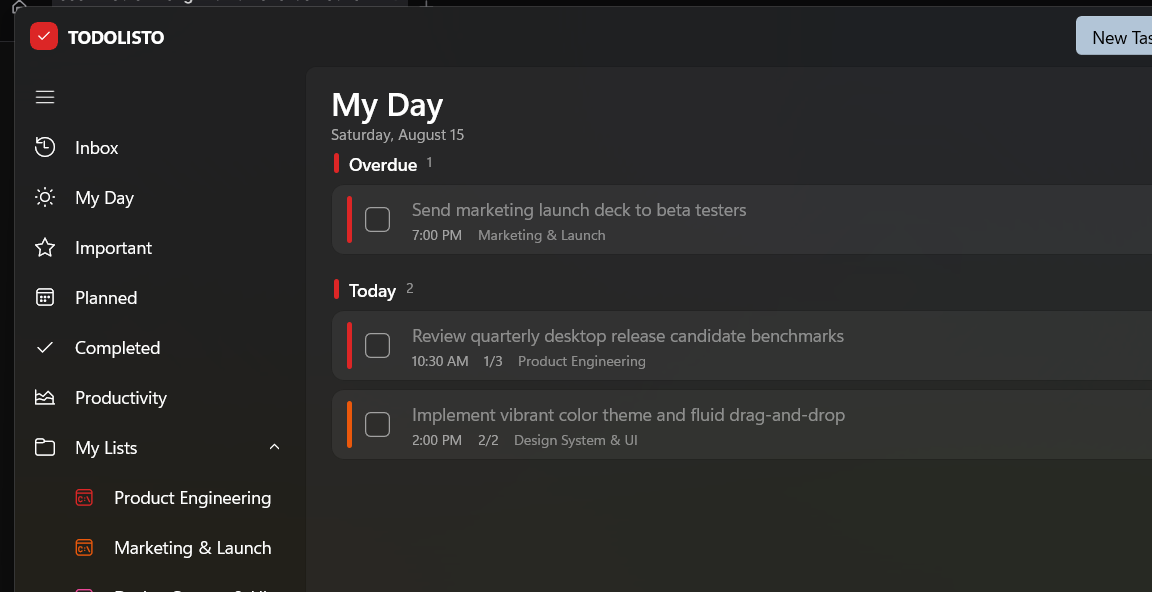
- Views: Inbox, My Day, Important, Planned, Completed, Productivity, plus per-project lists, labels, and custom filters
- Full task editor: title, notes, due date & time, priority, and subtasks with progress
- Drag-and-drop reordering, one-click complete, bulk actions
- Natural-language quick add — just type
ship deck tomorrow 9am #launch, and TODOLISTO parses title, due date, project, and labels automatically (Ctrl+Shift+Space for quick capture) - Command palette (Ctrl+K) to jump to any view or action
- Daily goals with a confetti celebration when you hit them
Organization
- Projects ("My Lists") with color accents
- Labels and custom filters (priority, due, project, label, text)
- Smart sections: Overdue, Today, Tomorrow, This Week, Later
AI assistant
- Optional Gemini integration (bring your own API key, set in Settings → AI)
- Chat with an assistant that understands your tasks and can create tasks for you from natural language
- "AI debrief" on the Productivity view summarizes your week
Notifications & reminders
- Native Windows toast notifications for due tasks
- In-app toast stack with undo
- Sound effects (toggleable) — chimes on completion, reminder pings
- Reminder engine that fires while the app is running
System integration
- System tray icon (show / hide / quick add / quit)
- Global hotkey support
- Start with Windows and start minimized to tray options
- Standard Windows title bar with native minimize/maximize/close buttons
UI / UX
- Fluent design with Mica backdrop, rounded corners, smooth 60 fps animations
- Dark / light / system theme, accent color picker
- Compact density mode
- Keyboard-first: full shortcut set (see below)
🏗️ Tech stack
| Layer | Technology |
|---|---|
| UI | WinUI 3 — Windows App SDK 1.7, XAML |
| Language | C# on .NET 8 |
| Architecture | MVVM (bindings, commands, converters) |
| Storage | SQLite via Microsoft.Data.Sqlite |
| Notifications | Windows App SDK AppNotificationManager |
| Packaging | Self-contained, unpackaged (WindowsPackageType=None) |
| Installer | WinForms setup with embedded payload (per-user, portable mode) |
🧱 Architecture
The app follows classic MVVM. Views (XAML) bind to view models; view models talk to a repository that wraps the SQLite database; cross-cutting concerns live in services.
XAML Views ──bind──▶ ViewModels ──▶ Repository ──▶ AppDatabase (SQLite)
                        │
                        └── Services: NlParser, FilterEngine, AiService,
                                      NotificationService, ReminderService,
                                      ThemeService, SoundService, NativeHostService
- Models — domain entities (
TaskItem,Project,Label,AppSettings, …) - Data —
AppDatabase(schema + migrations),Repository(typed queries),SeedData(starter tasks on first run) - Services — pure logic, no UI: natural-language parsing, filter engine, Gemini REST client, reminder scheduling, theme management, sound, tray/hotkey
- ViewModels —
MainViewModelorchestrates the app; dedicated view models for quick add, command palette, settings, and the AI assistant - Controls — reusable overlays (
QuickAddOverlay,CommandPaletteOverlay,SettingsOverlay,AiAssistantOverlay,TaskDetailPane,ToastHost)
📁 Project layout
Todolisto.sln
build.bat                 # one-command build (this machine's workaround, see below)
README.md
build/
  Todolisto-Setup.exe     # installer (generated)
  Todolisto-portable.zip  # portable copy (generated, kept in repo)
  pri/make-pri.ps1        # merges framework PRIs into Todolisto.pri
  setup/make-setup.ps1    # builds the installer + portable zip
  TasksStub/              # stub for VS packaging tasks missing on this machine
src/
  Todolisto/              # the app
    Models/ Data/ Services/ ViewModels/ Controls/ Converters/
    App.xaml(.cs)  MainWindow.xaml(.cs)  Program.cs
  Setup/                  # the setup program (WinForms)
💿 Installing
Standard install
Double-click Todolisto-Setup.exe:
- Choose the install folder (default:
%LOCALAPPDATA%\Programs\Todolisto— no administrator rights needed) - Optionally tick "Create a desktop shortcut"
- Install — Start-menu shortcut, "Add or remove programs" entry, and a working uninstaller are created automatically
- Launch, or run from Start menu / desktop
Portable mode (USB sticks)
Tick "Portable mode" in the setup — or from the command line:
Todolisto-Setup.exe /silent /portable /dir="E:\Todolisto"
It only extracts the app (with a small PORTABLE.txt note) — no shortcuts,
no registry entries. Run Todolisto.exe from that folder.
Note: even in portable mode, task data is stored per-user in
%LOCALAPPDATA%\Todolisto\, so a USB copy runs on any machine but carries its own data per user. (Making portable mode store data next to the exe is a natural future enhancement.)
Silent install
Todolisto-Setup.exe /silent                                  # default location
Todolisto-Setup.exe /silent /dir="D:\Apps\Todolisto"         # custom location
Todolisto-Setup.exe /silent /portable /dir="E:\Todolisto"    # portable
Uninstall
Settings → Apps → Installed apps → TODOLISTO → Uninstall (or run
Todolisto-Setup.exe /uninstall). It removes the app folder, shortcuts, and
registry entry.
⌨️ Keyboard shortcuts
| Shortcut | Action |
|---|---|
Ctrl+K / Ctrl+F | Command palette (search & jump) |
Ctrl+N | New task (quick add) |
Ctrl+Shift+Space | Quick capture |
Esc | Close overlay / palette |
Delete (task selected) | Delete selected task |
Space (task selected) | Toggle complete |
💾 Data & storage
Everything lives locally — no account, no cloud:
%LOCALAPPDATA%\Todolisto\
  todolisto.db          # SQLite database (tasks, projects, labels, settings)
  startup.log           # startup diagnostics
The first run seeds a few example projects and tasks so the UI is not empty. Delete the folder to reset to a clean state.
🤖 AI assistant setup
- Get a free Gemini API key at https://aistudio.google.com/apikey
- Open TODOLISTO → Settings → AI, paste the key
- Open the assistant (💬 button in the toolbar) and ask things like "Add a task to review the PR by Friday"
Your key is stored in the local settings table only.
🛠️ Troubleshooting
| Problem | Fix |
|---|---|
dotnet build fails with MSB3073 / XAML compiler exits 1 | Use build.bat or Visual Studio (see Building) |
| App crashes at startup: Cannot locate resource … themeresources.xaml | The merged Todolisto.pri is missing/stale — re-run build.bat |
| Nothing shows / empty lists | Delete %LOCALAPPDATA%\Todolisto\ and relaunch (resets to seed data) |
| No notifications | Allow notifications when Windows first asks; notifications require the app to have run once |
| AI assistant not responding | Check the API key in Settings → AI; keys are validated live |
| Installer blocked by SmartScreen | Click "More info" → "Run anyway" (unsigned local build) |
❓ FAQ
Does TODOLISTO need an internet connection? No — everything except the optional AI assistant and live language resources works fully offline.
How is this different from the original web version? The original was a React/Vite app that required a Node server to run. This is a native Windows app: one self-contained folder, no runtime prerequisites, native notifications/tray/hotkeys, SQLite storage, and a real installer.
Can I keep it portable and carry it on a USB stick? Yes — see Portable mode.
Is there a mobile version? Not yet — the app targets Windows 10/11 x64.
📜 License
This is an independent native rebuild of the TODOLISTO concept. Provided as-is; see the repository for history.
TODOLISTO has no macOS build yet
The person who submitted TODOLISTO only tested and declared a build for the other platform, so publik has nothing reviewed to walk you through here — a guessed set of commands would be worse than an honest no.