Quick-Pill
Dynamic Island for Windows
not yet reviewed by publik

How to install Quick-Pill
Every step written out, for people who have never opened a terminal. Pick the setup you have.
README
Open in GitHubQuick Pill
Dynamic Island, but for everyone
Quick Pill is a desktop application that recreates Apple's Dynamic Island experience on Windows. It's a notification hub, widget system, and smart assistant that stays out of your way until you need it.


Features
Core Functionality
- Multi-Monitor & Desktop Support — Island syncs seamlessly across all desktops and monitors
- Dynamic Stadium Pill Physics — Smooth Framer Motion spring morphing (
stiffness: 340, damping: 28) between Still (semicircular 20px pill) and Large modes (32px pill) - Media Controls & Clean Titles — Now playing preview with clean app naming (Spotify/Apple Music) and un-cropped marquee titles
- Customizable Themes — Multiple themes including Win95, SleekBlack, and custom RGB colors
- Quick Apps — One-click access to 4 apps of your choice
- Keyboard Shortcuts — Quick navigation with
Ctrl + [Number]shortcuts
Information & Alerts
- Weather Display — Real-time weather information & forecasts
- Battery Alerts — Charging status and low battery notifications
- Windows Notifications — Native Windows 10/11 notification integration and management
- WhatsApp Calls — Detects and manages incoming WhatsApp voice and video calls directly from the Island
- Hardware & System Alerts — Real-time CPU/RAM stats, USB connection alerts, Bluetooth, and Keyboard lock (Caps/Num/Scroll) indicators
Smart Features & Productivity
- Minimalist Tasks Manager — Apple / Things 3 style task list with circular check buttons and single-capsule input bar
- Timer & Presets — Quick preset timer chips (15m, 30m, 60m, 100m) and custom time picker
- Browser Search — Instant web search integration
- Clipboard Manager — Access and manage your copied text snippets
- Compact Calendar — Monthly interactive calendar with zero-margin height optimization
How to Use
The Three Modes
Still Mode — The default idle state
- Compact display
- Minimal visual footprint
- Ready to expand on interaction
Quick Mode — Hover over the Island
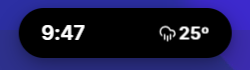
- See current time, weather, and battery status
- If music is playing, view now-playing info
- Hover playback controls for music
Large Mode — Click the Island
- Full interface with all tabs
- Switch tabs with arrow keys or mouse scroll
- Access all features and settings
- Default view for focused work
Using Tabs
- Arrow Keys — Navigate between tabs
- Mouse Wheel — Scroll horizontally between tabs
- Ctrl + Number — Jump to a specific tab
Build & Development
Prerequisites
- Node.js 16+ and npm
- Platform-specific build tools:
- Windows: Visual Studio Build Tools
Development Setup
# Clone the repository
git clone https://github.com/Abrar Nabil/Quick-Pill.git
cd Quick-Pill

# Install dependencies
npm install

# Start development server
npm start
The development server will launch Quick Pill with hot reload enabled. Press Ctrl+R to refresh the app.
Build for Current OS
npm run make
Build for Specific Platforms
Windows (x64)
npm run make -- --platform=win32 --arch=x64
Contributing
We welcome contributions!:
- Bug reports and fixes
- New features and improvements
- Documentation updates
- Theme designs
- Ideas and suggestions
Please check CONTRIBUTING.md for guidelines.
License
Quick Pill is open source and available under the MIT License.
Quick-Pill has no macOS build yet
The person who submitted Quick-Pill only tested and declared a build for the other platform, so publik has nothing reviewed to walk you through here — a guessed set of commands would be worse than an honest no.