OpenASCII
Turn any photo into living ASCII art you can play with
No AI needed
How to install OpenASCII
Every step written out. No terminal experience needed. Pick your setup.
README
Open in GitHub
OpenASCII
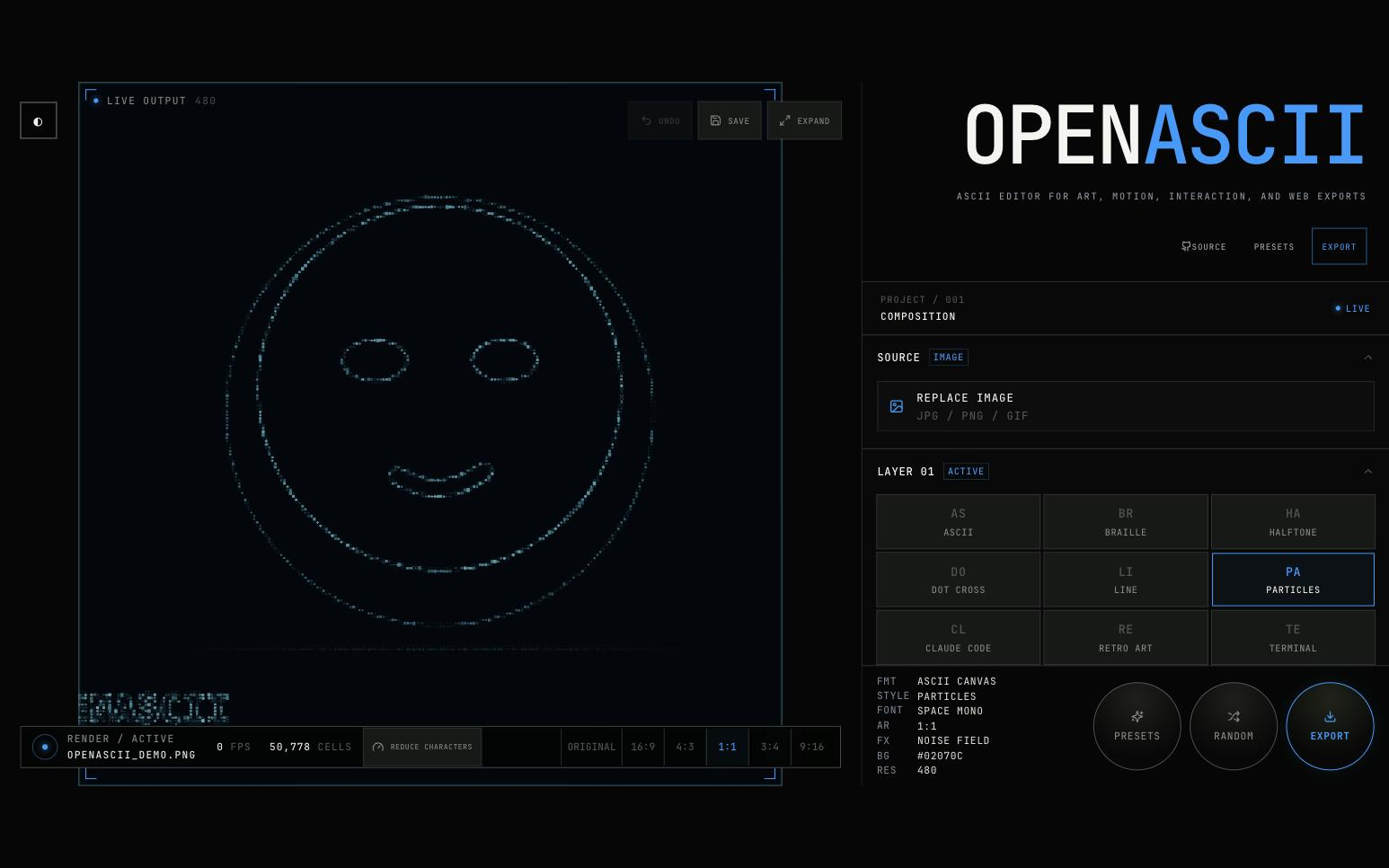
A local-first, browser-native studio for turning images into animated, cursor-reactive ASCII compositions.
No image is ever uploaded. All rendering, processing, and export happens entirely inside your browser.
What's inside
Render modes (9)
Classic ASCII · Braille · Halftone · Dot Cross · Line · Particles · Claude Code · Retro Art · Terminal
Color palettes (9)
Grayscale · Full Color (sampled) · Matrix Green · Amber Monitor · Cyanotype · Phosphor · Ice White · Palette Gradient · Custom
Motion & effects
- Five motion presets: None, Drift, Beam Sweep, Noise Field, Cascade
- Five FX modes: None, Glow, Glitch, CRT, Vignette
- Cursor attract / push interaction with radius, strength, and falloff controls
Image processing
- Floyd–Steinberg, Atkinson, ordered, and disabled dithering
- Local-contrast enhancement, Scharr edge analysis, saliency-weighted sampling
- Resolution 160 → 640, one-click character reduction
Editor features
- Undo — 40-deep history stack,
Ctrl+Z/Cmd+Z - Save — auto-saves config to
localStorage; manual Save button with visual confirmation - Fullscreen — one-click expand/exit, synced to native browser Fullscreen API
- Presets — 8 curated named presets with procedural randomiser
- Loading indicator — spinner overlay while images decode
- Tooltips — context hints on every interactive control
Export (3 formats)
- Self-contained interactive HTML file
- React JSX component
- PNG snapshot
Commands
corepack pnpm dev      # start the editor development server
corepack pnpm build    # production build  →  packages/app/dist/
corepack pnpm test     # run all unit tests (Node built-in test runner)
Benchmark commands
pnpm benchmark:export     # regenerate the self-contained HTML benchmark export
pnpm benchmark:capture    # capture reference PNGs for all styles
pnpm benchmark:particles  # particles benchmark only
pnpm benchmark:colors     # color-mode comparison
pnpm benchmark:lines      # line-renderer comparison
pnpm benchmark:styles     # all art-style comparison
pnpm benchmark:aspects    # aspect-ratio comparison
pnpm benchmark:generated  # procedural preset benchmark
pnpm benchmark:temporal   # temporal effect benchmark
Open http://localhost:5173/?benchmark=1 for the deterministic benchmark. Append &style=classic-ascii, braille, line, or particles to isolate a renderer.
Workspace layout
openascii/
├── packages/
│   ├── core/     — framework-free Canvas engine and image pipeline
│   ├── react/    — lifecycle-safe React canvas wrapper (@openascii/react)
│   └── app/      — Vite editor, presets, controls, and exporters
├── docs/
│   ├── architecture.md
│   └── performance.md
├── examples/
│   └── benchmarks/   — reference capture PNGs
└── scripts/          — benchmark and export automation
See architecture.md and performance.md for implementation details.
Browser support
Current releases of Chrome, Edge, Firefox, and Safari with Canvas 2D, ResizeObserver, and IntersectionObserver support.
Roadmap — Milestone 2
The next milestone evolves OpenASCII from a feature-complete editor into a procedural rendering engine.
Goals:
- Unified cell-analysis pipeline shared across all renderers
- Field-based physics simulation with spring, damping, and cursor forces
- Coherent preset generator — Random produces curated visual systems, not shuffled parameters
- Temporal effects: CRT phosphor decay, motion persistence, ghost frames
- Glyph metric cache (coverage, density, entropy, edge response) computed once per font/size
- Structural fidelity benchmark: facial features and edge sharpness preserved at low resolution
The milestone is complete when pressing RANDOM consistently produces visually distinct, high-quality outputs — each feeling intentionally designed, not randomly parameterised.
Changelog
v1.0.0 — Stable Release
Editor
- Removed redundant Library, Templates, and Creations navigation buttons
- Added 40-deep undo stack with
Ctrl+Z/Cmd+Zshortcut - Added auto-save to
localStorageand manual Save button with visual feedback - Added fullscreen toggle (EXPAND / EXIT) wired to native browser Fullscreen API
- Added image-load spinner overlay ("PROCESSING") on the canvas during decode
- Added CSS tooltip system across all primary controls
- Removed duplicate SOURCE / PUBLISH buttons; consolidated to sidebar
- Added GitHub icon to SOURCE link in sidebar brand area
- Applied custom favicon and web manifest
Typography
- Set JetBrains Mono as the global root font-family across all UI elements
- Fixed wordmark from system sans-serif to JetBrains Mono
- Calibrated font sizes across all UI tiers for readability
- Fixed sidebar metadata label column to prevent text overlap
Assets & infrastructure
- Added local JetBrains Mono WOFF2 font files (all 17 weights)
- Added favicon set (ICO, 16×16, 32×32, Apple Touch, Android Chrome, webmanifest)
- Issued MIT License
v0.1.1
- CI fix: removed
internal_dev/reference from build path
v0.1.0
- Initial public release
License
MIT © Saswat Sundar Rath — see LICENSE for full text.