NoScroll
Keep the apps. Lose the part that eats your evening
No AI needed
How to install NoScroll
Every step written out. No terminal experience needed. Pick your setup.
README
Open in GitHubNoScroll
Use Instagram and YouTube without short-form video. Free, open source, no paywall, no ads, no analytics.
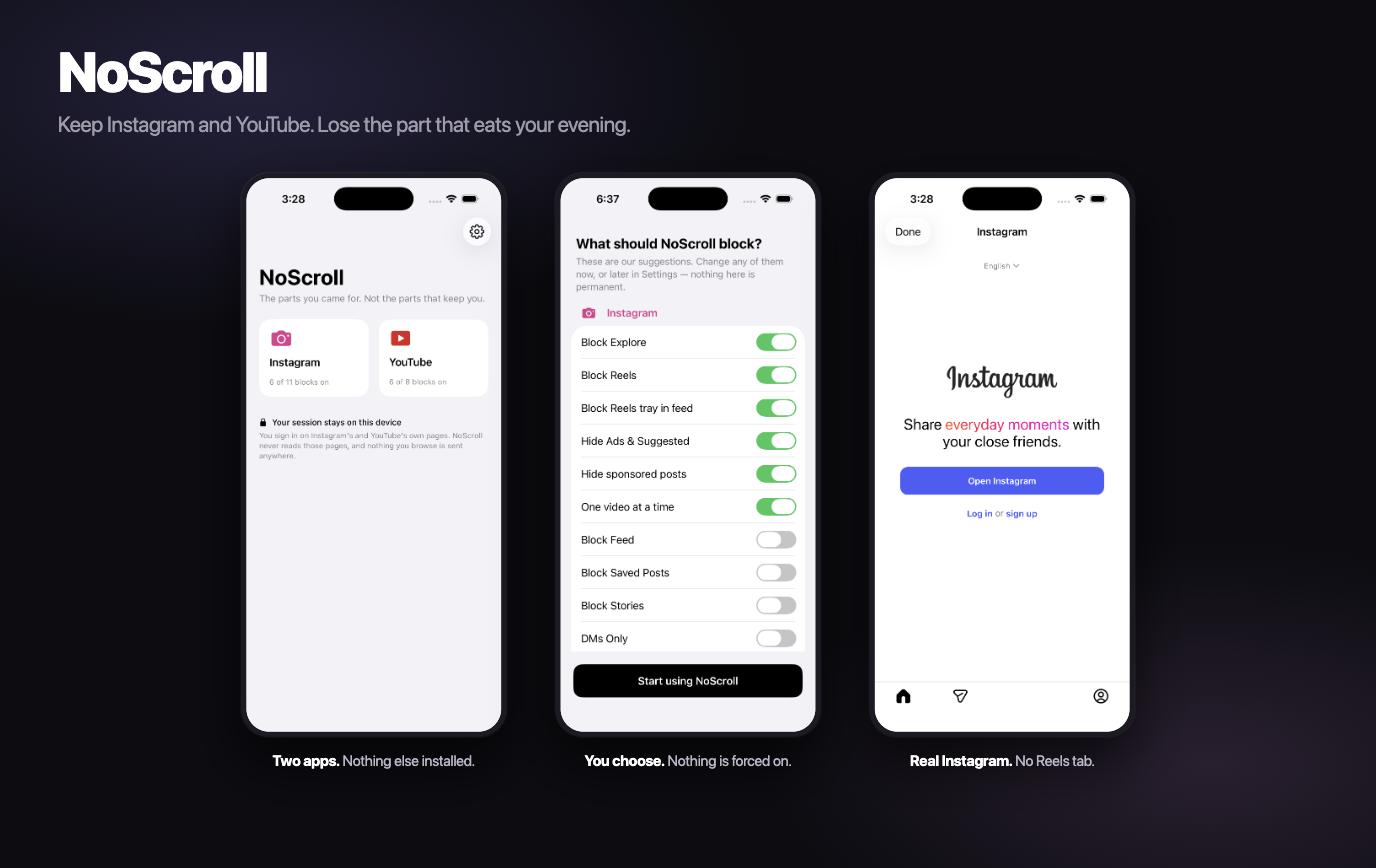
NoScroll removes Reels, Shorts, Explore and algorithmically suggested content — and keeps the parts you actually opened the app for: messages, the people you follow, and posting. When a friend sends you a reel you can watch that video. You just can't scroll to the next one.
Eight services: Instagram and YouTube are probe-verified against the live sites; X, TikTok, Facebook, LinkedIn, Snapchat and Reddit ship as beta and are labelled so in the app.
Status: pre-release. The engine, rule bundles, both native shells and the shield layers are written and tested, and both the iPhone and Android apps build and run. Not yet submitted to either store — see What's not done.
How it works
Two layers. The second is the one that matters.
1. The wrapper. NoScroll loads the platforms' own mobile websites in an embedded browser and injects a small engine that hides or removes the endless surfaces. Your session cookies stay on your device.
2. The shield. A wrapper on its own enforces nothing — you'd just open Safari. So NoScroll also shields the real Instagram and YouTube apps at the OS level (iOS Screen Time / FamilyControls, Android AccessibilityService), which makes the stripped version the way in rather than a suggestion.
engine/    TypeScript → one IIFE. The entire blocking implementation.
rules/     Signed JSON rule bundles. Data, not code — updatable without an app release.
ios/       Swift. WKWebView shell + FamilyControls + three Screen Time extensions
           + a WidgetKit extension (home-screen shortcuts via noscroll://open/<service>).
android/   Kotlin. WebView shell + AccessibilityService.
probe/     Playwright smoke tests, run every 6h against live Instagram and YouTube.
tools/     Bundle signing, cross-language canonicalisation check, engine sync.
The engine is byte-identical on both platforms. Everything platform-specific stays in the shells.
The app
iOS. First run is a narrative, not a checklist: how much you scroll → how old you are → your life in weeks, with every band and the percentage derived from your two answers (at 18, scrolling 4.8h of a 5h daily surplus, that is 96% of your remaining free time). Then the permissions, then out.
Home is one service at a time, with today's usage, that service's switches, and a five-tab shell —
Sleep, everything-blocked, Home, Shield, You. A WidgetKit extension puts the same services on your
home screen, opening through NoScroll via noscroll://open/<service>.
Android does not have this UI yet. There is no onboarding narrative, no five-tab shell, and no widget. What exists: the wrapper (Instagram and YouTube, with a button to switch between them) and the shield, plus a Status screen showing whether the accessibility permission is granted and which apps are shielded — reachable from a button in the wrapper, not a settings tab. Fresh installs shield Instagram and YouTube by default the same as iOS does. Building Android up to the same onboarding/shell UI iOS has is open work, not a bug — see the install guide, which should say so at the point a user would otherwise expect to see it.
Rules are data
Every competitor in this category hardcodes CSS selectors and patches them reactively, which is why they visibly leak. NoScroll ships selectors as an ed25519-signed JSON bundle fetched at runtime with a three-tier fallback — remote → cached → baked into the binary — so a cold first launch with no network still blocks, and an upstream redesign is fixed in minutes instead of an App Store review cycle.
Every rule declares expectMin. The engine counts what it actually matched and reports anomalies,
so a rotted selector raises an alert before a user notices.
Rules are open to pull requests. If Instagram changes something and NoScroll starts leaking, you can fix it yourself — see docs/RULES.md.
Nothing is forced on
Every block is a switch you own. The core ones — Reels, Shorts, Explore, suggested posts — arrive switched on, so a fresh install works with no setup, and first-run onboarding shows you every switch once so nothing is a surprise later. But you can turn any of them off, at any time, in Settings.
The product has an opinion. It doesn't take the choice away.
The one rule that is not negotiable
The engine MUST NOT hide, remove, restyle, or observe any node on an auth surface.
Hard-coded in engine/src/authguard.ts, not overridable by any rule
bundle, and enforced by a CI test that fails the build.
Two reasons. A hiding rule that swallows Instagram's own security interstitial bricks login with no visible error. And Apple 5.1.1(vi) treats credential harvesting as developer-program removal — refusing to look at a login page at all is what keeps NoScroll provably clear of it.
Verified against the real login page by the live probe, not just in a test DOM.
Privacy
Two tiers, stated precisely, because vagueness here is what makes people call a wrapper a phishing app:
- Platform session cookies never leave your device. There is no backend, no proxy, and no server-side cache of anything you look at. The repo is public, so this is auditable rather than a promise.
- Rule-health telemetry is opt-in and anonymous. It reports
{ruleId, expected, actual, bundleVersion}— never a URL, never page content. Seeengine/src/bridge.ts.
No analytics SDK. No ad pixel. No crash reporter carrying identifiers. No tracking on the website or the legal pages.
Full detail: docs/PRIVACY.md.
What's not done
Honestly, because a feature list that overpromises is the thing this project is reacting to:
- Not submitted to either store. The iOS
com.apple.developer.family-controlsentitlement is gated by Apple, takes days-to-weeks, and can be denied — see docs/ENTITLEMENT.md. It has to be granted before the shield layer can run on a device. - The three Screen Time extensions are not yet targets in the Xcode project. The app target builds and runs today; the shield extensions are written and typecheck against the iOS SDK, but adding them as targets is blocked on the entitlement above, since they cannot run without it.
- Android rule-bundle signature verification is not implemented. iOS verifies; Android currently reads bundles from assets/cache without checking the signature. Do not ship without it.
- Android has no onboarding, five-tab shell, or widget. See "The app" above. It has the wrapper, a two-service switch, shielding on by default, and a Status screen — not the iOS experience. Building it out is open work.
- No notifications. WKWebView cannot receive web push, and shielding an app suppresses that app's own notifications too. This is a scoped-out non-goal, not a bug.
- Screen Time is off by default even on a device. The Family Controls entitlement is opt-in
(
NOSCROLL_ENTITLEMENTS) because wiring it unconditionally breaks signing for any account without Apple's approval. Without it, "Grant access" explains why rather than failing with Apple'sCouldn't communicate with a helper application. - Screen Time does not work in the iOS Simulator at all. The frameworks are non-functional there, so the permission prompt can never appear; the app says so rather than failing quietly. Testing that flow needs a real device and the entitlement below.
- Six of the eight services are beta. Instagram and YouTube are probe-verified against the live sites; X, TikTok, Facebook, LinkedIn, Snapchat and Reddit have researched rules that no probe has confirmed yet. The app labels them BETA rather than listing eight logos as if they were equal.
- Per-app usage and the app picker need the entitlement. Usage reads "—" instead of a number until a DeviceActivityReport extension can run.
- Posting Reels, stories, DM media, calls — not available on the mobile web, so not available here. Post Mode temporarily lifts the shield so you can post in the real app.
- The logged-in probe is skipped unless you supply
PROBE_IG_STATE. Use a dedicated probe account, never a personal one.
Licence
AGPL-3.0-or-later. See LICENCE.
Rule bundles seeded from MIT-licensed filter lists — gijsdev/ublock-hide-yt-shorts and
BevizLaszlo/UBlock-Filters-for-Social-Media — with provenance recorded per rule.
NoScroll is not affiliated with, endorsed by, or connected to Meta, Instagram, Google or YouTube.