MoodleDesk
A Tauri-based desktop Moodle client.
not yet reviewed by publik. It is live now; the founder has not reviewed this version yet.
by 
Listed on @Zac06’s behalf — not claimed yet.

README
Open in GitHub
Zenith
A native, cross-platform client for the Moodle™ platform on the desktop and on Android, built with Tauri v2 and React. It talks to your institution's Moodle through the official mobile web service API, so it has its own UI. It is NOT a browser wrapper around the Moodle website.
Runs on Linux, Windows, macOS and Android. iOS is not supported yet (see MOBILE.md).
Download page: https://zac06.github.io/zenith/ (source in docs/, published with GitHub Pages).
Screenshots
Features
- Connect to any Moodle site by entering its address.
- Single sign-on (SSO): the login opens your institution's own login page in the system browser (Shibboleth, CAS, SAML, OAuth2, Microsoft/Google...). The app then receives the session token through a
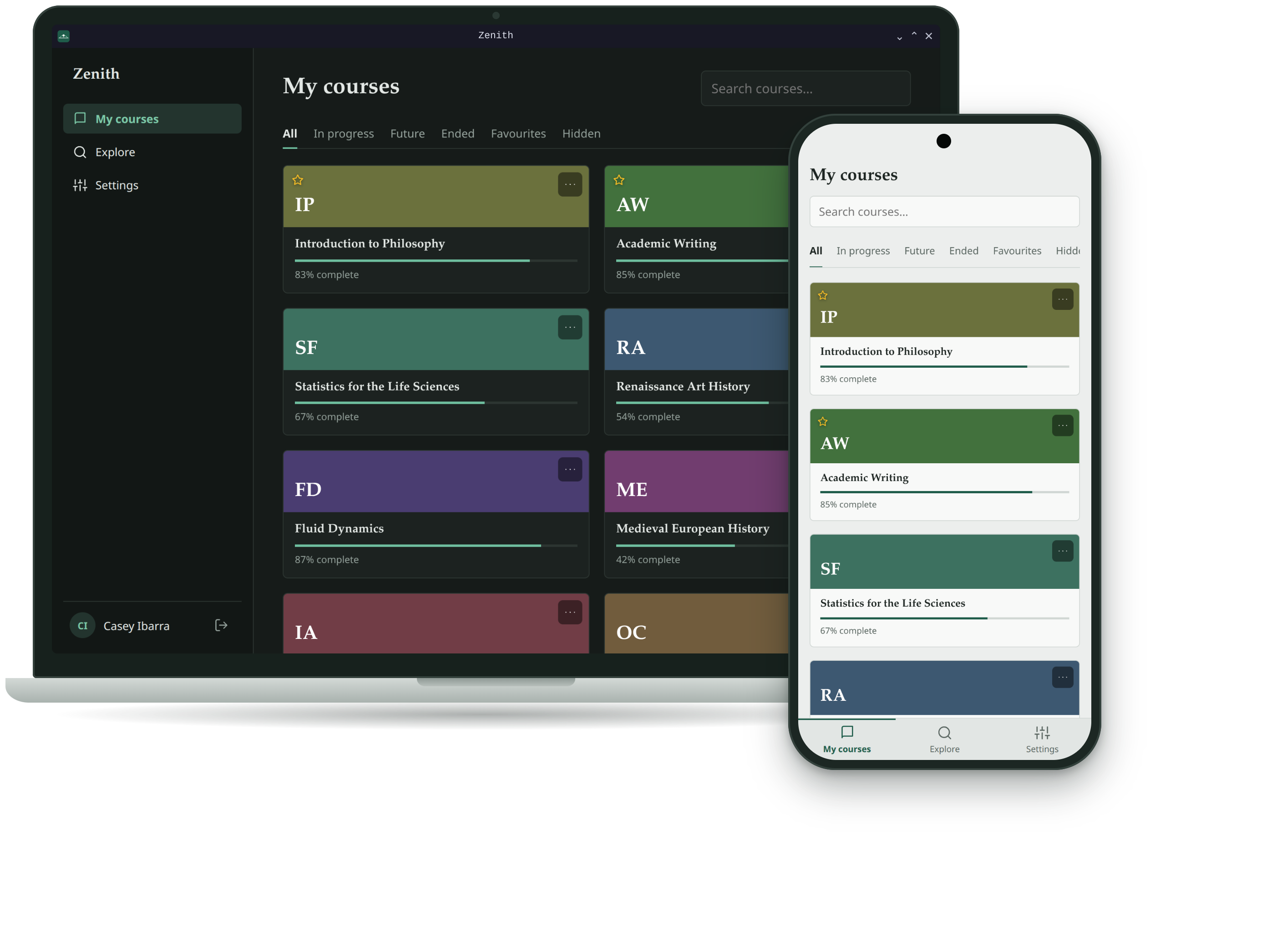
zenith://deep link. Sites that use plain username/password login are supported too. - Courses with filters (All, In progress, Future, Ended, Favourites, Hidden), search, progress bars, course images (with a generated gradient fallback), and a per-card menu to favourite, hide or unhide a course.
- Course contents: sections, resources, folders and links.
- Assignments: assignments in a course show their due date. Open one for the description, attachments, submission status and grade. Submitting happens in the browser.
- Explore: search all courses on the site by course name, department and teacher, and self-enrol (with an enrolment key if required). Other enrolment methods are finished in the browser.
- Downloads: files are saved to
Downloads/Zenith(or a folder you choose in Settings), organised by course, and opened with the system default application. On Android they stay in the app's own storage and open in the app you pick. You choose whether to re-download only when Moodle's copy is newer (default), always reuse the saved copy, or always download again. - Settings: theme (system, light, dark), high contrast, download folder and behaviour, and a list of the files Zenith saved, which you can delete per file, per course or all at once.
- Links: course links open inside the app; other links open in your browser, already logged in when the site allows it.
- Update notice (desktop): the app checks GitHub for a newer release and shows a banner with a download link. On Android, download the newer
.apkfrom the releases page and install it over the old one. - Android: the same app on phones and tablets, with a bottom navigation bar on phones, the Android back button, and a launcher icon that matches the desktop app.
- First-run setup for theme and contrast.
- Secure token storage in the OS keychain (macOS Keychain, Windows Credential Manager, Secret Service on Linux), or encrypted with a key in the Android Keystore.
How it works
React UI --invoke--> Rust (Tauri commands) --HTTPS--> Moodle web service API
- All Moodle web-service and download requests run in Rust (
reqwest), so there are no CORS problems. The UI does hold the session token in memory, only to load course images, and it is only ever attached to URLs on your Moodle site itself, never to another host. Downloads and browser auto-login are refused for any URL outside the site's scheme, host and port. - Site discovery:
tool_mobile_get_public_config(vialib/ajax/service-nologin.php) reports whether the site uses password login or browser SSO. - SSO flow: the app opens
/admin/tool/mobile/launch.php?service=moodle_mobile_app&passport=…&urlscheme=zenith. After login, Moodle redirects tozenith://token=<base64>. The app checks themd5(site + passport)value and stores the token. - Data:
core_webservice_get_site_info,core_course_get_enrolled_courses_by_timeline_classification,core_course_get_contents,core_course_set_favourite_courses, user preferences for hiding courses, and for Explorecore_course_search_courses,core_course_get_courses_by_field,core_course_get_categories,core_enrol_get_course_enrolment_methods,core_enrol_get_users_coursesenrol_self_enrol_user, and for assignmentsmod_assign_get_assignmentsandmod_assign_get_submission_status. Opening a link logged in usestool_mobile_get_autologin_key.
Requirements on the Moodle side
- The site must have the mobile web service enabled (if the official Moodle app works with it, this is already the case).
- For SSO, the site's Type of login setting (Mobile authentication) must be "Via a browser window". The "embedded browser" mode is not supported.
- Some functions may be restricted by the site's administrators. In that case the app shows an error message.
Development
Prerequisites
- Node.js 18+
- Rust (stable)
- Platform dependencies for Tauri: see the official prerequisites
- Linux:
libwebkit2gtk-4.1-dev build-essential libssl-dev libxdo-dev libayatana-appindicator3-dev librsvg2-dev patchelf - macOS:
xcode-select --install - Windows: Visual Studio C++ Build Tools
- Android: Android Studio with the NDK, JDK 21 and the Rust Android targets; see
MOBILE.md
- Linux:
Run
npm install
npm run tauri dev
The first Rust build takes several minutes. Later builds are incremental.
Note: the
zenith://deep link is registered at runtime on Linux and Windows. On macOS it only works from a bundled.app, so test SSO with a real build there.
Icons
The bundler needs a full icon set, including icon.icns and icon.ico. Generate it from any square PNG of 1024×1024 or larger:
npx tauri icon path/to/icon.png
Screenshot mode
zenith --screenshot shows invented course names, teachers and a made-up username (different on each launch) instead of your account, so you can take screenshots without exposing real data. It sends nothing to any Moodle site and never reads or changes your saved login. Close any running Zenith window first, because a second launch hands its arguments to the first instance instead of starting a new one. In development, npm swallows the first --, and the Tauri CLI needs two more (the first ends its own options, the second starts the app's): npm run tauri dev -- -- -- --screenshot.
Project structure
zenith/
├─ .github/workflows/      release build for Linux, Windows, macOS and Android
├─ docs/                   download website (GitHub Pages), logo and screenshots
├─ MOBILE.md               Android build, signing, iOS status
├─ src/                    React + TypeScript frontend
│  ├─ App.tsx              UI: first-run setup, login, sidebar, course grid,
│  │                       course view, Explore, Settings, update banner
│  ├─ api.ts               typed wrappers around the Tauri commands
│  ├─ main.tsx             entry point, applies the saved theme before render
│  └─ style.css            global styles, light/dark and high-contrast themes
└─ src-tauri/
   ├─ src/lib.rs           commands: site discovery, SSO, password login,
   │                       web-service calls, downloads, browser launching,
   │                       update check, keychain session
   ├─ capabilities/        Tauri permissions (opener, deep-link, dialog)
   ├─ plugins/             small native plugins (Android: Keystore, open file;
   │                       iOS: Quick Look, not working yet)
   ├─ gen/android/         the Android Studio project
   ├─ icons/               app icons for every platform
   ├─ tauri.conf.json      app config, bundle icons, deep-link scheme
   └─ Cargo.toml
Tauri commands
| Command | Purpose |
|---|---|
resolve_site | Normalise the URL and fetch the site's public mobile config |
start_sso | Open the browser-based SSO login |
login_password | Username/password login through login/token.php |
ws_call | Generic Moodle web-service call |
download_file | Download a file (token added in Rust), then open it |
list_downloads / delete_downloads | List or delete the files Zenith saved |
default_download_dir | Default folder (Downloads/Zenith; the app's own storage on Android) |
is_mobile | Lets the UI hide what a phone cannot do |
open_local / open_external | Open a saved file or a web link with the system default |
open_authed | Open a site URL in the browser, logged in via auto-login key |
check_update | Compare the latest GitHub release with the running version |
get_session / logout | Restore or clear the session in the OS keychain |
Known limitations
- Only browser-based SSO is supported (see the Moodle requirements above).
- Android only: no Play Store listing, no automatic updates, and ARM devices only (no x86 emulator). iOS is not supported yet.
- Files are downloaded in one request, held in memory and then written to disk, without a progress indicator.
- Hiding courses relies on Moodle allowing the preference update through the mobile service. Some sites may block it.
- Assignments are read-only (submitting opens the browser). Calendar, forums, grades and messaging are not implemented yet; those activities open in the browser.
Roadmap ideas
Assignments and deadlines, dashboard with upcoming events, forums, grades, download progress, in-app auto-install of updates (tauri-plugin-updater).
Troubleshooting
- "Failed to load module appmenu-gtk-module" (Linux): a harmless GTK warning. Silence it with
GTK_MODULES= npm run tauri dev. - "icon is not RGBA": regenerate icons with
npx tauri icon. - Unstyled UI: make sure
src/main.tsximports./style.css. - Site not recognised at login: use the Moodle base address (for example
https://moodle.university.edu) and check that the mobile service is enabled.
License
GNU General Public License v3.0. See LICENSE.
Trademarks
Zenith is an independent project. It is not affiliated with, endorsed by or sponsored by Moodle.
The word Moodle and associated Moodle logos are trademarks or registered trademarks of Moodle Pty Ltd or its related affiliates.