Jobleft Intern
Local job search with a one-click US software, backend and ML internship preset
publik verified: the founder reviewed this exact version for malware and approved it
Forked from jobleft by @mann · 1 other fork · See the family tree
How to install Jobleft Intern
Every step written out. No terminal experience needed. Pick your setup.
README
Open in GitHubJobleft Intern
A fork of Jobleft with an optional US internship preset on the first setup screen. One click selects Software Engineering and Data & Analytics, software/backend/machine-learning intern titles, Internship, Intern/New Grad, and United States, replacing any existing city filters with all US locations. The choices remain editable; the preset does not fill personal details or work-authorization answers.
Run this fork
This fork currently runs from source as a local web app. It has no packaged desktop release of its own. The upstream download described below installs the original Jobleft and does not include this preset.
Requires Node.js 24 or later and pnpm. From a clone of this repository:
pnpm install --frozen-lockfile
pnpm start
Open the local address printed by pnpm start. It contains a private local access token; do not share it. Data is saved in the ignored .jobleft-dev/ folder. Stop the local service with pnpm app:down.
On the first setup screen, choose Use US internship preset, review the next steps, and import your own resume. Job search, scoring, and tracking work without an AI provider. AI features are optional and require a separately configured provider or local model; no paid account is created by this fork.
Validated on Apple Silicon macOS with Node 24.18.0: UI production build, workspace type checks, the existing test suite, and the live onboarding flow. Other platforms have not been verified for this fork.
Original code and design credit: Blueturboguy07 and Jobleft contributors. The MIT license and upstream documentation follow.
jobleft
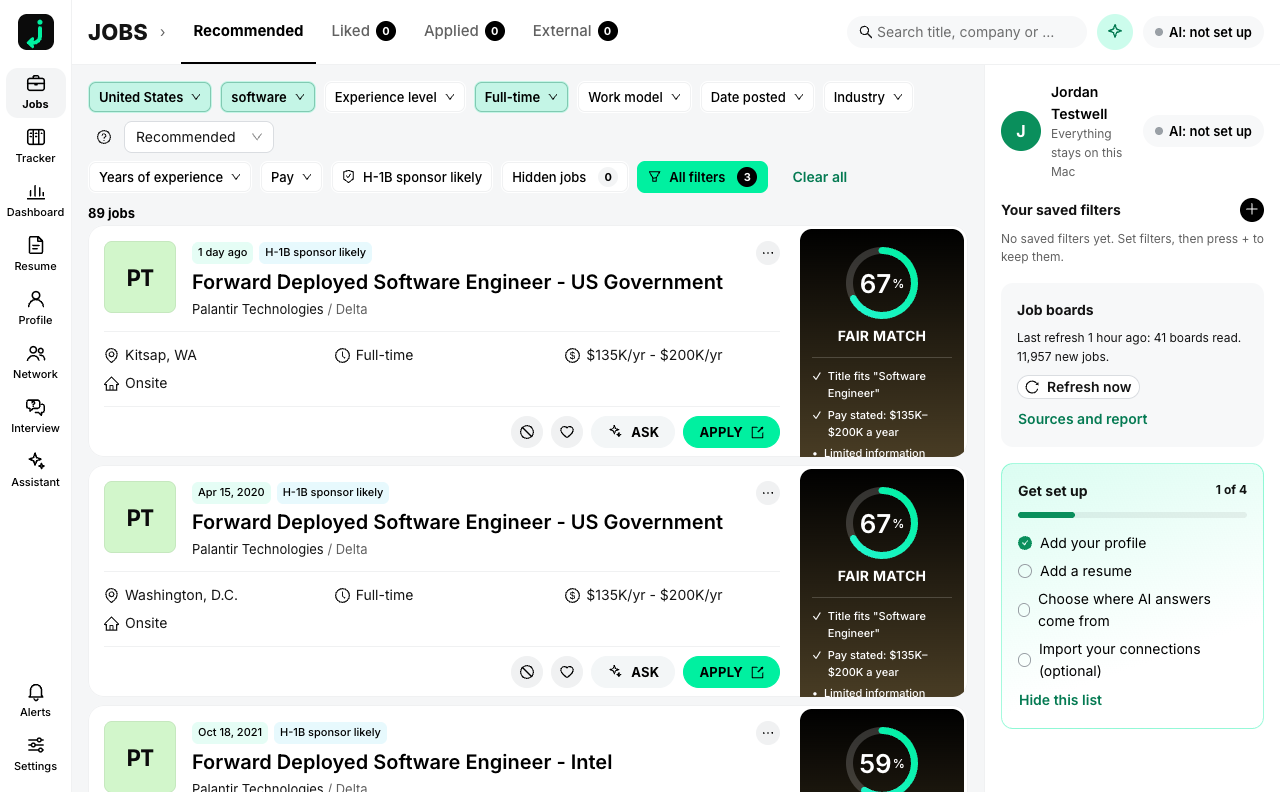
A job-search app that runs on your Mac. It reads employers' public job boards straight from the employer, keeps every job in a local database, ranks them against your profile, and helps you tailor a resume, track applications and reach the people you already know. Your profile, resumes, tracker, notes and connections never leave your computer. The one exception is AI, and only for the provider you pick.
What it does
| Part | What you get |
|---|---|
| Feed | Jobs from the employers' own boards (Greenhouse, Lever, Ashby, Workable, Recruitee, Personio, Teamtailor, Gem and a few public feeds), with pay, place, work model, level, years and an "H-1B sponsor likely" hint from public filing data. Closed postings leave the feed. |
| Match | A percent and a band (Strong, Good, Fair) with three parts: experience level, skills, industry experience. Every score shows its reasons. It never changes between loads. |
| Filters | Location, job function, level, job type, work model, date posted, industry, years, pay, sponsorship. Saved filters with alerts. |
| Resumes | Import, edit, readability grade, keyword gaps, and tailoring for a job that only uses facts already in your profile. Export as PDF and Word. Cover letters the same way. |
| Tracker | Applied, Interviewing, Offer, Rejected, Archived, with notes and reminders. |
| Network | Import the Connections.csv that LinkedIn lets you download. See who you know at each company, who to message first and why, and a draft you send yourself. Nothing is sent by the app. |
| Assistant | Answers about your own jobs and fit. It changes nothing without your confirmation. |
| Extension | A Chrome extension that fills application forms on Greenhouse, Lever, Ashby and Workable (Workday one step at a time). It never presses Submit. |
AI and money
Search, filters, match scores and the tracker use no AI and cost nothing. Tailoring a resume, writing a letter and the assistant run a model. You choose where:
- publik API: pay per use from a dollar balance, with a small free starter amount. No key to paste; jobleft keeps the connection key in the macOS Keychain.
- A model on this computer: Ollama, LM Studio or any OpenAI-compatible server. Nothing leaves the Mac.
- Your own key: Anthropic or OpenAI.
Privacy
- Every request to an employer board carries a plain
jobleft/<version>User-Agent and no personal data. - One request a second per host, and
robots.txtis honoured. LinkedIn, Indeed and Glassdoor are never contacted. - The local service listens on
127.0.0.1only, and only the app window and a paired extension can use it. - No analytics, no crash reports, no update check that sends an identifier.
The data folder is ~/Library/Application Support/jobleft. Settings → Data and backup exports or deletes all of it.
Build from source
Node 24 and pnpm, plus Rust for the desktop shell.
pnpm install
pnpm -r test                                   # 17 suites
pnpm start                                     # builds the UI and opens the app in a browser (data in .jobleft-dev)
pnpm --filter @jobleft/shell app:build         # the desktop bundle (see apps/shell/README.md)
docs/INTERFACES.md documents the local API; docs/BUILD-REPORT.md says what is built and what is not.
Licence
MIT. Third-party code and data are listed in THIRD_PARTY_NOTICES.md.