Ghost
Set a phone location or follow a route over USB or Wi-Fi
No AI needed
publik verified: the founder reviewed this exact version for malware and approved it
by 
How to install Ghost
Every step written out. No terminal experience needed. Pick your setup.
README
Open in GitHubGhost
A small Electron app for setting a fixed phone location or following a road route over USB or Wi-Fi. Search for a place, drop a pin, or enter coordinates, then explicitly apply it to your selected phone. Windows and macOS share one interface and use the appropriate iPhone or Android adapter.
Current version: 0.1.7. See CHANGELOG.md for the onboarding, interface, Android cleanup, Windows packaging, recovery-record, and reconnection changes.
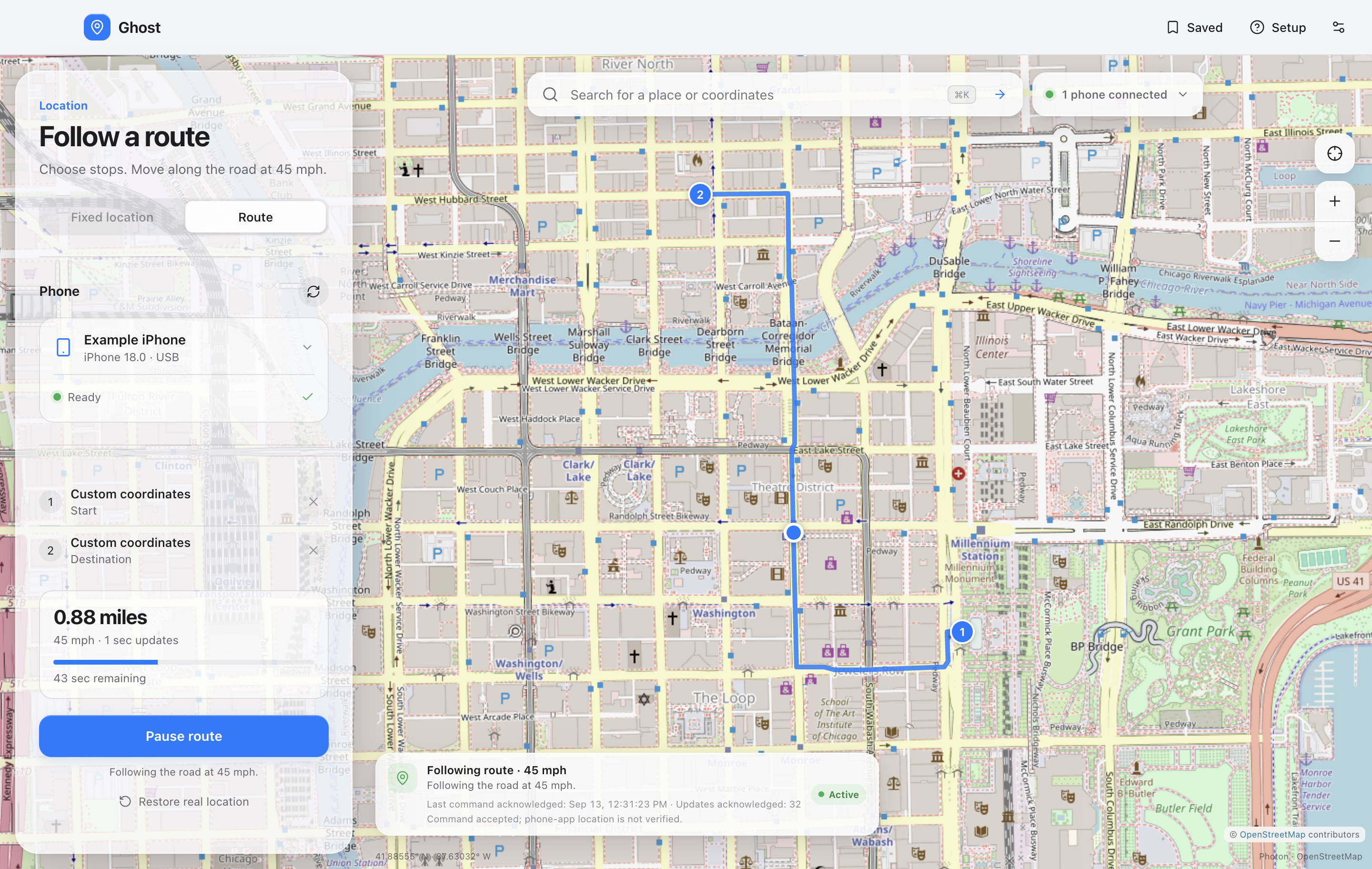
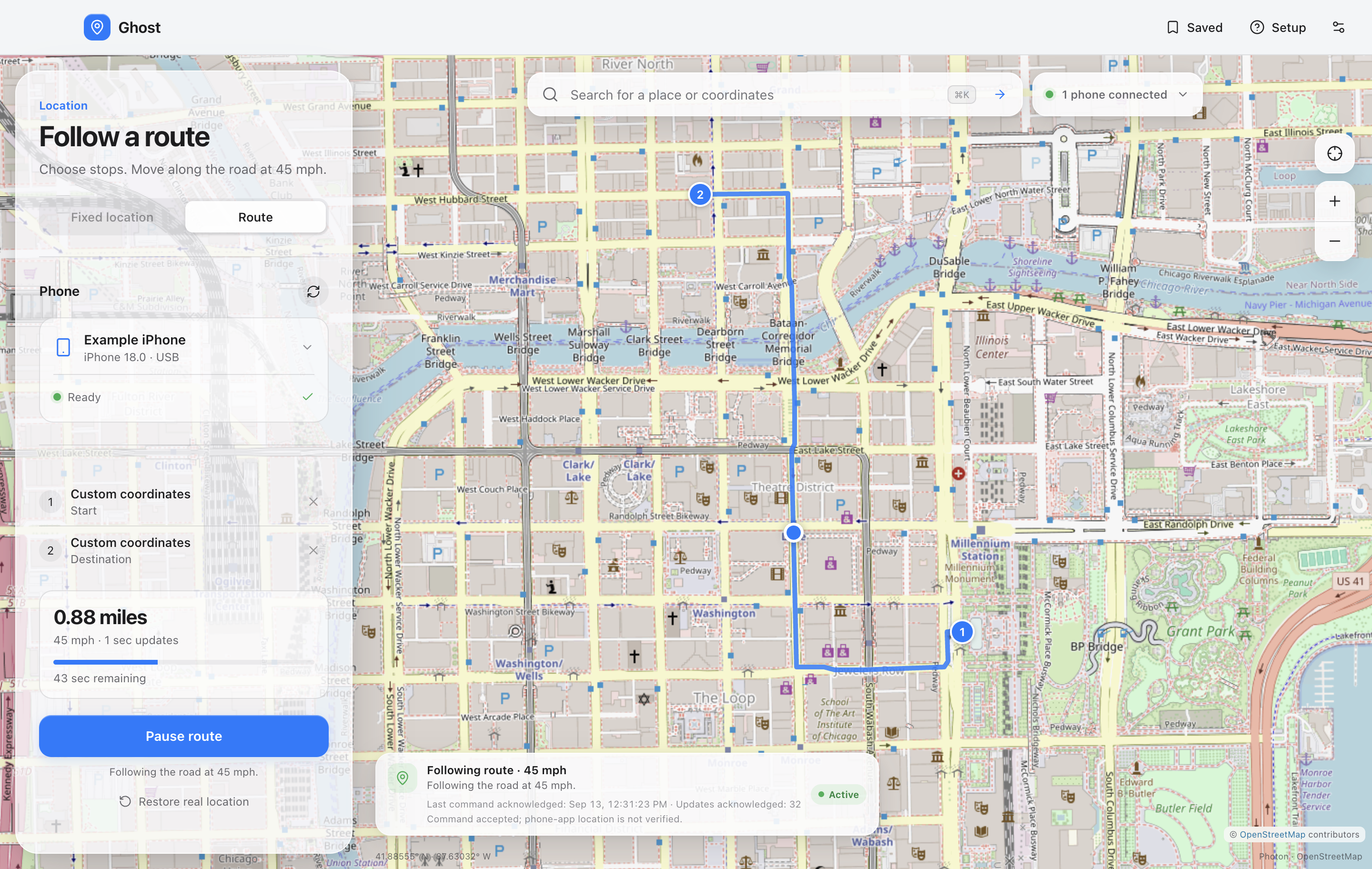
Route mode in the actual interface, using an example phone and sample Chicago route.
Features
- Road routes through up to 12 stops, 45 mph movement, one-second updates, Pause and Resume.
- Interactive map, manual place search, draggable pin, and latitude/longitude input.
- First-run Mac/Windows and iPhone/Android survey with a checklist tailored to all four USB configurations.
- Saved places and recent selections stored locally.
- A one-click USB → Wi-Fi handoff keeps the current location and resumes routes. Ghost offers it after a working USB session when the computer has Wi-Fi. Android 11+ also supports cable-free pairing.
- iPhone location simulation through a bundled pymobiledevice3 sidecar.
- Android location simulation through bundled ADB and Appium Settings.
- Ongoing fixed-location updates and same-phone reconnection while Ghost stays open.
- Automatic stale recovery-record cleanup when a different usable USB phone appears.
- Explicit restoration, normal-quit cleanup, and a persisted recovery journal.
- Honest disconnected/error states: lost connectivity never means “restored”.
- No account, telemetry, analytics, or cloud location history.
Development
Use Node.js 24 LTS and npm. Python 3.12 or 3.13 is needed only to build the iPhone runtime. End users of a complete packaged release do not install Python, Node.js, Android Studio, or Appium Server.
npm ci
npm run runtime:prepare
npm run dev
GHOST_BUILD_PYTHON can point to a specific Python executable. A runtime build can
download public Python packages, Apple-device support dependencies, Google's
platform tools, and the Android helper. Driver installation and changes to phone
settings are performed through the setup flow, not by the build scripts.
For a browser-only interface preview: npm run preview. Hardware controls are only
available inside Electron. For a production renderer inside Electron: npm start.
Session behavior
Selecting a map pin only changes the preview. Set location starts or updates a fixed location on the selected phone. Only one unresolved phone session is kept at a time. When an unknown, waiting, or error recovery record belongs to a different phone and Ghost discovers another usable USB phone, Ghost automatically discards the old record so the newly connected phone can be prepared or have a location set. Active, applying, reconnecting, and stopping sessions remain protected from this automatic cleanup.
On iPhone, the sidecar reasserts the selected coordinates on a one-second loop. Each DVT location command is awaited before Ghost records its acknowledgement. Fresh acknowledgements also keep the selected USB connection ready during discovery polling, so a transient discovery miss does not gray out a healthy session. On Android, the on-phone helper emits timestamped mock fixes every two seconds; the desktop checks the helper's reported coordinates.
The interface distinguishes command acknowledgements from helper readbacks. An iOS acknowledgement confirms the developer command, and an Android readback confirms the helper's coordinates. Neither proves a fresh GPS reading in a phone app. The Android receiver does not expose the fix timestamp to the desktop. Verify the result in the intended phone app.
Restore stops the Android mock service or sends the iOS clear-location command. The iOS clear API does not return an independent real-GPS measurement; cached locations in other apps can take time to update. Normal quit attempts restoration by default. If that fails, Ghost offers to keep the app open or quit with an unresolved session saved for recovery.
If the phone disconnects during a live session, Ghost waits and automatically reconnects the same phone and applied target when it becomes available again, while the same Ghost process remains open. Selecting another pin still changes only the preview; use Update location to apply that target. You can also use Retry location or Reconnect & set location on the same phone after a connection failure. While the previous session is active, applying, reconnecting, or stopping, a different phone remains blocked.
If that previous session is already unresolved as unknown, waiting, or error, connecting a different usable USB phone automatically removes the old recovery record instead. This does not send Restore to the old phone. Because the old phone is absent or cannot be verified, it may retain its last simulated location until it is restarted or restored separately.
Restore cancels automatic reconnection, including while the cable is absent. If reconnection is already in progress, Ghost waits for that bounded operation before clearing the simulation. An unplugged phone must reconnect before Ghost can send the clear command.
USB unplug, laptop sleep, force-quit, and a crashed helper cannot guarantee immediate restoration. Android's upstream helper can keep supplying its last coordinates without the cable. After Ghost restarts, continuing or clearing a saved session on the same phone requires a manual Retry location or Restore; it is never automatically resumed on startup. A different usable phone instead triggers the unresolved-record cleanup described above. An iPhone restart is a further recovery step if its developer simulation becomes stuck.
Maps, search, and privacy
Search sends your submitted text to the configured Photon provider. Viewing the map requests tiles from OpenStreetMap. Device identifiers and saved/session coordinates stay in the local application settings file. Planning a route sends the chosen stop coordinates (without device identifiers) to the public OSRM service. Route playback itself makes no routing-service requests. Search is rate-limited and cached for the running app; there is no autocomplete, background geocoding, or offline tile download. Pin and coordinate selection remain available if search fails.
The default Photon public demo is appropriate only for moderate use and has no availability guarantee. Change the HTTPS Photon API endpoint in Settings for a larger public deployment. See THIRD_PARTY_NOTICES.md.
The OSRM demo service is for reasonable noncommercial use, capped at one request per second, with no uptime guarantee. Ghost requests it only on Plan road route. See OSRM's demo policy. A larger public deployment needs its own routing service instead of relying on the demo.
Build installers
npm test
npm run build
npm run runtime:prepare
npm run pack
npm run dist
Build on each target operating system. macOS Apple Silicon, macOS Intel and Windows x64 use matching Python sidecars and ADB resources. Windows ARM is not a supported release target yet. The packaging check refuses to produce an app with missing device runtimes. Release installers are unsigned. Signing/notarization credentials are required for a trusted macOS launch and a recognized Windows publisher. No publishing or repository upload is performed by these commands.
For v0.1.7, a macOS arm64 build produces Ghost-0.1.7-mac-arm64.dmg and
Ghost-0.1.7-mac-arm64.zip in release/.
Native CI builds
.github/workflows/build.yml defines separate native jobs for Windows x64
(windows-2025), macOS Apple Silicon (macos-15), and macOS Intel
(macos-15-intel). Each uses pinned Node.js 24.18.0 and Python 3.12.10, installs
the npm lockfile with npm ci, builds both phone runtimes, runs tests, and produces
unsigned installers. Action implementations are pinned to commit hashes.
The Python pin is the latest 3.12 build available for these macOS/Windows targets
in GitHub's actions/python-versions manifest; newer 3.12 entries there are Linux-only.
The prepack check verifies executable CPU types, the actual iOS executable and
Python bundle, Android helper version/checksum, ADB files/checksums, license notices,
and device-free launch smoke checks. Native target matching is required because
electron-builder's ${platform} resource macro resolves to darwin or win32
from its build host. Cross-platform packaging and Windows ARM are excluded.
CI uploads installers and provenance as workflow artifacts only; it does not publish a GitHub release, upload to a store, or use signing credentials. Passing CI does not verify real phones. Complete the hardware test matrix before claiming phone/OS compatibility.
Validation
npm test checks USB filtering, exact-device targeting, argument handling,
adapter failures, acknowledgement handling, fixed-target refresh, same-process
reconnection, cancellation, persisted crash recovery, concurrency,
search validation, saved settings, route interpolation, one-second scheduling,
pause/resume, arrival, slow transport, and cancellation during an in-flight update. Sidecar-specific Python tests are in
sidecar/ where applicable. See docs/hardware-test-matrix.md for on-device checks.
npm run test:ios-stream runs a hardware-free stress harness through the real
Node adapter, JSONL bridge loop, Python bridge, and pinned upstream location API.
It replaces only the USB/tunnel/DVT peer, then checks repeated acknowledgements,
an in-place target update, concurrent discovery, and post-Restore silence.
npm run test:native launches Electron with isolated settings and exercises map
search, live OSRM road planning, coordinates, saved-place create/rename/delete, setup, preferences, and a
compact window. It performs read-only USB discovery but never invokes phone
preparation, Set, or Restore. Screenshots are written to artifacts/. It requires
a graphical desktop; live search and map tiles need internet access.
npm run test:renderer-session runs a separate, bounded Electron fixture with no
device adapters and all external requests blocked. Ten real-time heartbeats span
more than eight seconds, checking that Update stays enabled, the pending pin and
selected phone persist, focus is retained, recovery restores the controls, and
only an explicit Update submits the new target. It also checks route stop selection,
plan/start/pause/resume controls, and a moving map dot with fake device state. It uses existing Electron and
Playwright dependencies, temporary settings, and a 45-second deadline; no phone
runtime or network access is needed.
To check an already packaged app, set GHOST_SMOKE_EXECUTABLE to its executable and
run node scripts/smoke-electron.mjs. The check also requires both bundled runtimes
to report available. See docs/validation.md for the recorded local build results.
Automated transport tests use controlled doubles; they are not evidence of phone compatibility. The project must be tested on actual target phone/OS combinations before claiming all four connections are verified.
License
GPL-3.0-or-later. See LICENSE and THIRD_PARTY_NOTICES.md.
For wireless setup, see the Wi-Fi guide. Wi-Fi support is implemented and covered by automated tests; physical phone validation is still needed.